
言語を選択する

Form 3CEB – Fillable PDF for Section 92E (International Transactions)

  1. 言語 英語
  2. インド
  3. アクティビティ 税金
Form 3CEB – Fillable PDF for Section 92E (International Transactions)

What Is Form 3CEB?

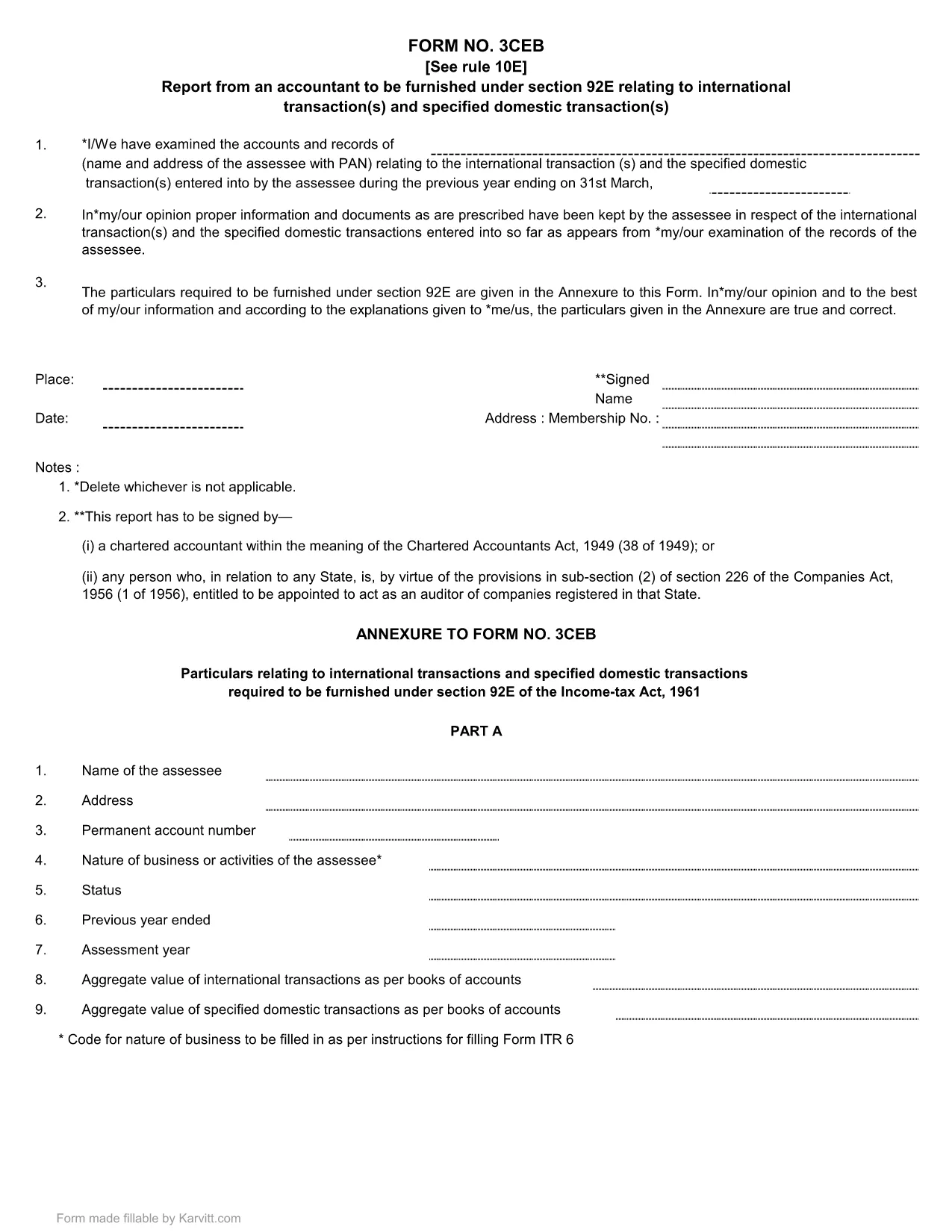
Form 3CEB is an Income Tax return required under Section 92E of the Indian Income Tax Act. It captures details of international transactions and specified domestic transactions that attract a special tax rate. Taxpayers must submit this form annually, along with their regular return, to disclose the nature, value, and tax paid on each transaction.

How to Fill the Form Online with Formize

Formize lets you complete the official 3CEB PDF without leaving your browser. No extra software is needed – just click the button, let the Formize PDF Filler load, and start entering data.

Key Sections & Common Mistakes

Section A – Transaction Details: Provide the transaction date, counterpart name, and country. Missing or incorrect country codes are a frequent error.

Section B – Tax Paid: Enter the exact tax amount deducted at source. Rounding errors can cause a mismatch with the tax department’s records.

Section C – Declaration: Ensure the authorized signatory’s name and PAN are entered exactly as they appear on the PAN card.

Tip: Use the built‑in validation messages in the Formize filler to catch errors before you download.

Download the Official PDF

When you’re ready, you can download the original, unaltered PDF for your records. The file retains the exact layout required by the Income Tax Department.

Download Form 3CEB (Fillable PDF)

よくある質問
  • Who needs to file Form 3CEB?

    Any taxpayer who has entered into an international transaction or a specified domestic transaction that is taxable under Section 92E must file Form 3CEB with their income tax return.

  • Can I fill Form 3CEB on a mobile device?

    Yes. The Formize filler works on modern mobile browsers, allowing you to complete the form on a smartphone or tablet.

  • What is the due date for filing Form 3CEB?

    Form 3CEB must be filed together with the regular income‑tax return, typically by 31 July of the assessment year.

  • Do I need Adobe Acrobat to fill the form?

    No. Formize provides a built‑in PDF filler, so you don’t need any additional software.

  • What happens if I make a mistake on the form?

    You can edit the fields in the Formize filler before saving. If you have already submitted, file a revised return with a corrected Form 3CEB.

  • Is the PDF download free?

    Yes. The official Form 3CEB fillable PDF is available for free download for personal use.

方法

オンラインで 4 回の簡単なステップで Form 3CEB を無料で入力する方法:

  1. 1
    Open the Fillable Form
    Click the “Fill out this form” button on the page. The Formize PDF Filler app will load directly in your browser.
  2. 2
    Enter Your Details
    Use the on‑screen fields to input transaction dates, amounts, counterpart details, and tax paid. Validation cues will guide you.
  3. 3
    Review & Save
    After completing all sections, click “Save” to generate a completed PDF. Download it for your records or attach it to your tax return.
  4. 4
    Submit to the Tax Authority
    Attach the saved PDF to your Income Tax filing as required under Section 92E.
Formize PDF Filler アプリ
だいたい

納税フォーム

Form 3CEB は、税金に関する情報を関連する税務当局に報告するために使用される文書である納税申告書の 1 つです。納税者の状況や場所によって、連邦税、州税、地方税など、さまざまな種類の納税申告書があります。

特徴

PDFフィラー

オンラインで PDF フォームに記入する最も簡単な方法

  • Form 3CEB をすばやく入力してください
    Form 3CEB をオンラインですばやく入力する方法をお探しですか?オンラインの無料 PDF フォーム フィラーを使用すると、この PDF ドキュメントを 1 分以内に編集して入力する方法がわかります。
  • 使いやすいオンライン PDF エディター
    再スキャンして返送する前に、編集できるように PDF ファイルを印刷することにうんざりしていませんか? PDFドキュメントをオンラインで無料で編集.当社のオンライン PDF エディターを使用して、時間と紙を節約してください。
  • 優れたツール、すべてのプラットフォーム
    Mac で Form 3CEB を入力する方法や、PDF フィラーを無料で使用する方法を知りたいですか?当社のオンライン PDF ツールは、すべてのプラットフォームで動作します。
  • 安全なファイル ストレージ
    完成した「Form 3CEB」ファイルは、Amazon クラウド ホスティングが管理する安全なデータベースに保存されます。いつでもシステムからファイルを削除できます。いずれにせよ、これらのファイルは 24 時間後に自動的に削除されます。
  • {キーワード} とチャットする
    無料の PDF リーダー アシスタントである Chatize で「Form 3CEB」とチャットします。質問すると、「Form 3CEB」から回答が得られます。上の [ドキュメントとチャット] ボタンをクリックするだけです。

フィルセッションを削除

選択したフィルセッションを削除しますか?この場合、フォームへの記入の進捗状況は失われます。

編集セッションを削除する

選択した編集セッションを削除しますか?この場合、フォームの作成および編集の進行状況は失われます。