
言語を選択する

Fillable Schedule I (Form 1041) – Estate & Trust AMT Form

  1. アメリカ合衆国
  2. 言語 英語
  3. アクティビティ 税金
  4. デパートメント 内国歳入サービス
Fillable Schedule I (Form 1041) – Estate & Trust AMT Form

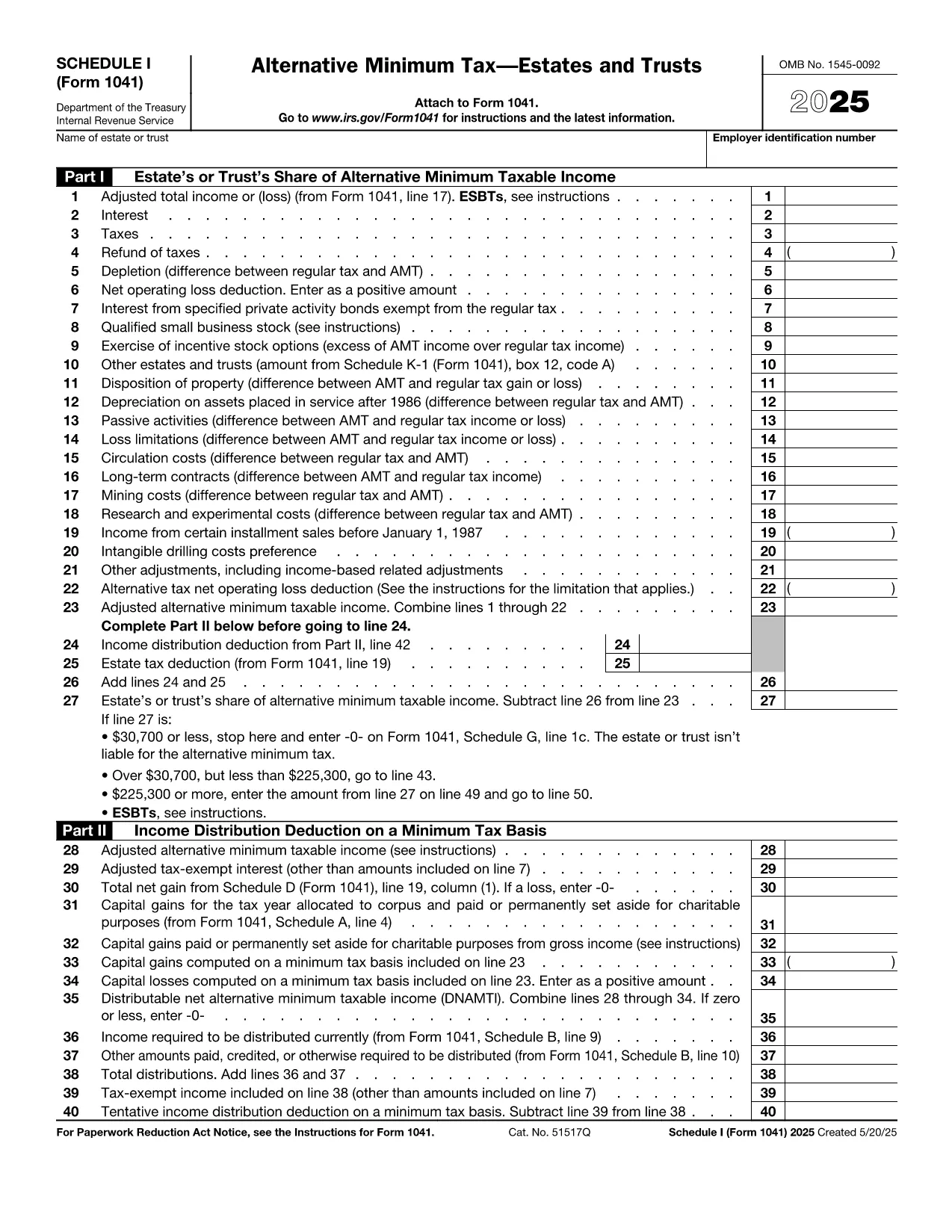
Schedule I (Form 1041) is the IRS worksheet used by estates and trusts to calculate Alternative Minimum Tax (AMT) adjustments. Whether you are an executor, trustee, or tax professional, you need a reliable, fillable version that eliminates manual calculations and reduces errors.

What Is Schedule I (Form 1041)?

Schedule I attaches to the Form 1041 – U.S. Income Tax Return for Estates and Trusts. It captures preference items, tax‑exempt interest, and other adjustments that affect the estate’s or trust’s AMT liability. The form is mandatory when the alternative minimum taxable income (AMTI) exceeds the threshold set by the IRS.

How to Complete Schedule I Online

Formize provides a secure, browser‑based PDF filler so you can complete Schedule I without downloading any software. Just click the "Fill out this form" button, wait for the editor to load, and start entering your numbers. All calculations are performed automatically, and you can save, print, or e‑sign the completed worksheet.

Common Mistakes & Tips

  • Missing Preference Items: Review all income sources, especially tax‑exempt interest, to ensure they are reported on line 1.
  • Incorrect AMTI Threshold: The threshold changes yearly; verify the correct amount for the tax year you are filing.
  • Calculation Errors: Use the built‑in auto‑sum feature in the Formize editor to avoid manual addition mistakes.
  • Signature Oversight: The form must be signed by the fiduciary. Add an e‑signature directly in the filler before saving.

Download the Official PDF

For reference or offline use, the official IRS version of Schedule I is available as a PDF. Our online filler is built from the same source, guaranteeing compliance.

Download IRS Schedule I (Form 1041) PDF

説明書

よくある質問
  • Who must file Schedule I (Form 1041)?

    Estates and trusts that have AMTI above the IRS threshold for the filing year must attach Schedule I to Form 1041.

  • Can I use the fillable PDF for multiple tax years?

    Each tax year has its own version of Schedule I. Use the PDF that matches the year you are filing; the link above is for the most recent version.

  • Do I need special software to fill the form?

    No. Formize’s online PDF filler works in any modern browser—no download or installation required.

  • Is my data secure when I use Formize?

    Yes. All data is encrypted in transit (TLS 1.2) and processed in a secure, GDPR‑compliant environment.

  • What if I make a mistake after submitting?

    Amend the return by filing Form 1041‑X and attach a corrected Schedule I. Keep a copy of the original for your records.

  • Do I need a separate signature for Schedule I?

    The fiduciary who signs Form 1041 also signs Schedule I. Use the e‑signature feature in the filler to add it.

方法

オンラインで 5 回の簡単なステップで Schedule I Form 1041 を無料で入力する方法:

  1. 1
    Click the Fill‑out Button
    On this page, click the blue "Fill out this form" button. The Formize PDF Filler app will open in a new tab.
  2. 2
    Wait for the Editor to Load
    The secure editor loads the fillable Schedule I template. This only takes a few seconds.
  3. 3
    Enter Your Information
    Fill each field with the required numbers – the editor automatically totals rows and validates entries.
  4. 4
    Review & Add Signature
    Double‑check all amounts, then use the e‑signature tool to sign as the fiduciary.
  5. 5
    Save, Print, or Submit
    When finished, click "Save" to download a completed PDF, or print directly for mailing to the IRS.
Formize PDF Filler アプリ
だいたい

納税フォーム

Schedule I Form 1041 は、税金に関する情報を関連する税務当局に報告するために使用される文書である納税申告書の 1 つです。納税者の状況や場所によって、連邦税、州税、地方税など、さまざまな種類の納税申告書があります。

特徴

PDFフィラー

オンラインで PDF フォームに記入する最も簡単な方法

  • Schedule I Form 1041 をすばやく入力してください
    Schedule I Form 1041 をオンラインですばやく入力する方法をお探しですか?オンラインの無料 PDF フォーム フィラーを使用すると、この PDF ドキュメントを 1 分以内に編集して入力する方法がわかります。
  • 使いやすいオンライン PDF エディター
    再スキャンして返送する前に、編集できるように PDF ファイルを印刷することにうんざりしていませんか? PDFドキュメントをオンラインで無料で編集.当社のオンライン PDF エディターを使用して、時間と紙を節約してください。
  • 優れたツール、すべてのプラットフォーム
    Mac で Schedule I Form 1041 を入力する方法や、PDF フィラーを無料で使用する方法を知りたいですか?当社のオンライン PDF ツールは、すべてのプラットフォームで動作します。
  • 安全なファイル ストレージ
    完成した「Schedule I Form 1041」ファイルは、Amazon クラウド ホスティングが管理する安全なデータベースに保存されます。いつでもシステムからファイルを削除できます。いずれにせよ、これらのファイルは 24 時間後に自動的に削除されます。
  • {キーワード} とチャットする
    無料の PDF リーダー アシスタントである Chatize で「Schedule I Form 1041」とチャットします。質問すると、「Schedule I Form 1041」から回答が得られます。上の [ドキュメントとチャット] ボタンをクリックするだけです。

フィルセッションを削除

選択したフィルセッションを削除しますか?この場合、フォームへの記入の進捗状況は失われます。

編集セッションを削除する

選択した編集セッションを削除しますか?この場合、フォームの作成および編集の進行状況は失われます。