


納税フォーム
Form 1118 Schedule K は、税金に関する情報を関連する税務当局に報告するために使用される文書である納税申告書の 1 つです。納税者の状況や場所によって、連邦税、州税、地方税など、さまざまな種類の納税申告書があります。
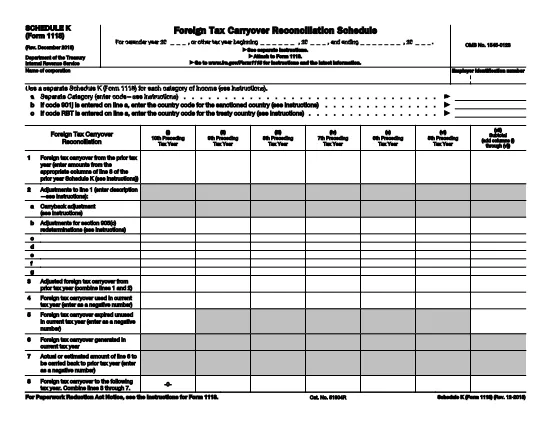
Schedule K (Form 1118) is the supplemental worksheet used by U.S. corporations to report foreign tax credits for each category of income. Whether you’re preparing a corporate tax return or need to amend a prior year, having a fillable PDF version saves time and reduces errors.
Our online Form 1118 Schedule K is hosted on Formize.com, so you can complete the entire form in your browser—no Adobe Acrobat or desktop editor required. Just click the "Fill out this form" button, wait for the Formize PDF Filler to load, and start entering your data.
Schedule K breaks down foreign taxes paid, accrued, or deemed paid by a domestic corporation into distinct income categories such as general earnings, passive income, and foreign oil and gas. The IRS uses this detail to calculate the allowable foreign tax credit under sections 901 and 960(b).
Follow the simple steps below to complete the form quickly and accurately.
Missing a box, entering an amount in the wrong column, or using the wrong tax year are frequent errors that can delay processing. Double‑check each line against your source documents before submitting.
For detailed instructions, refer to the official IRS instructions linked on the page, or consult a qualified tax professional. The IRS also provides a complete Form 1118 guide for broader context.
Yes, the PDF is fully interactive. All numeric fields, checkboxes, and signature lines can be completed directly in your web browser.
No. Formize’s online filler works in any modern browser, so you can fill the form for free without installing additional software.
Absolutely. Use the "Save" button to download a partially completed PDF, then reopen it later in Formize to continue.
Simply reopen the saved PDF in Formize, edit the incorrect fields, and save a new version. The original file remains unchanged.
Formize uses SSL encryption for all data transmitted between your browser and our servers, ensuring your tax information stays private.
Only if the IRS specifically requires a paper copy. Most corporate filings can be submitted electronically with the completed PDF attached.
The official instructions are linked on the page and can also be downloaded from the IRS website at https://www.irs.gov/pub/irs-pdf/f1118.pdf.
Form 1118 Schedule K は、税金に関する情報を関連する税務当局に報告するために使用される文書である納税申告書の 1 つです。納税者の状況や場所によって、連邦税、州税、地方税など、さまざまな種類の納税申告書があります。
オンラインで PDF フォームに記入する最も簡単な方法
フィルセッションを削除
編集セッションを削除する