
言語を選択する

Form 1120-F Schedule Q – Fillable PDF

  1. アメリカ合衆国
  2. 言語 英語
  3. アクティビティ 税金
  4. デパートメント 内国歳入サービス
Form 1120-F Schedule Q – Fillable PDF

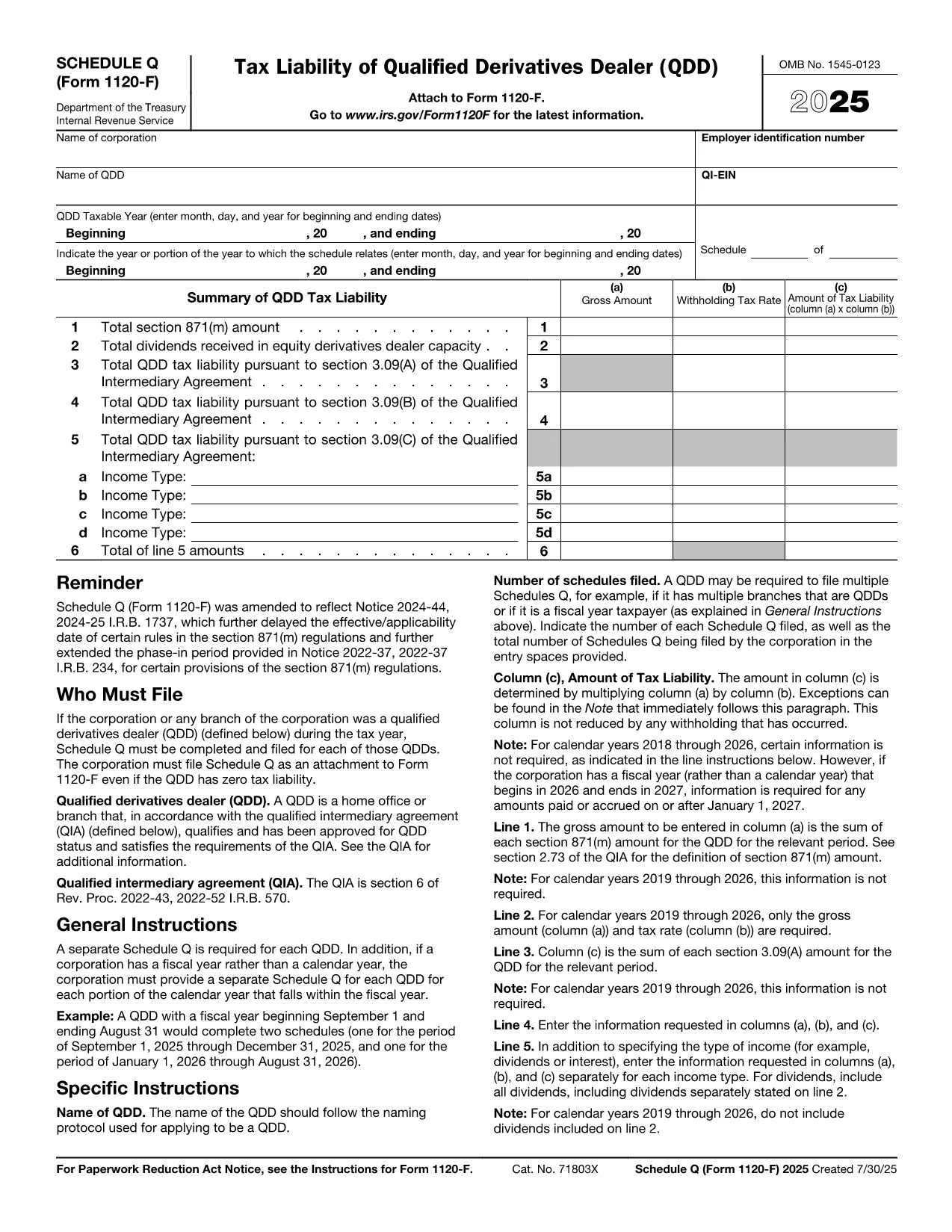
Schedule Q (Form 1120-F) is the supplemental schedule used by foreign corporations filing a U.S. corporate income‑tax return (Form 1120‑F). It reports specific information required under section 871(m) and helps the IRS verify compliance with the foreign‑derived intangible income (FDII) rules.

Our fillable PDF version lets you enter data directly in the browser, eliminates manual printing, and reduces the risk of transcription errors. Simply click the “Fill out this form” button, let the Formize PDF Filler load, and start entering the required numbers.

  • Instant validation: Built‑in checks highlight missing or inconsistent entries.
  • Secure storage: Your completed form is saved locally until you choose to download or submit.
  • Print‑ready: Export a clean, IRS‑approved PDF ready for electronic filing or paper submission.

Whether you are a tax professional preparing returns for multiple foreign subsidiaries or a corporation filing its own return, this tool streamlines the Schedule Q process and keeps you compliant.

よくある質問
  • Do I need special software to fill Schedule Q?

    No. The Formize fillable PDF works in any modern web browser; no Adobe Acrobat license is required.

  • Is the fillable PDF accepted by the IRS?

    Yes. The underlying file is the official IRS Schedule Q (Form 1120‑F) PDF. Only the data entry method changes.

  • Can I save my progress and return later?

    Absolutely. Use the “Save” button to download a partially completed PDF, then reopen it later with the Formize filler.

  • What common errors should I avoid?

    Watch for mismatched totals, omitted foreign‑partner percentages, and incorrect tax year entries. The validator flags these automatically.

  • Is there a cost to use the Formize PDF Filler?

    The basic fillable PDF feature is free. Advanced features like batch processing are available with a paid Formize subscription.

  • Where can I find the official IRS instructions for Schedule Q?

    The instructions are included in the PDF’s first pages and also available on the IRS website under “Form 1120-F Instructions.”

方法

オンラインで 5 回の簡単なステップで Form 1120-F Schedule Q を無料で入力する方法:

  1. 1
    Step 1 – Click the Fill Button
    On this page, press the “Fill out this form” button. The Formize PDF Filler app will open in a new tab.
  2. 2
    Step 2 – Wait for the Filler to Load
    The app loads the fillable Schedule Q PDF. A loading spinner indicates progress; this usually takes a few seconds.
  3. 3
    Step 3 – Enter Your Information
    Type directly into each field. Required fields are highlighted in blue; optional fields are gray.
  4. 4
    Step 4 – Validate and Save
    Click the “Validate” button to run built‑in checks. Fix any highlighted errors, then click “Save” to store the completed PDF on your computer.
  5. 5
    Step 5 – Download or Submit
    After saving, you can download the final PDF for your records or attach it to an electronic filing submission.
Formize PDF Filler アプリ
だいたい

納税フォーム

Form 1120-F Schedule Q は税務フォームの 1 つで、個人または企業の収入、控除、納税義務に関する情報を関連する税務当局に報告するために使用される文書です。これらのフォームは税法を遵守し、納税義務を果たすために必要です。納税フォームは国と適用される特定の税金要件によって異なります。一般的な納税フォームのいくつかを次に示します。

個人納税フォーム: これらのフォームは、個人の納税者が個人所得を報告し、控除、控除、免除を申請するために使用します。例としては、米国の1040 フォームや英国の自己申告納税申告書などがあります。

事業税フォーム: 事業税フォームは、企業、パートナーシップ、または自営業者が事業収入、経費、その他の税関連情報を報告するために使用します。例には、米国のスケジュール C フォーム (事業からの損益) や英国の CT600 フォーム (法人税申告書) が含まれます。

給与税フォーム: これらのフォームは、雇用主が従業員の給与から源泉徴収された賃金、給与、税金を報告するために使用されます。例としては、米国の W-2 形式や英国の P60 形式などが挙げられます。

売上税フォーム: 売上税フォームは、企業が課税対象の商品またはサービスに対して徴収した売上税を報告および納付するために使用されます。特定の売上税フォームは管轄区域によって異なります。

付加価値税 (VAT) フォーム: VAT フォームは、販売に対して徴収された VAT を報告および送金し、購入に対する VAT クレジットを請求するために、付加価値税を課す国で使用されます。例には、多くの国で使用されている VAT 申告書が含まれます。

見積納税フォーム: 見積納税フォームは、自営業収入や投資収入など、源泉徴収の対象とならない所得に対する見積税を報告し、支払うために使用されます。

これらは、存在する可能性のある多数の納税フォームのほんの一例です。必要な特定のフォームは、お住まいの国または管轄区域の税法および規制によって異なります。どのフォームが自分の状況に適用できるかを判断するには、税務当局のガイドラインを参照するか、専門家のアドバイスを求めることが重要です。

特徴

PDFフィラー

オンラインで PDF フォームに記入する最も簡単な方法

  • Form 1120-F Schedule Q をすばやく入力してください
    Form 1120-F Schedule Q をオンラインですばやく入力する方法をお探しですか?オンラインの無料 PDF フォーム フィラーを使用すると、この PDF ドキュメントを 1 分以内に編集して入力する方法がわかります。
  • 使いやすいオンライン PDF エディター
    再スキャンして返送する前に、編集できるように PDF ファイルを印刷することにうんざりしていませんか? PDFドキュメントをオンラインで無料で編集.当社のオンライン PDF エディターを使用して、時間と紙を節約してください。
  • 優れたツール、すべてのプラットフォーム
    Mac で Form 1120-F Schedule Q を入力する方法や、PDF フィラーを無料で使用する方法を知りたいですか?当社のオンライン PDF ツールは、すべてのプラットフォームで動作します。
  • 安全なファイル ストレージ
    完成した「Form 1120-F Schedule Q」ファイルは、Amazon クラウド ホスティングが管理する安全なデータベースに保存されます。いつでもシステムからファイルを削除できます。いずれにせよ、これらのファイルは 24 時間後に自動的に削除されます。
  • {キーワード} とチャットする
    無料の PDF リーダー アシスタントである Chatize で「Form 1120-F Schedule Q」とチャットします。質問すると、「Form 1120-F Schedule Q」から回答が得られます。上の [ドキュメントとチャット] ボタンをクリックするだけです。

フィルセッションを削除

選択したフィルセッションを削除しますか?この場合、フォームへの記入の進捗状況は失われます。

編集セッションを削除する

選択した編集セッションを削除しますか?この場合、フォームの作成および編集の進行状況は失われます。