
言語を選択する

Form 13614-C – Fillable PDF for IRS Tax Interview

  1. アメリカ合衆国
  2. 言語 英語
  3. アクティビティ 税金
  4. デパートメント 内国歳入サービス
Form 13614-C – Fillable PDF for IRS Tax Interview

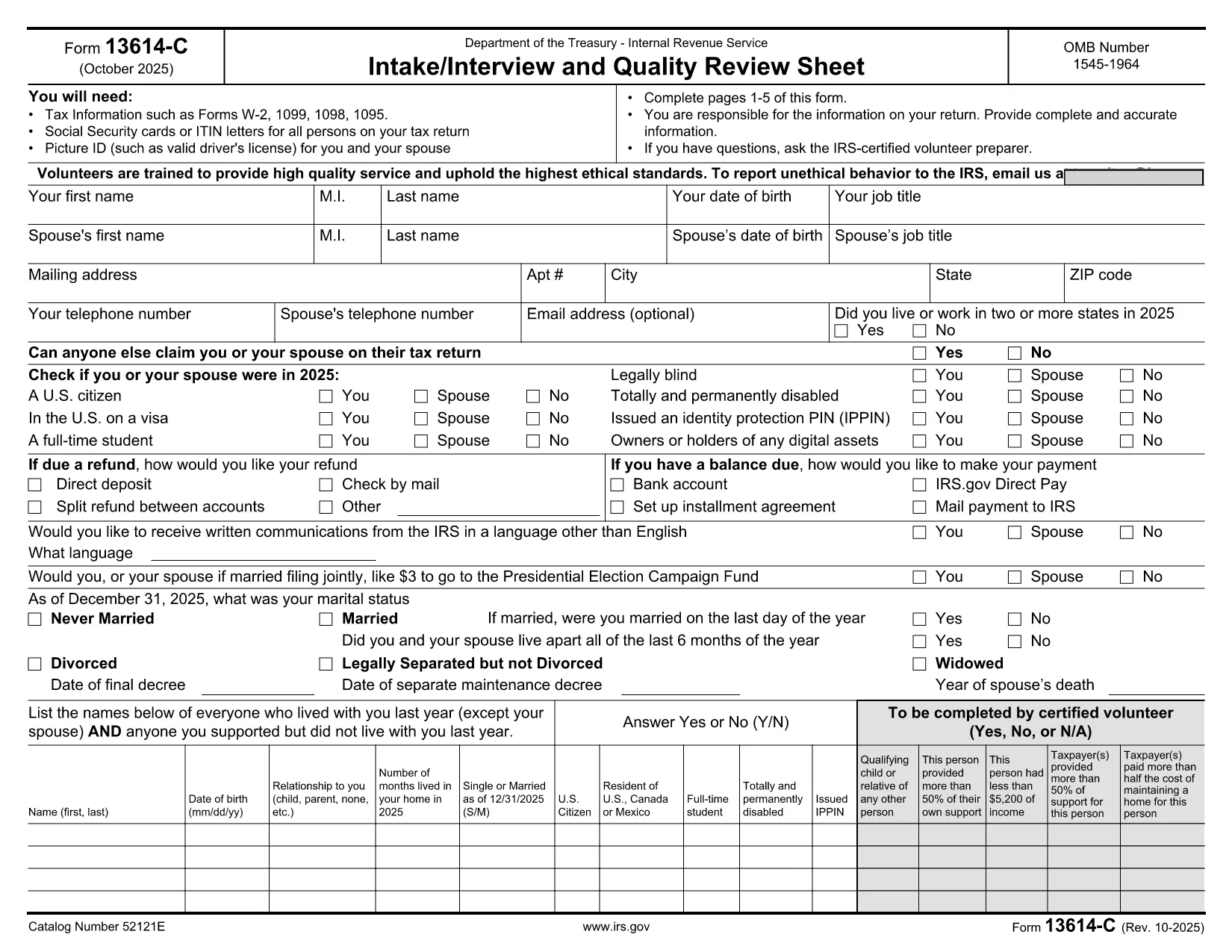
Form 13614-C, also known as the Intake/Interview and Quality Review Sheet, is the standard worksheet used by IRS‑approved Volunteer Income Tax Assistance (VITA) and Tax Counseling for the Elderly (TCE) programs. It collects essential taxpayer information—income, deductions, credits, and filing status—so volunteers can prepare an accurate return.

While the IRS provides a printable PDF, you can now complete the entire form online, save time, and eliminate errors. Our Formize fillable PDF loads instantly in your browser, lets you type directly into each field, and stores your data securely until you download the finished document.

Below you’ll find a quick overview of the form’s sections, step‑by‑step instructions for using the online filler, and tips to keep your submission error‑free.

よくある質問
  • Is Form 13614-C required for every tax return?

    It is required only when a VITA/TCE volunteer is preparing your return. Independent filers can skip it, but many volunteers use it to gather accurate data.

  • Can I edit the form after I download it?

    Yes. The PDF is fully fillable, so you can reopen it in any PDF reader that supports form fields and make changes before final submission.

  • Do I need special software to use the online filler?

    No. Formize works in all modern browsers (Chrome, Edge, Firefox, Safari) and requires no additional plugins.

  • Is my personal information safe?

    All data stays in your browser until you choose to download or delete it. Formize does not store any personal information on external servers.

  • What if I make a mistake while filling the form?

    You can clear any field by selecting it and pressing Delete, or use the “Reset Form” button to start over without losing the rest of your entries.

  • Can I print the completed form?

    Absolutely. After you download the filled PDF, you can print it like any standard document.

  • Which version of Form 13614-C should I use?

    Use the most recent revision (October 2025). The link below always points to the latest official PDF.

方法

オンラインで 3 回の簡単なステップで form 13614-c を無料で入力する方法:

  1. 1
    Click “Fill out this form”
    On the page, press the bright “Fill out this form” button. The Formize PDF Filler app will open in a new tab.
  2. 2
    Enter your information
    Type directly into each field—no printing or scanning required. Use the tab key to move quickly between sections.
  3. 3
    Save or download
    When you’re finished, click “Save” to store a copy in your browser or “Download” to get the completed PDF ready for submission.
Formize PDF Filler アプリ
だいたい

納税フォーム

form 13614-c は、税金に関する情報を関連する税務当局に報告するために使用される文書である納税申告書の 1 つです。納税者の状況や場所によって、連邦税、州税、地方税など、さまざまな種類の納税申告書があります。

特徴

PDFフィラー

オンラインで PDF フォームに記入する最も簡単な方法

  • form 13614-c をすばやく入力してください
    form 13614-c をオンラインですばやく入力する方法をお探しですか?オンラインの無料 PDF フォーム フィラーを使用すると、この PDF ドキュメントを 1 分以内に編集して入力する方法がわかります。
  • 使いやすいオンライン PDF エディター
    再スキャンして返送する前に、編集できるように PDF ファイルを印刷することにうんざりしていませんか? PDFドキュメントをオンラインで無料で編集.当社のオンライン PDF エディターを使用して、時間と紙を節約してください。
  • 優れたツール、すべてのプラットフォーム
    Mac で form 13614-c を入力する方法や、PDF フィラーを無料で使用する方法を知りたいですか?当社のオンライン PDF ツールは、すべてのプラットフォームで動作します。
  • 安全なファイル ストレージ
    完成した「form 13614-c」ファイルは、Amazon クラウド ホスティングが管理する安全なデータベースに保存されます。いつでもシステムからファイルを削除できます。いずれにせよ、これらのファイルは 24 時間後に自動的に削除されます。
  • {キーワード} とチャットする
    無料の PDF リーダー アシスタントである Chatize で「form 13614-c」とチャットします。質問すると、「form 13614-c」から回答が得られます。上の [ドキュメントとチャット] ボタンをクリックするだけです。

フィルセッションを削除

選択したフィルセッションを削除しますか?この場合、フォームへの記入の進捗状況は失われます。

編集セッションを削除する

選択した編集セッションを削除しますか?この場合、フォームの作成および編集の進行状況は失われます。