
言語を選択する

IRS Form 2350 – Fillable PDF for Tax Extension Abroad

  1. アメリカ合衆国
  2. 言語 英語
  3. アクティビティ 税金
  4. デパートメント 内国歳入サービス
IRS Form 2350 – Fillable PDF for Tax Extension Abroad

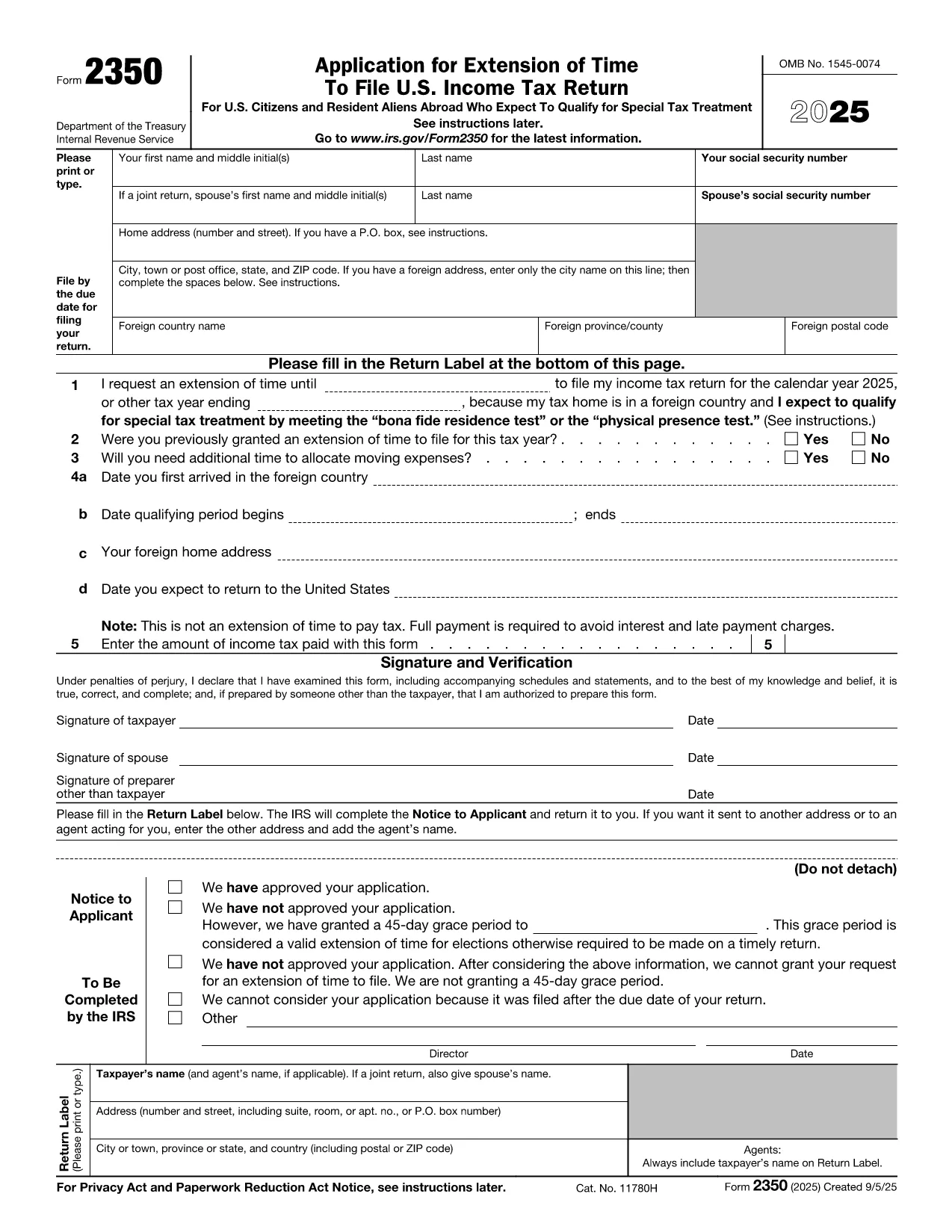
U.S. citizens and resident aliens who live outside the United States often need extra time to meet the presence requirements for the foreign earned income exclusion or foreign housing exclusion. IRS Form 2350 is the official request for a two‑month filing extension when you are abroad.

When to Use Form 2350

File Form 2350 if you:

  • Expect to claim the foreign earned income exclusion (Form 2555) or foreign housing exclusion.
  • Need additional time to meet the bona fide residence test or the physical presence test.
  • Require extra days to allocate moving expenses.

How to Complete the Fillable PDF

Our online Formize fillable PDF loads instantly – just click the "Fill out this form" button and the Formize PDF Filler app will appear. Follow these steps:

  • Enter your personal information (name, SSN, home and foreign addresses).
  • Specify the date you need the extension for (Line 1).
  • Answer whether you have previously received an extension (Line 2).
  • Provide the qualifying period dates for the bona fide residence or physical presence test (Lines 4a‑4b).
  • Indicate any payment you are sending with the extension request (Line 5).
  • Sign and date the form electronically.

Common Mistakes to Avoid

  • Wrong qualifying dates: The extension date must be 12 months + 30 days from the start of your qualifying period.
  • Missing foreign address details: Include city, country, province/state, and postal code.
  • Forgetting the payment: The extension does not extend the payment deadline. Include any tax due to avoid interest.
  • Incorrect signatures: Both spouses must sign on a joint return.

Where to Submit Your Extension Request

After filling out the form, you can:

  • Mail the completed PDF to the IRS address listed in the instructions.
  • Bring it to a local IRS representative office.
  • Keep a digital copy for your records and attach it to an electronic filing if you later e‑file your return.

Need the official PDF? Download Form 2350 (PDF) directly from the IRS.

よくある質問
  • What is the purpose of IRS Form 2350?

    Form 2350 requests a two‑month extension to file your U.S. individual income tax return when you are living abroad and need extra time to meet the foreign earned income or housing exclusion tests.

  • Who must file Form 2350?

    U.S. citizens or resident aliens abroad who expect to claim the foreign earned income exclusion (Form 2555) or foreign housing exclusion and need more time to meet the qualifying tests.

  • Does Form 2350 extend the payment deadline?

    No. The extension only applies to filing the return. Any tax due must still be paid by the original filing deadline to avoid interest and penalties.

  • Can I file Form 2350 electronically?

    The IRS does not accept an electronic submission for Form 2350. You must mail the completed form or deliver it to a local IRS office.

  • What is the difference between the bona fide residence test and the physical presence test?

    The bona fide residence test requires you to be a resident of a foreign country for an uninterrupted period that includes an entire tax year. The physical presence test requires you to be physically present in a foreign country for at least 330 full days in any 12‑month period.

  • How long is the extension granted by Form 2350?

    Typically, the IRS grants a two‑month extension, but you can request additional days for moving expenses, up to a total of 12 months + 30 days from the start of your qualifying period.

  • What happens if I miss the extended filing deadline?

    If you miss the extension deadline, the IRS may assess a failure‑to‑file penalty and continue to charge interest on any unpaid tax.

  • Do I need to attach Form 2555 with my Form 2350?

    No. Form 2555 is filed with your tax return after the extension is granted. Form 2350 only requests more time to file.

方法

オンラインで 7 回の簡単なステップで IRS Form 2350 を無料で入力する方法:

  1. 1
    Open the Fillable Form
    Click the “Fill out this form” button on the page. The Formize PDF Filler app loads directly in your browser.
  2. 2
    Enter Personal Information
    Type your name, Social Security number, home address, and foreign address exactly as they appear on your tax documents.
  3. 3
    Set the Extension Date
    In Line 1, enter the date that is 12 months + 30 days after the first day of your qualifying period (or add 90 days if you have moving expenses).
  4. 4
    Answer Eligibility Questions
    Complete Lines 2‑4, indicating prior extensions, moving expenses, and the dates you arrived in and will leave the foreign country.
  5. 5
    Include Your Payment (If Any)
    Enter the amount of tax you are sending with the extension request on Line 5. Remember the extension does not postpone payment.
  6. 6
    Sign Electronically
    Use the built‑in signature field to sign. If filing jointly, both spouses must sign.
  7. 7
    Save and Submit
    Save the completed PDF, print it, and mail it to the IRS address provided in the instructions, or keep a digital copy for your records.
Formize PDF Filler アプリ
だいたい

納税フォーム

IRS Form 2350 は、税金に関する情報を関連する税務当局に報告するために使用される文書である納税申告書の 1 つです。納税者の状況や場所によって、連邦税、州税、地方税など、さまざまな種類の納税申告書があります。
特徴

PDFフィラー

オンラインで PDF フォームに記入する最も簡単な方法

  • IRS Form 2350 をすばやく入力してください
    IRS Form 2350 をオンラインですばやく入力する方法をお探しですか?オンラインの無料 PDF フォーム フィラーを使用すると、この PDF ドキュメントを 1 分以内に編集して入力する方法がわかります。
  • 使いやすいオンライン PDF エディター
    再スキャンして返送する前に、編集できるように PDF ファイルを印刷することにうんざりしていませんか? PDFドキュメントをオンラインで無料で編集.当社のオンライン PDF エディターを使用して、時間と紙を節約してください。
  • 優れたツール、すべてのプラットフォーム
    Mac で IRS Form 2350 を入力する方法や、PDF フィラーを無料で使用する方法を知りたいですか?当社のオンライン PDF ツールは、すべてのプラットフォームで動作します。
  • 安全なファイル ストレージ
    完成した「IRS Form 2350」ファイルは、Amazon クラウド ホスティングが管理する安全なデータベースに保存されます。いつでもシステムからファイルを削除できます。いずれにせよ、これらのファイルは 24 時間後に自動的に削除されます。
  • {キーワード} とチャットする
    無料の PDF リーダー アシスタントである Chatize で「IRS Form 2350」とチャットします。質問すると、「IRS Form 2350」から回答が得られます。上の [ドキュメントとチャット] ボタンをクリックするだけです。

フィルセッションを削除

選択したフィルセッションを削除しますか?この場合、フォームへの記入の進捗状況は失われます。

編集セッションを削除する

選択した編集セッションを削除しますか?この場合、フォームの作成および編集の進行状況は失われます。