
言語を選択する

Form 4461-C Fillable PDF – Download & Complete Online

  1. アメリカ合衆国
  2. 言語 英語
  3. アクティビティ 税金
  4. デパートメント 内国歳入サービス
Form 4461-C Fillable PDF – Download & Complete Online

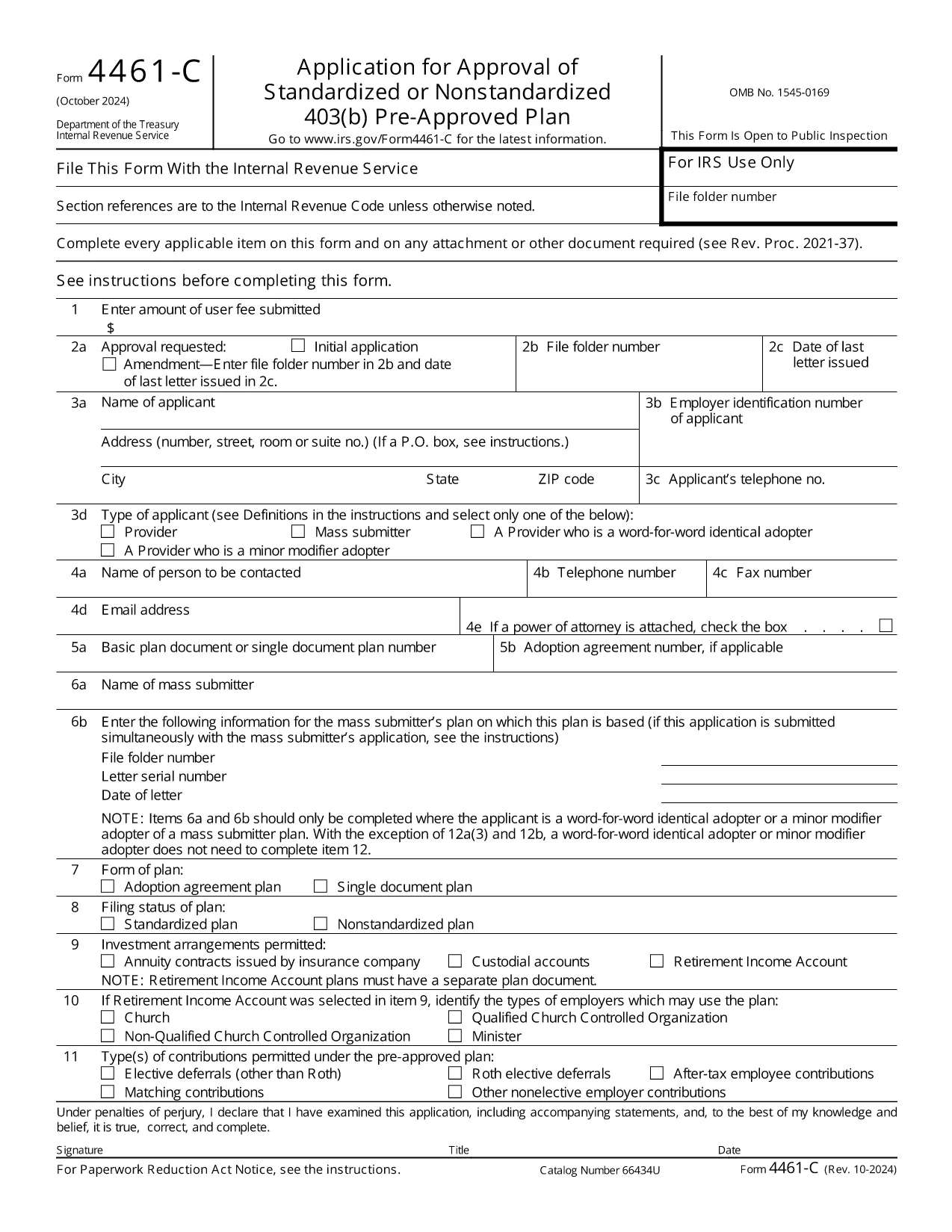
The IRS Form 4461‑C is the official application used by providers or mass submitters of a 403(b) pre‑approved plan. It must be filed for each separate adoption agreement or for each single‑document plan where no adoption agreement is used. Our fillable PDF lets you complete the form quickly, accurately, and securely.

What Is Form 4461‑C?

Form 4461‑C is part of the IRS’s pre‑approval process for employee benefit plans under section 401(a) of the Internal Revenue Code. It captures essential plan details, adoption agreements, and supporting documentation required for IRS approval.

How to Fill Out Form 4461‑C Online

Instead of downloading the PDF and opening a separate editor, simply click the "Fill out this form" button on this page. The Formize PDF Filler will load in your browser, allowing you to:

  1. Enter information directly into each field.
  2. Save your progress automatically.
  3. Validate entries with built‑in checks.
  4. Download the completed, IRS‑ready PDF or submit it electronically.

Common Mistakes to Avoid

  • Leaving required fields blank: The filler highlights missing data before you can save.
  • Mismatched plan numbers: Double‑check the plan identification numbers on line 12(a).
  • Incorrect signatures: Use the electronic signature option or print and sign where required.
  • Submitting outdated versions: This page always provides the latest revision (Rev. 10‑2024).

Submission & Acceptance Guidelines

After completing the form, you can either:

  • Download the PDF and mail it to the IRS address listed in the instructions.
  • Upload the PDF through the IRS e‑file portal if you have an authorized transmitter.

Keep a copy for your records and track the submission status using the IRS’s online tools.

FAQs About Form 4461‑C

For quick answers, scroll down to the FAQ section below.

よくある質問
  • Who must file Form 4461‑C?

    Any provider or mass submitter of a 403(b) pre‑approved plan must file Form 4461‑C for each separate adoption agreement or single‑document plan.

  • Can I file Form 4461‑C electronically?

    Yes. After completing the fillable PDF, you can upload it through the IRS e‑file portal if you have an authorized transmitter.

  • How many copies of Form 4461‑C are required?

    Submit one copy of Form 4461‑C for each adoption agreement or each single‑document plan, plus any supporting documents listed on line 12(a).

  • What is the latest revision of Form 4461‑C?

    The current version is Rev. 10‑2024, which is the PDF linked on this page.

  • Do I need a signature on the PDF?

    Yes. The form requires the plan sponsor’s signature. You can use the electronic signature feature in Formize or print, sign, and scan the completed form.

  • Where do I send the completed form?

    Mail the completed form to the address specified in the IRS instructions, or submit it electronically via the IRS e‑file system.

方法

オンラインで 4 回の簡単なステップで Form 4461-C を無料で入力する方法:

  1. 1
    Open the Fillable Form
    Click the "Fill out this form" button on the page. The Formize PDF Filler loads instantly in your browser.
  2. 2
    Enter Your Information
    Complete each field. Required fields are highlighted. Use the auto‑save feature to protect your data.
  3. 3
    Review & Sign
    Check all entries for accuracy, add electronic signatures where allowed, and correct any validation warnings.
  4. 4
    Download or Submit
    When finished, download the completed PDF for mailing or upload it to the IRS e‑file system.
Formize PDF Filler アプリ
だいたい

納税フォーム

Form 4461-C は税務フォームの 1 つで、個人または企業の収入、控除、納税義務に関する情報を関連する税務当局に報告するために使用される文書です。これらのフォームは税法を遵守し、納税義務を果たすために必要です。納税フォームは国と適用される特定の税金要件によって異なります。一般的な納税フォームのいくつかを次に示します。

個人納税フォーム: これらのフォームは、個人の納税者が個人所得を報告し、控除、控除、免除を申請するために使用します。例としては、米国の1040 フォームや英国の自己申告納税申告書などがあります。

事業税フォーム: 事業税フォームは、企業、パートナーシップ、または自営業者が事業収入、経費、その他の税関連情報を報告するために使用します。例には、米国のスケジュール C フォーム (事業からの損益) や英国の CT600 フォーム (法人税申告書) が含まれます。

給与税フォーム: これらのフォームは、雇用主が従業員の給与から源泉徴収された賃金、給与、税金を報告するために使用されます。例としては、米国の W-2 形式や英国の P60 形式などが挙げられます。

売上税フォーム: 売上税フォームは、企業が課税対象の商品またはサービスに対して徴収した売上税を報告および納付するために使用されます。特定の売上税フォームは管轄区域によって異なります。

付加価値税 (VAT) フォーム: VAT フォームは、販売に対して徴収された VAT を報告および送金し、購入に対する VAT クレジットを請求するために、付加価値税を課す国で使用されます。例には、多くの国で使用されている VAT 申告書が含まれます。

見積納税フォーム: 見積納税フォームは、自営業収入や投資収入など、源泉徴収の対象とならない所得に対する見積税を報告し、支払うために使用されます。

これらは、存在する可能性のある多数の納税フォームのほんの一例です。必要な特定のフォームは、お住まいの国または管轄区域の税法および規制によって異なります。どのフォームが自分の状況に適用できるかを判断するには、税務当局のガイドラインを参照するか、専門家のアドバイスを求めることが重要です。

特徴

PDFフィラー

オンラインで PDF フォームに記入する最も簡単な方法

  • Form 4461-C をすばやく入力してください
    Form 4461-C をオンラインですばやく入力する方法をお探しですか?オンラインの無料 PDF フォーム フィラーを使用すると、この PDF ドキュメントを 1 分以内に編集して入力する方法がわかります。
  • 使いやすいオンライン PDF エディター
    再スキャンして返送する前に、編集できるように PDF ファイルを印刷することにうんざりしていませんか? PDFドキュメントをオンラインで無料で編集.当社のオンライン PDF エディターを使用して、時間と紙を節約してください。
  • 優れたツール、すべてのプラットフォーム
    Mac で Form 4461-C を入力する方法や、PDF フィラーを無料で使用する方法を知りたいですか?当社のオンライン PDF ツールは、すべてのプラットフォームで動作します。
  • 安全なファイル ストレージ
    完成した「Form 4461-C」ファイルは、Amazon クラウド ホスティングが管理する安全なデータベースに保存されます。いつでもシステムからファイルを削除できます。いずれにせよ、これらのファイルは 24 時間後に自動的に削除されます。
  • {キーワード} とチャットする
    無料の PDF リーダー アシスタントである Chatize で「Form 4461-C」とチャットします。質問すると、「Form 4461-C」から回答が得られます。上の [ドキュメントとチャット] ボタンをクリックするだけです。

フィルセッションを削除

選択したフィルセッションを削除しますか?この場合、フォームへの記入の進捗状況は失われます。

編集セッションを削除する

選択した編集セッションを削除しますか?この場合、フォームの作成および編集の進行状況は失われます。