
言語を選択する

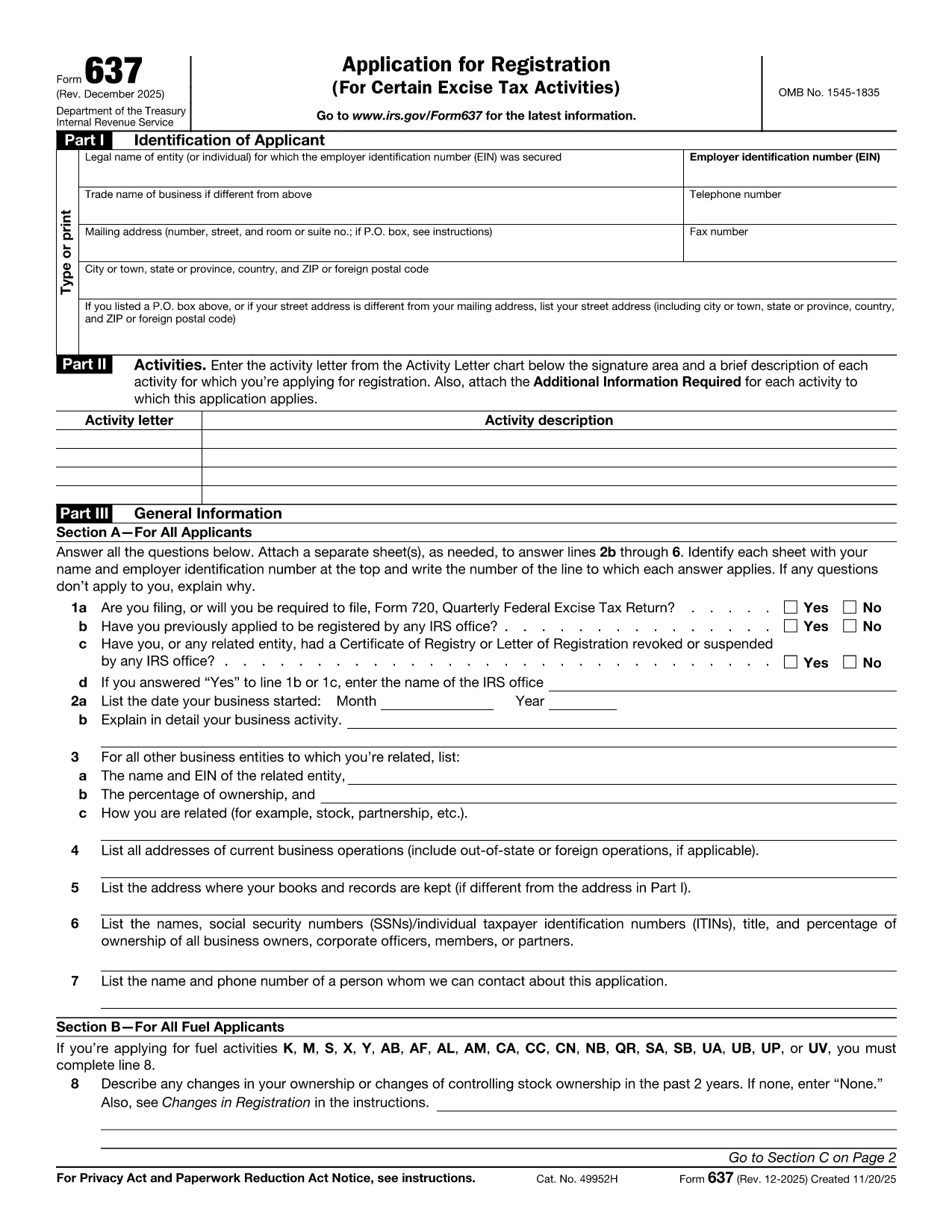
Form 637 – Application for Excise Tax Registration (Fillable PDF)

  1. アメリカ合衆国
  2. 言語 英語
  3. アクティビティ 税金
  4. デパートメント 内国歳入サービス
Form 637 – Application for Excise Tax Registration (Fillable PDF)

Form 637, Application for Registration (For Certain Excise Tax Activities), is the IRS’s official request to register for activities subject to federal excise taxes. Whether you are a manufacturer, importer, fuel seller, or any other entity that handles taxable products, you need this form to stay compliant.

On Formize.com you can fill the form directly in the browser—no PDF editor required. Just click the Fill out this form button, let the Formize PDF Filler load, and start entering your information.

Who Must File Form 637

  • Manufacturers, producers, or importers of excise‑taxed products.
  • Sellers or purchasers of taxable fuel.
  • Exporters of excise‑taxed goods.
  • Any entity using products that require a Certificate of Registration.

How to Complete Form 637 Online

Follow these simple steps to finish the application without printing a single page:

  1. Click the Fill out this form button on this page.
  2. Wait for the Formize PDF Filler to load (usually a few seconds).
  3. Enter your legal name, EIN, trade name, and contact information.
  4. Select the appropriate activity letter (M, S, etc.) and provide a brief description.
  5. Answer the general information questions in Part III.
  6. Upload any required supporting documents directly in the filler.
  7. Review the completed form, then click Submit to download a signed PDF or mail it to the IRS address shown in the instructions.

Common Mistakes & Tips

  • Incorrect EIN: Double‑check the number; a typo will delay approval.
  • Missing activity letter: Use the chart on pages 2‑5 of the form to pick the right letter.
  • Skipping supporting documents: Attach licenses, permits, or prior registration letters as required.
  • Out‑of‑date form: Always use the latest PDF – the link below points to the current IRS version.

Download the Fillable PDF

If you prefer to work offline, you can download the official PDF from the IRS and open it with any PDF editor. However, the online filler is faster, error‑proof, and saves you a trip to the printer.

FAQs About Form 637

Below are the most frequently asked questions. Click each question to see the answer.

よくある質問
  • What is Form 637 used for?

    Form 637 is the IRS application to register for activities subject to federal excise taxes, such as manufacturing or selling taxable fuel.

  • Who is required to file Form 637?

    Manufacturers, producers, importers, fuel sellers, exporters, and any entity that uses products requiring excise tax registration must file Form 637.

  • Can I file Form 637 electronically?

    Yes. On Formize.com you can fill the PDF online, then download the completed form to mail to the IRS. The IRS does not accept direct e‑filing, but the online filler streamlines the process.

  • Do I need an EIN to complete Form 637?

    An Employer Identification Number (EIN) is required. If you don’t have one, apply using Form SS‑4 before completing Form 637.

  • What supporting documents are required?

    Typically you must attach business licenses, permits, prior registration letters, and any documents that prove the activity you’re registering for.

  • How long does the IRS take to approve the registration?

    Processing times vary, but most applicants receive a response within 30‑45 days after the IRS receives the complete application.

  • Is there a fee to file Form 637?

    No filing fee is required for Form 637 itself. However, excise taxes will be due based on the activity once registration is approved.

  • What should I do if I make a mistake on the form?

    Correct the error in the online filler before downloading the final PDF. If you’ve already mailed the form, submit a corrected Form 637 with a cover letter explaining the changes.

  • Where do I mail the completed Form 637?

    The mailing address is listed in the form’s instructions. It is typically the IRS Office of Excise Tax at the address shown on page 1 of the PDF.

  • Can I save my progress while filling the form online?

    Yes. The Formize PDF Filler allows you to save a draft and return later to finish the application.

方法

オンラインで 5 回の簡単なステップで Form 637 を無料で入力する方法:

  1. 1
    Click "Fill out this form"
    Locate the button on this page and click it to launch the Formize PDF Filler.
  2. 2
    Wait for the filler to load
    The web app loads the fillable version of Form 637 in a few seconds.
  3. 3
    Enter required information
    Complete each field—legal name, EIN, activity letter, and any supporting details.
  4. 4
    Review and validate
    Use the built‑in validation to catch missing or incorrectly formatted entries.
  5. 5
    Submit or download
    When finished, either submit the form directly to the IRS address shown or download the completed PDF for your records.
Formize PDF Filler アプリ
だいたい

納税フォーム

Form 637 は、税金に関する情報を関連する税務当局に報告するために使用される文書である納税申告書の 1 つです。納税者の状況や場所によって、連邦税、州税、地方税など、さまざまな種類の納税申告書があります。

特徴

PDFフィラー

オンラインで PDF フォームに記入する最も簡単な方法

  • Form 637 をすばやく入力してください
    Form 637 をオンラインですばやく入力する方法をお探しですか?オンラインの無料 PDF フォーム フィラーを使用すると、この PDF ドキュメントを 1 分以内に編集して入力する方法がわかります。
  • 使いやすいオンライン PDF エディター
    再スキャンして返送する前に、編集できるように PDF ファイルを印刷することにうんざりしていませんか? PDFドキュメントをオンラインで無料で編集.当社のオンライン PDF エディターを使用して、時間と紙を節約してください。
  • 優れたツール、すべてのプラットフォーム
    Mac で Form 637 を入力する方法や、PDF フィラーを無料で使用する方法を知りたいですか?当社のオンライン PDF ツールは、すべてのプラットフォームで動作します。
  • 安全なファイル ストレージ
    完成した「Form 637」ファイルは、Amazon クラウド ホスティングが管理する安全なデータベースに保存されます。いつでもシステムからファイルを削除できます。いずれにせよ、これらのファイルは 24 時間後に自動的に削除されます。
  • {キーワード} とチャットする
    無料の PDF リーダー アシスタントである Chatize で「Form 637」とチャットします。質問すると、「Form 637」から回答が得られます。上の [ドキュメントとチャット] ボタンをクリックするだけです。

フィルセッションを削除

選択したフィルセッションを削除しますか?この場合、フォームへの記入の進捗状況は失われます。

編集セッションを削除する

選択した編集セッションを削除しますか?この場合、フォームの作成および編集の進行状況は失われます。