
言語を選択する

IRS Form 8927 – Fillable PDF Download

  1. アメリカ合衆国
  2. 言語 英語
  3. アクティビティ 税金
  4. デパートメント 内国歳入サービス
IRS Form 8927 – Fillable PDF Download

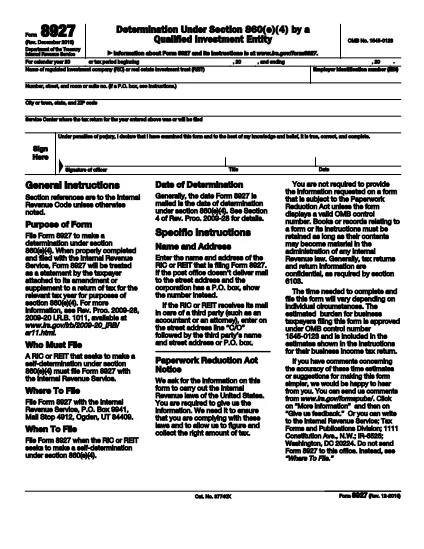
Form 8927 ("Determination Under Section 860(e)(4) by a Qualified Investment Entity") is a one‑page IRS document required by regulated investment companies (RICs) and real estate investment trusts (REITs). It allows the entity to attach a sworn statement to an amended or supplemented tax return, confirming the accuracy of the amendment under section 860(e)(4) of the Internal Revenue Code.

What Is Form 8927?

The form is used to:

  • Identify the tax year or period being amended.
  • Provide the entity’s legal name, EIN, and mailing address.
  • Declare, under penalty of perjury, that the amendment is correct.
  • Submit the statement to the IRS service center where the original return was filed.

How to Complete Form 8927 Online

Instead of downloading a static PDF and editing it with a separate editor, simply click the "Fill out this form" button on this page. The Formize PDF Filler app will load the fillable version of Form 8927, letting you type directly into the fields, save your progress, and download the completed PDF.

Common Mistakes to Avoid

  • Leaving the tax period blank: Always indicate the calendar year or the exact start and end dates.
  • Incorrect EIN: Verify the Employer Identification Number before submitting.
  • Missing signature: The authorized officer must sign and date the form; an unsigned form is rejected.
  • Wrong service center address: Use the address of the IRS center where the original return was filed.

By following these tips and using our fillable version, you can submit Form 8927 quickly and avoid unnecessary delays.

よくある質問
  • Who must file Form 8927?

    Regulated Investment Companies (RICs) and Real Estate Investment Trusts (REITs) that need to make a self‑determination under section 860(e)(4) for an amended or supplemented return.

  • Is Form 8927 available as a fillable PDF?

    Yes. On this page you can open the fillable version with Formize, complete it online, and download the finished document.

  • Do I need a separate signature for each amendment?

    A single authorized officer’s signature is sufficient for the entire Form 8927, as long as it covers the specific amendment being reported.

  • Can I submit Form 8927 electronically?

    The IRS still requires a mailed paper copy attached to the amended return, but you can create an electronic PDF with Formize and print it for mailing.

  • What happens if I file Form 8927 with errors?

    The IRS may reject the attached amendment, request a corrected form, and could impose penalties for inaccurate statements.

  • Where do I mail the completed Form 8927?

    Mail it to the IRS service center where the original return for the tax year was filed. The address is listed on the form itself.

  • Is there a filing deadline for Form 8927?

    Form 8927 must be filed with the amended return; therefore, it follows the same deadline as the amendment, typically within three years of the original filing date.

方法

オンラインで 4 回の簡単なステップで Form 8927 を無料で入力する方法:

  1. 1
    Click the Fillable Form Button
    Press the "Fill out this form" button on this page. The Formize PDF Filler will open in a new tab.
  2. 2
    Enter All Required Information
    Complete each field – tax year, entity name, EIN, address, and signature – directly in the online filler.
  3. 3
    Review and Save
    Double‑check the entered data, then click "Save" to download the completed PDF or print it for mailing.
  4. 4
    Mail to the Correct IRS Service Center
    Send the signed PDF to the IRS service center listed on the form, or attach it to your electronic filing if applicable.
Formize PDF Filler アプリ
だいたい

内国歳入庁 (IRS) フォーム

Form 8927 は、米国で所得の報告、控除と控除の請求、納税額の計算、その他の税関連義務の履行に使用される公式の納税フォームの 1 つです。 IRS は、米国の内国歳入法の管理と執行を担当する連邦機関です。

以下に内国歳入庁フォームの例をいくつか示します。

フォーム 1040: これは、ほとんどの納税者が使用する主な個人所得税申告書です。これは、さまざまな種類の収入、控除とクレジットの請求、納税義務の計算、納税者が追加の税金を支払う義務があるかどうか、または還付を受ける権利があるかどうかを判断するために使用されます。

フォーム 1099: 1099-MISC1099-INT1099-DIV など。これらのフォームは、個人または企業が自営業など雇用以外のさまざまな源泉から受け取った収入を報告するために使用されます。収入、利息収入、配当収入、家賃収入。

フォーム W-2: このフォームは、雇用主が従業員に支払った賃金と税金を報告するために使用されます。彼らの給料から差し引かれます。従業員はフォーム W-2 の情報を使用して個人の納税申告書を完成させます。

フォーム 941: 雇用主はこのフォームを使用して、従業員の源泉徴収された連邦所得税、社会保障税、メディケア税などの雇用税を報告します。

フォーム 1065: このフォームは、パートナーシップが収入、控除、納税額を報告するために使用します。パートナーシップ自体は所得税を支払いません。代わりに、パートナーは個人の納税申告書でパートナーシップ収入の取り分を報告します。

フォーム 1120: これは、C 法人が収入を報告するために使用する法人税申告書です。控除や納税義務など。

フォーム 990: このフォームは、非営利団体や慈善団体などの非課税団体によって使用されます。財務情報、活動、税法の遵守を報告します。

フォーム 8862: このフォームは、以前に稼得所得税額控除 (EITC) を申請した納税者が使用します。しかし、許可されなかったので、再度申請したいと考えています。

これらは、さまざまな税金関連の義務を果たすために存在する多数の IRS フォームのほんの一例です。個人または企業に必要な特定のフォームは、その固有の状況、収入源、および控除によって異なります。特定の IRS に関する正確で最新の情報を入手するには、内国歳入庁の公式 Web サイト (www.irs.gov) を参照するか、税務の専門家に相談することをお勧めします。あなたの税務状況に関連するフォーム。

特徴

PDFフィラー

オンラインで PDF フォームに記入する最も簡単な方法

  • Form 8927 をすばやく入力してください
    Form 8927 をオンラインですばやく入力する方法をお探しですか?オンラインの無料 PDF フォーム フィラーを使用すると、この PDF ドキュメントを 1 分以内に編集して入力する方法がわかります。
  • 使いやすいオンライン PDF エディター
    再スキャンして返送する前に、編集できるように PDF ファイルを印刷することにうんざりしていませんか? PDFドキュメントをオンラインで無料で編集.当社のオンライン PDF エディターを使用して、時間と紙を節約してください。
  • 優れたツール、すべてのプラットフォーム
    Mac で Form 8927 を入力する方法や、PDF フィラーを無料で使用する方法を知りたいですか?当社のオンライン PDF ツールは、すべてのプラットフォームで動作します。
  • 安全なファイル ストレージ
    完成した「Form 8927」ファイルは、Amazon クラウド ホスティングが管理する安全なデータベースに保存されます。いつでもシステムからファイルを削除できます。いずれにせよ、これらのファイルは 24 時間後に自動的に削除されます。
  • {キーワード} とチャットする
    無料の PDF リーダー アシスタントである Chatize で「Form 8927」とチャットします。質問すると、「Form 8927」から回答が得られます。上の [ドキュメントとチャット] ボタンをクリックするだけです。

フィルセッションを削除

選択したフィルセッションを削除しますか?この場合、フォームへの記入の進捗状況は失われます。

編集セッションを削除する

選択した編集セッションを削除しますか?この場合、フォームの作成および編集の進行状況は失われます。