言語を選択する

Fillable Form W-4P – Federal Income Tax Withholding for Pensions & Annuities

  1. アメリカ合衆国
  2. 言語 英語
  3. アクティビティ 税金
  4. デパートメント 内国歳入サービス
Fillable Form W-4P – Federal Income Tax Withholding for Pensions & Annuities

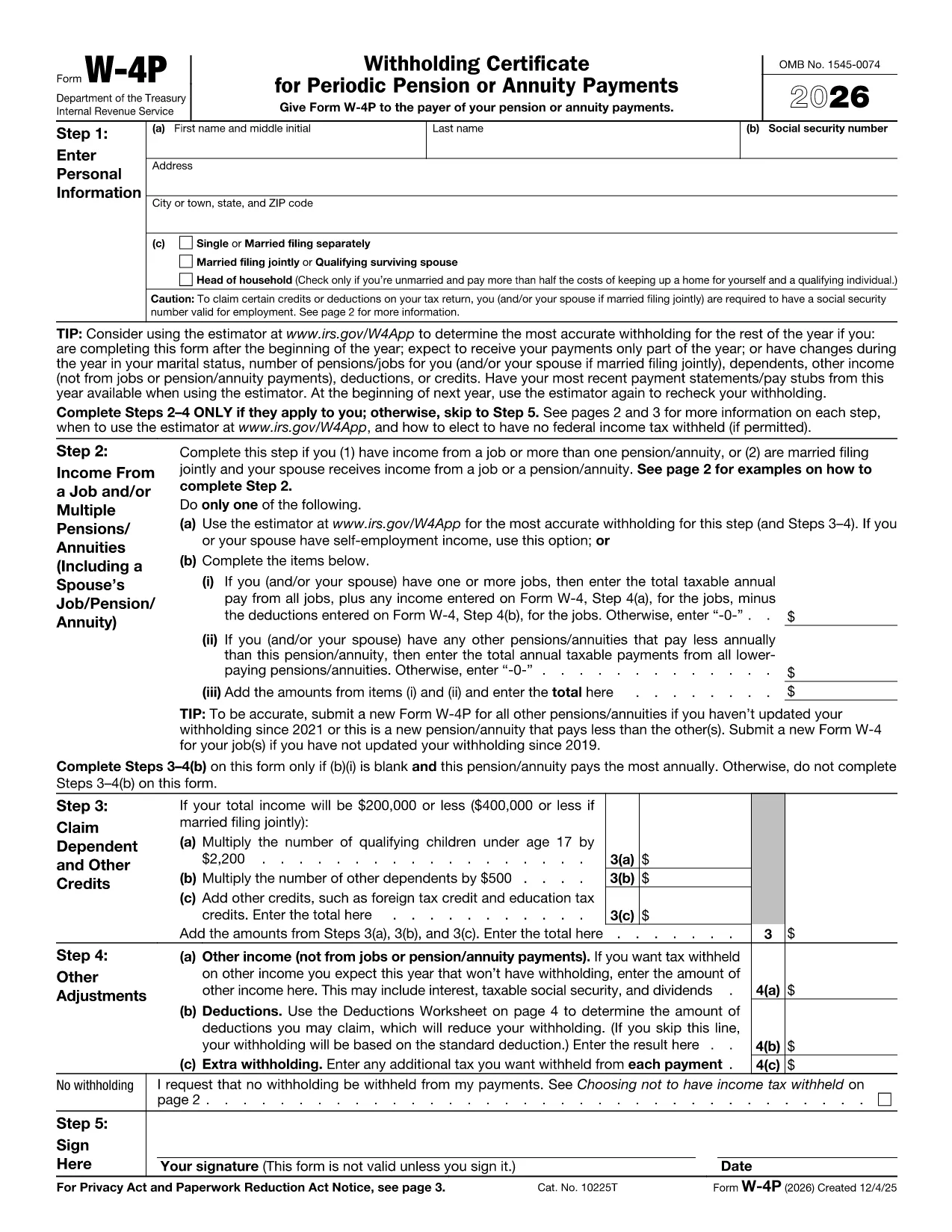
Form W-4P is the IRS document used to tell a payer how much federal income tax to withhold from periodic pension, annuity, profit‑sharing, stock‑bonus plan, or IRA payments. The form captures personal information, filing status, credits, deductions, and any extra withholding you want.

What Is Form W-4P?

The IRS Form W-4P ("Withholding Certificate for Pension or Annuity Payments") replaces the older paper‑only version with a modern, fillable PDF that can be completed electronically. It applies only to the taxable portion of your periodic payments.

When Do You Need Form W-4P?

  • When you start receiving a pension or annuity and want the correct tax withheld.
  • If you have multiple sources of retirement income and need to adjust withholding.
  • When you experience a change in filing status, dependents, or tax credits.

How to Fill Out the Fillable W-4P Online

Instead of downloading the PDF and opening a separate editor, simply click the "Fill out this form" button on this page. The Formize PDF Filler app will load instantly, allowing you to complete the form directly in your browser.

Common Mistakes to Avoid

  • Leaving the "Exempt" box unchecked when you qualify for exemption.
  • Entering an incorrect Social Security Number – double‑check each digit.
  • Forgetting to sign and date the form; an unsigned form is rejected.
  • Misreporting credits or deductions, which can lead to over‑ or under‑withholding.

Where to Submit Your Completed Form

Send the finished Form W-4P to the payer of your pension or annuity (financial institution, plan administrator, or IRA custodian). Keep a copy for your records. The payer will use the information to calculate the correct federal tax to withhold each payment cycle.

Need a printable copy? Use the official IRS PDF linked below.

よくある質問
  • Do I need to file Form W-4P every year?

    You only need to file a new W-4P when your situation changes (e.g., filing status, dependents, or extra withholding). Otherwise, the original form remains valid.

  • Can I claim exemption from withholding on Form W-4P?

    Yes, if you had no tax liability last year and expect none this year, you can check the exemption box. Be sure you truly qualify; an incorrect claim can result in penalties.

  • What happens if I make a mistake on the form?

    Contact the payer immediately to submit a corrected W-4P. Incorrect information can cause under‑withholding, leading to a large tax bill at year‑end.

  • Is the fillable PDF accepted by all payers?

    The IRS‑approved fillable PDF meets all requirements. Most financial institutions and plan administrators accept it, but you can always request a paper copy if needed.

  • How do I know how much tax should be withheld?

    Use the IRS Tax Withholding Estimator or consult a tax professional. The form also lets you add extra withholding amounts if you anticipate a higher tax liability.

  • Can I submit the form electronically?

    Yes. After completing the fillable PDF, you can email the PDF directly to your payer or upload it through their secure portal if they offer one.

  • Where can I find the official PDF version of Form W-4P?

    The official, up‑to‑date PDF is available from the IRS at https://www.irs.gov/pub/irs-pdf/fw4p.pdf.

方法

オンラインで 5 回の簡単なステップで Form W-4P を無料で入力する方法:

  1. 1
    Click the Fill Out Button
    Press the “Fill out this form” button on the page to launch the Formize PDF Filler.
  2. 2
    Wait for the Filler to Load
    The online filler loads in seconds. No download or installation is required.
  3. 3
    Enter Your Information
    Complete each required field – personal details, filing status, credits, and any extra withholding.
  4. 4
    Review and Sign
    Double‑check all entries, then add your electronic signature and the date.
  5. 5
    Save or Email Your Form
    Download the completed PDF or email it directly to your payer from the Formize interface.
Formize PDF Filler アプリ
だいたい

内国歳入庁 (IRS) フォーム

Form W-4P は、米国で所得の報告、控除と控除の請求、納税額の計算、その他の税関連義務の履行に使用される公式の納税フォームの 1 つです。 IRS は、米国の内国歳入法の管理と執行を担当する連邦機関です。

以下に内国歳入庁フォームの例をいくつか示します。

フォーム 1040: これは、ほとんどの納税者が使用する主な個人所得税申告書です。これは、さまざまな種類の収入、控除とクレジットの請求、納税義務の計算、納税者が追加の税金を支払う義務があるかどうか、または還付を受ける権利があるかどうかを判断するために使用されます。

フォーム 1099: 1099-MISC1099-INT1099-DIV など。これらのフォームは、個人または企業が自営業など雇用以外のさまざまな源泉から受け取った収入を報告するために使用されます。収入、利息収入、配当収入、家賃収入。

フォーム W-2: このフォームは、雇用主が従業員に支払った賃金と税金を報告するために使用されます。彼らの給料から差し引かれます。従業員はフォーム W-2 の情報を使用して個人の納税申告書を完成させます。

フォーム 941: 雇用主はこのフォームを使用して、従業員の源泉徴収された連邦所得税、社会保障税、メディケア税などの雇用税を報告します。

フォーム 1065: このフォームは、パートナーシップが収入、控除、納税額を報告するために使用します。パートナーシップ自体は所得税を支払いません。代わりに、パートナーは個人の納税申告書でパートナーシップ収入の取り分を報告します。

フォーム 1120: これは、C 法人が収入を報告するために使用する法人税申告書です。控除や納税義務など。

フォーム 990: このフォームは、非営利団体や慈善団体などの非課税団体によって使用されます。財務情報、活動、税法の遵守を報告します。

フォーム 8862: このフォームは、以前に稼得所得税額控除 (EITC) を申請した納税者が使用します。しかし、許可されなかったので、再度申請したいと考えています。

これらは、さまざまな税金関連の義務を果たすために存在する多数の IRS フォームのほんの一例です。個人または企業に必要な特定のフォームは、その固有の状況、収入源、および控除によって異なります。特定の IRS に関する正確で最新の情報を入手するには、内国歳入庁の公式 Web サイト (www.irs.gov) を参照するか、税務の専門家に相談することをお勧めします。あなたの税務状況に関連するフォーム。

特徴

PDFフィラー

オンラインで PDF フォームに記入する最も簡単な方法

  • Form W-4P をすばやく入力してください
    Form W-4P をオンラインですばやく入力する方法をお探しですか?オンラインの無料 PDF フォーム フィラーを使用すると、この PDF ドキュメントを 1 分以内に編集して入力する方法がわかります。
  • 使いやすいオンライン PDF エディター
    再スキャンして返送する前に、編集できるように PDF ファイルを印刷することにうんざりしていませんか? PDFドキュメントをオンラインで無料で編集.当社のオンライン PDF エディターを使用して、時間と紙を節約してください。
  • 優れたツール、すべてのプラットフォーム
    Mac で Form W-4P を入力する方法や、PDF フィラーを無料で使用する方法を知りたいですか?当社のオンライン PDF ツールは、すべてのプラットフォームで動作します。
  • 安全なファイル ストレージ
    完成した「Form W-4P」ファイルは、Amazon クラウド ホスティングが管理する安全なデータベースに保存されます。いつでもシステムからファイルを削除できます。いずれにせよ、これらのファイルは 24 時間後に自動的に削除されます。
  • {キーワード} とチャットする
    無料の PDF リーダー アシスタントである Chatize で「Form W-4P」とチャットします。質問すると、「Form W-4P」から回答が得られます。上の [ドキュメントとチャット] ボタンをクリックするだけです。

フィルセッションを削除

選択したフィルセッションを削除しますか?この場合、フォームへの記入の進捗状況は失われます。

編集セッションを削除する

選択した編集セッションを削除しますか?この場合、フォームの作成および編集の進行状況は失われます。