
言語を選択する

Fillable Form W‑9S – Request Student or Borrower TIN

  1. アメリカ合衆国
  2. 言語 英語
  3. アクティビティ 税金
  4. デパートメント 内国歳入サービス
Fillable Form W‑9S – Request Student or Borrower TIN

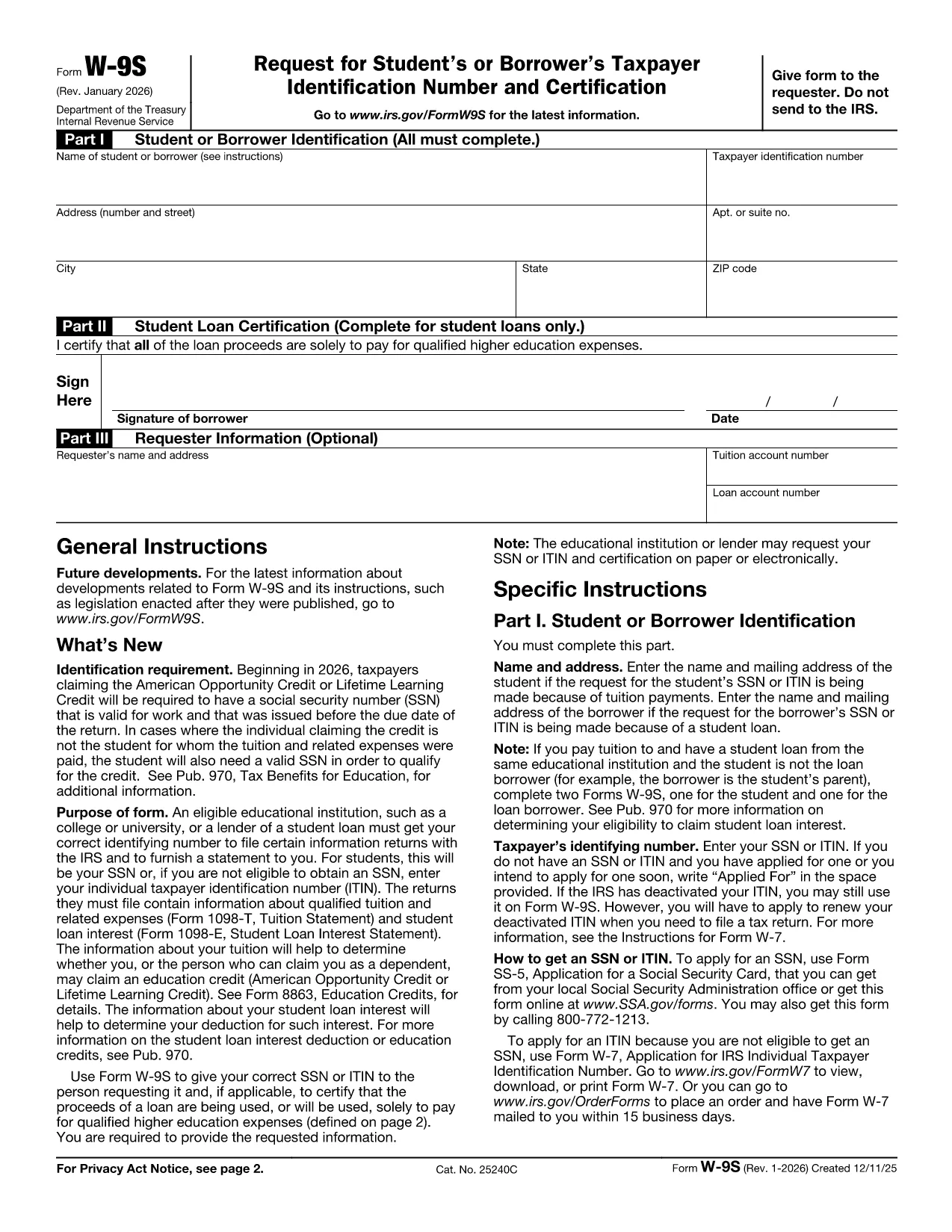
The IRS Form W‑9S, Request for Student's or Borrower's Taxpayer Identification Number and Certification, is used by qualifying educational institutions to collect the TIN of students or borrowers who receive scholarships, grants, or loan interest that must be reported on Forms 1098‑T or 1098‑E.

Our fillable Form W‑9S lets you complete the entire request directly in your browser—no printing, scanning, or PDF editor required. Simply click the “Fill out this form” button, let the Formize PDF Filler load, and start entering the required information.

What Is Form W‑9S and Who Needs It?

Form W‑9S captures the name, address, and Taxpayer Identification Number (TIN) of a student or borrower. It is required when the institution must issue a 1098‑T (tuition statement) or 1098‑E (student loan interest) to the IRS. Both federal and private loan recipients may be asked to submit this form.

How to Complete Form W‑9S Online

Follow these simple steps:

  1. Click the “Fill out this form” button on this page.
  2. Wait for the Formize PDF Filler app to load (usually a few seconds).
  3. Enter the student or borrower’s legal name, TIN (SSN or EIN), and full address.
  4. If you are reporting a loan, complete Part II with the loan certification.
  5. Sign electronically and submit the form according to your school’s instructions.

Common Mistakes to Avoid on Form W‑9S

  • Incorrect TIN: Double‑check the Social Security Number or EIN; a typo will delay processing.
  • Missing Signature: The form is not valid without a signed certification.
  • Out‑of‑date Address: Use the current mailing address to ensure the 1098‑E or 1098‑T reaches the taxpayer.
  • Leaving Part II Blank: Only leave it blank if the request is not for a loan.

Download the Official PDF

If you prefer the original IRS version, you can download it here: Form W‑9S (PDF). Our fillable version mirrors this official layout while adding a seamless online experience.

よくある質問
  • What is the difference between Form W‑9 and Form W‑9S?

    Form W‑9 is used for general payee information, while Form W‑9S is specifically for students or borrowers who need to report tuition or loan interest to the IRS.

  • Can I use the same TIN for multiple schools?

    Yes. Your Social Security Number or EIN remains the same; each institution will request a separate Form W‑9S for its records.

  • Do I need to file Form W‑9S with the IRS myself?

    No. The educational institution collects the form and uses the information to issue the appropriate 1098‑T or 1098‑E to the IRS.

  • Is an electronic signature accepted on Form W‑9S?

    Yes. The IRS accepts electronic signatures on fillable PDFs as long as the signer certifies the information is correct.

  • What should I do if I make a mistake after submitting?

    Contact your school’s financial aid office immediately. They can provide a corrected Form W‑9S or advise you on the next steps.

  • Is there a fee to use the Formize PDF Filler?

    No. Formize offers free online filling for government forms like Form W‑9S.

方法

オンラインで 3 回の簡単なステップで Form W‑9S を無料で入力する方法:

  1. 1
    Open the Fillable Form
    Click the “Fill out this form” button on the page. The Formize PDF Filler will open in a new window.
  2. 2
    Enter Required Information
    Complete Part I with the student or borrower’s name, TIN, and address. If you have a loan, fill in Part II.
  3. 3
    Sign and Submit
    Add your electronic signature, review the data for accuracy, and follow your institution’s submission instructions.
Formize PDF Filler アプリ
だいたい

納税フォーム

Form W‑9S は、税金に関する情報を関連する税務当局に報告するために使用される文書である納税申告書の 1 つです。納税者の状況や場所によって、連邦税、州税、地方税など、さまざまな種類の納税申告書があります。

特徴

PDFフィラー

オンラインで PDF フォームに記入する最も簡単な方法

  • Form W‑9S をすばやく入力してください
    Form W‑9S をオンラインですばやく入力する方法をお探しですか?オンラインの無料 PDF フォーム フィラーを使用すると、この PDF ドキュメントを 1 分以内に編集して入力する方法がわかります。
  • 使いやすいオンライン PDF エディター
    再スキャンして返送する前に、編集できるように PDF ファイルを印刷することにうんざりしていませんか? PDFドキュメントをオンラインで無料で編集.当社のオンライン PDF エディターを使用して、時間と紙を節約してください。
  • 優れたツール、すべてのプラットフォーム
    Mac で Form W‑9S を入力する方法や、PDF フィラーを無料で使用する方法を知りたいですか?当社のオンライン PDF ツールは、すべてのプラットフォームで動作します。
  • 安全なファイル ストレージ
    完成した「Form W‑9S」ファイルは、Amazon クラウド ホスティングが管理する安全なデータベースに保存されます。いつでもシステムからファイルを削除できます。いずれにせよ、これらのファイルは 24 時間後に自動的に削除されます。
  • {キーワード} とチャットする
    無料の PDF リーダー アシスタントである Chatize で「Form W‑9S」とチャットします。質問すると、「Form W‑9S」から回答が得られます。上の [ドキュメントとチャット] ボタンをクリックするだけです。

フィルセッションを削除

選択したフィルセッションを削除しますか?この場合、フォームへの記入の進捗状況は失われます。

編集セッションを削除する

選択した編集セッションを削除しますか?この場合、フォームの作成および編集の進行状況は失われます。