
言語を選択する

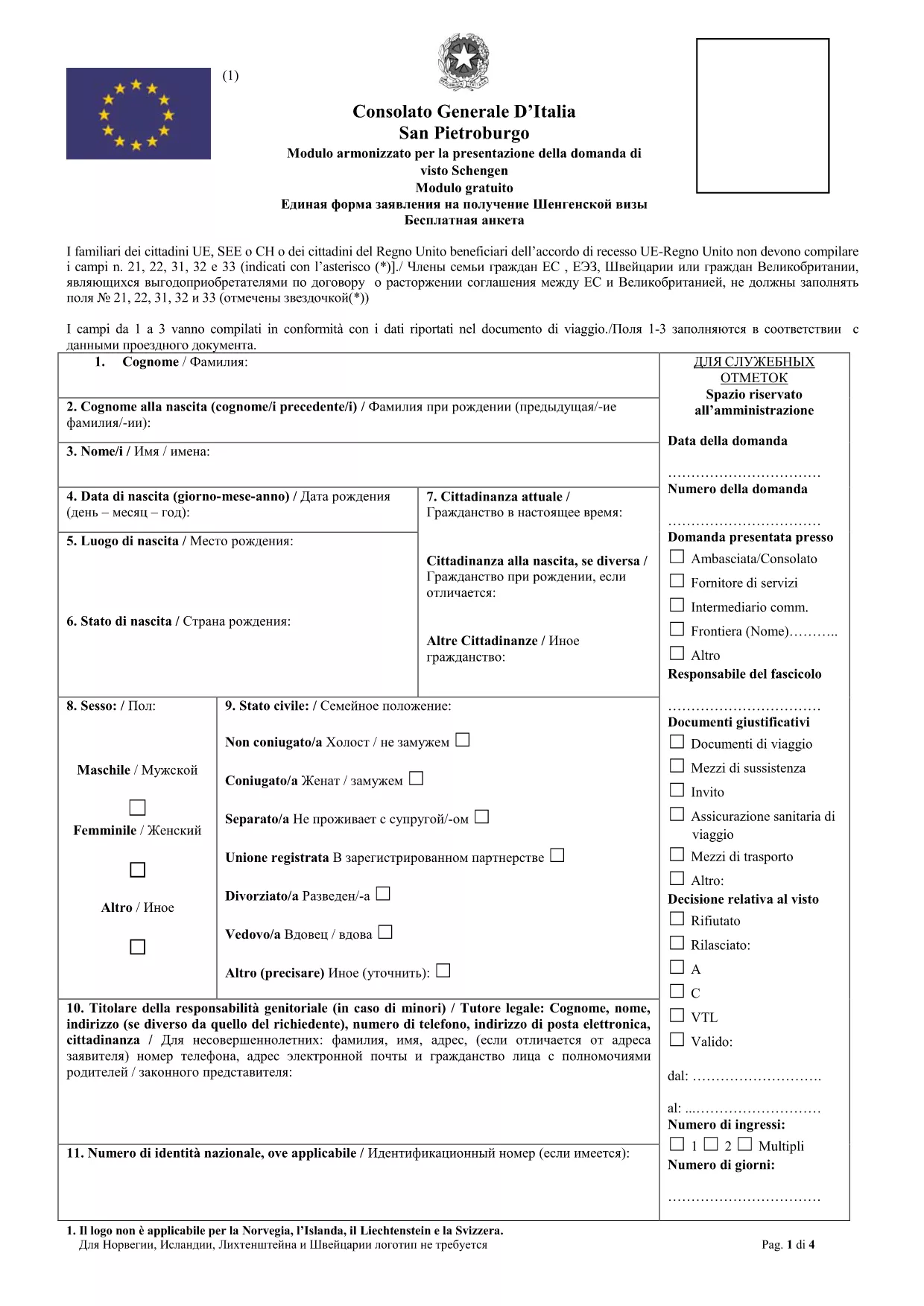
Italy Visa Application Form (Type C) – Fillable PDF

  1. イタリア
  2. 言語 英語
  3. アクティビティ ビザ
  4. デパートメント Consulate
Italy Visa Application Form (Type C) – Fillable PDF

Planning a trip to Italy? The first step is a correctly completed visa application. Our fillable PDF for the Italy Visa (Type C) lets you enter all required information directly in your browser, eliminating the hassle of printing, scanning, or rewriting.

Why Use a Fillable PDF for Your Italy Visa?

  • Instant validation: The Formize PDF Filler checks required fields as you type.
  • Secure storage: Your data stays encrypted on our servers until you download the finished form.
  • Eco‑friendly: No paper waste until you need a printed copy for the consulate.

How to Complete the Italy Visa Application Form Online

Follow these simple steps – no PDF editor required:

  1. Click the "Fill out this form" button on this page.
  2. Wait a few seconds while the Formize PDF Filler app loads.
  3. Enter your personal details in block letters (English or Italian).
  4. Upload a digital signature or use the built‑in e‑signature tool.
  5. Review the form, then download the completed PDF or send it directly to the Italian consulate.

Common Mistakes to Avoid When Filling the Form

  • Using cursive or mixed‑case letters – the consulate requires block capitals.
  • Leaving optional fields blank when they are actually required for your visa category.
  • Submitting an outdated passport number or an expired passport copy.
  • Forgetting to sign both pages if you are under 18 – a parent/guardian must sign.

Document Checklist for a Schengen Visa to Italy

Before you submit, gather these items:

  • Completed Italy Visa Application Form (type C)
  • Valid passport (at least 2 blank pages, 3‑month validity beyond travel dates)
  • Recent passport‑size photo (white background)
  • Proof of travel insurance (minimum €30,000 coverage)
  • Round‑trip flight itinerary
  • Proof of accommodation (hotel booking or invitation letter)
  • Financial proof (bank statements, sponsor letter)

Submit Your Application with Confidence

Once you have the filled PDF, book an appointment at the nearest Italian consulate or visa centre. Bring the printed form, all supporting documents, and the required visa fee. Our fillable form meets the official layout used by the Italian Ministry of Foreign Affairs, so you can submit it without any extra formatting.

Need a quick preview? Click the button below and start filling the form instantly.

よくある質問
  • Is the Italy visa application form free to use?

    Yes, the fillable PDF provided on Formize is free. You only pay the official visa fee to the Italian consulate.

  • Can I submit the form electronically to the consulate?

    Most Italian consulates still require a printed, signed copy. Use the online filler to create a PDF, print it, sign it, and bring it to your appointment.

  • What language should I fill out the form in?

    The form accepts English or Italian. Choose the language you are most comfortable with; both are officially accepted.

  • Do I need a digital signature?

    A digital signature is accepted for the online version, but you must also sign the printed copy with a pen before submission.

  • How long does the online filler keep my data?

    Formize stores your data securely for 24 hours after the session ends, giving you enough time to download the completed PDF.

  • What should I do if I make a mistake?

    Use the "Clear" button in the filler to reset a field, or click the back arrow to edit any section before saving.

  • Is this the same form used for long‑stay (type D) visas?

    No. This fillable PDF is for short‑stay Schengen visas (type C). Type D visas have a different form and requirements.

  • Can I fill out the form on a mobile device?

    Yes, the Formize PDF Filler works on smartphones and tablets, though a larger screen makes data entry easier.

方法

オンラインで 4 回の簡単なステップで Italy visa application form を無料で入力する方法:

  1. 1
    Open the Fillable Form
    Click the "Fill out this form" button on the page. The Formize PDF Filler will open in a new tab.
  2. 2
    Load the Formizer App
    Wait a few seconds while the online PDF filler loads all fields and validation rules.
  3. 3
    Enter Your Information
    Type your details in block letters, upload required documents, and add your digital signature.
  4. 4
    Save or Download
    When you’re done, download the completed PDF or send it directly to the Italian consulate from the app.
Formize PDF Filler アプリ
だいたい

ビザフォーム

Italy visa application form は、外国に入国するためのビザを申請するために使用される書類であるビザフォームの 1 つです。ビザとは、外国人が外国に一定期間入国し、滞在し、場合によっては就労することを許可する書類です。ビザを取得するための正確なフォームと要件は、国とビザの種類によって異なります。

ビザフォームには、通常、名前、生年月日、パスポート情報などの個人情報に加えて、旅行の目的と期間、目的地、申請者が以前にビザを拒否されたか国から強制送還されたかどうかに関する情報が必要です。フォームには、パスポート、写真、財政支援の証明などの補足書類も必要になる場合があります。

米国では、最も一般的なビザ フォームは DS-160 および DS-260 フォームです。 DS-160 フォームは非移民ビザの申請に使用され、DS-260 フォームは移民ビザの申請に使用されます。これらのフォームには、申請者の個人および旅行履歴に関する詳細な情報と、パスポート、旅行日程表、財務記録などの補足書類が必要です。

他の国ではビザのフォームと要件が異なる場合がありますが、基本的なプロセスには通常、ビザ申請の完了、補足書類の提供、米国大使館または領事館での領事官との面接が含まれます。ビザ申請プロセスは複雑で時間がかかる場合があることに注意することが重要です。ビザを求める個人は、移民弁護士またはその他の有資格の専門家に相談して、必要なすべてのフォームと要件が満たされていることを確認することをお勧めします。

特徴

PDFフィラー

オンラインで PDF フォームに記入する最も簡単な方法

  • Italy visa application form をすばやく入力してください
    Italy visa application form をオンラインですばやく入力する方法をお探しですか?オンラインの無料 PDF フォーム フィラーを使用すると、この PDF ドキュメントを 1 分以内に編集して入力する方法がわかります。
  • 使いやすいオンライン PDF エディター
    再スキャンして返送する前に、編集できるように PDF ファイルを印刷することにうんざりしていませんか? PDFドキュメントをオンラインで無料で編集.当社のオンライン PDF エディターを使用して、時間と紙を節約してください。
  • 優れたツール、すべてのプラットフォーム
    Mac で Italy visa application form を入力する方法や、PDF フィラーを無料で使用する方法を知りたいですか?当社のオンライン PDF ツールは、すべてのプラットフォームで動作します。
  • 安全なファイル ストレージ
    完成した「Italy visa application form」ファイルは、Amazon クラウド ホスティングが管理する安全なデータベースに保存されます。いつでもシステムからファイルを削除できます。いずれにせよ、これらのファイルは 24 時間後に自動的に削除されます。
  • {キーワード} とチャットする
    無料の PDF リーダー アシスタントである Chatize で「Italy visa application form」とチャットします。質問すると、「Italy visa application form」から回答が得られます。上の [ドキュメントとチャット] ボタンをクリックするだけです。

フィルセッションを削除

選択したフィルセッションを削除しますか?この場合、フォームへの記入の進捗状況は失われます。

編集セッションを削除する

選択した編集セッションを削除しますか?この場合、フォームの作成および編集の進行状況は失われます。