言語を選択する

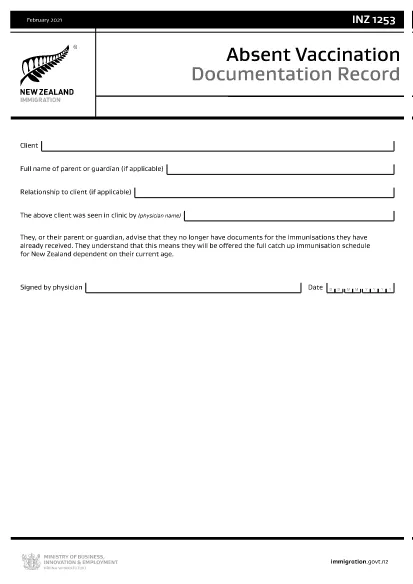
INZ1253 – Absent Vaccination Documentation Record (Fillable PDF)

  1. 言語 英語
  2. ニュージーランド
  3. アクティビティ 健康
INZ1253 – Absent Vaccination Documentation Record (Fillable PDF)

The INZ1253 is the official Absent Vaccination Documentation Record used by Immigration New Zealand when an applicant cannot produce proof of previously received immunisations. This form allows the applicant (or a parent/guardian) to declare the missing records and request the appropriate catch‑up vaccination schedule.

What is the INZ1253 Form?

The form is required for anyone applying for a New Zealand visa or residency who does not have the original vaccination certificates. By completing INZ1253 you acknowledge that you will follow the full catch‑up immunisation schedule based on your age.

How to Complete the INZ1253 Online

Instead of downloading, printing, and scanning, you can fill out the form directly on our site:

  • Click the “Fill out this form” button below.
  • Wait a few seconds while the Formize PDF Filler app loads.
  • Enter the required information in the fillable fields (personal details, reason for missing records, etc.).
  • Save the completed PDF to your device or submit it directly to Immigration New Zealand.

Common Mistakes to Avoid

  • Leaving mandatory fields blank – the system will highlight any missing information before you can save.
  • Using an outdated version – always use the latest INZ1253 PDF provided below.
  • Incorrect date formats – follow the DD/MM/YYYY format as shown in the example.
  • Not signing the form – the electronic signature field must be completed before submission.

Where to Submit the Completed Form

After you have saved the filled PDF, attach it to your visa or residency application through the Immigration New Zealand online portal. If you are applying by paper, include the printed form with your supporting documents.

Need help? Review the FAQs below or contact Immigration New Zealand directly.

よくある質問
  • Do I need to print the INZ1253 form after filling it online?

    No. The Formize filler creates a fully signed PDF that can be uploaded directly to the Immigration New Zealand portal.

  • Can I edit the form after I have saved it?

    Yes. Open the saved PDF again with the Formize filler to make any changes, then re‑save.

  • What if I don’t have any vaccination records at all?

    Select “No records available” in the form and provide a brief explanation. You will be scheduled for the full catch‑up immunisation program.

  • Is the electronic signature legally accepted?

    Immigration New Zealand accepts electronic signatures on the INZ1253 when the form is completed using a certified PDF filler like Formize.

  • How long does it take for Immigration New Zealand to process the form?

    Processing times vary, but most applicants receive a response within 5‑10 business days after submission.

方法

オンラインで 4 回の簡単なステップで INZ1253 を無料で入力する方法:

  1. 1
    Open the Fillable Form
    Click the “Fill out this form” button on the page. The Formize PDF Filler will launch in your browser.
  2. 2
    Enter Your Details
    Complete each highlighted field – personal information, reason for missing vaccination records, and any additional notes.
  3. 3
    Save or Submit
    When all required fields are filled, click “Save PDF” to download the completed form or use the built‑in “Submit” button to send it directly to Immigration New Zealand.
  4. 4
    Confirm Receipt
    Check your email or the immigration portal for a confirmation that the form has been received.
Formize PDF Filler アプリ
だいたい

メディケア申請書

INZ1253 は、メディケア フォームの 1 つで、メディケア プログラムの管理に使用される文書です。メディケア プログラムは、主に 65 歳以上の個人と、障害のある特定の若年者や特定の医療を対象とした米国の連邦健康保険プログラムです。条件。これらのフォームは、メディケア給付金への登録、管理、アクセスに関連するさまざまな目的に使用されます。一般的なメディケア フォームのいくつかを次に示します。

メディケア申請フォーム: CMS-40B などのこれらのフォームは、パート A (病院保険) やパート B (医療保険) を含むメディケア給付金の申請に使用されます。名前、住所、社会保障番号、現在の健康保険の適用範囲に関する情報などの個人情報が必要です。

メディケア登録フォーム: 医療提供者用の CMS-855B などのフォームは、医療専門家、サプライヤー、組織がメディケア プログラムに登録するために使用します。彼らは、医療提供者や組織、およびメディケアに参加するための資格に関する情報を収集します。

メディケア請求フォーム: CMS-1500 や UB-04 などのフォームは、メディケア受給者に提供された医療サービスの償還請求を提出するために使用されます。医療提供者またはサプライヤーは、対象サービスの支払いを求めるためにこれらのフォームに記入します。

メディケア処方薬計画フォーム: CMS-10260 などのこれらのフォームは、メディケア パート D 処方薬計画に登録したり、既存の計画を変更したりするために使用されます。受益者が服用している薬と希望する薬局に関する情報が必要です。

メディケア承認フォーム: CMS-10114 などのこれらのフォームは、メディケア記録から指定された個人または組織への個人健康情報の公開を承認するために使用されます。これにより、受益者は特定の目的で自分の医療記録へのアクセスを許可できます。

メディケア上訴フォーム: CMS-20027 などのこれらのフォームは、請求が拒否された場合、またはメディケアの決定に同意できない場合に上訴を要求するために使用されます。これらは、受益者またはその代理人が補償範囲の決定または支払い決定の見直しを求めるプロセスを提供します。

これらは、存在するさまざまなメディケア形式のほんの一例です。特定のフォームや要件は異なる場合があるため、正確で最新の情報については、メディケアの公式 Web サイトを参照するか、メディケアの管理当局に問い合わせることが重要です。

特徴

PDFフィラー

オンラインで PDF フォームに記入する最も簡単な方法

  • INZ1253 をすばやく入力してください
    INZ1253 をオンラインですばやく入力する方法をお探しですか?オンラインの無料 PDF フォーム フィラーを使用すると、この PDF ドキュメントを 1 分以内に編集して入力する方法がわかります。
  • 使いやすいオンライン PDF エディター
    再スキャンして返送する前に、編集できるように PDF ファイルを印刷することにうんざりしていませんか? PDFドキュメントをオンラインで無料で編集.当社のオンライン PDF エディターを使用して、時間と紙を節約してください。
  • 優れたツール、すべてのプラットフォーム
    Mac で INZ1253 を入力する方法や、PDF フィラーを無料で使用する方法を知りたいですか?当社のオンライン PDF ツールは、すべてのプラットフォームで動作します。
  • 安全なファイル ストレージ
    完成した「INZ1253」ファイルは、Amazon クラウド ホスティングが管理する安全なデータベースに保存されます。いつでもシステムからファイルを削除できます。いずれにせよ、これらのファイルは 24 時間後に自動的に削除されます。
  • {キーワード} とチャットする
    無料の PDF リーダー アシスタントである Chatize で「INZ1253」とチャットします。質問すると、「INZ1253」から回答が得られます。上の [ドキュメントとチャット] ボタンをクリックするだけです。

フィルセッションを削除

選択したフィルセッションを削除しますか?この場合、フォームへの記入の進捗状況は失われます。

編集セッションを削除する

選択した編集セッションを削除しますか?この場合、フォームの作成および編集の進行状況は失われます。