
言語を選択する

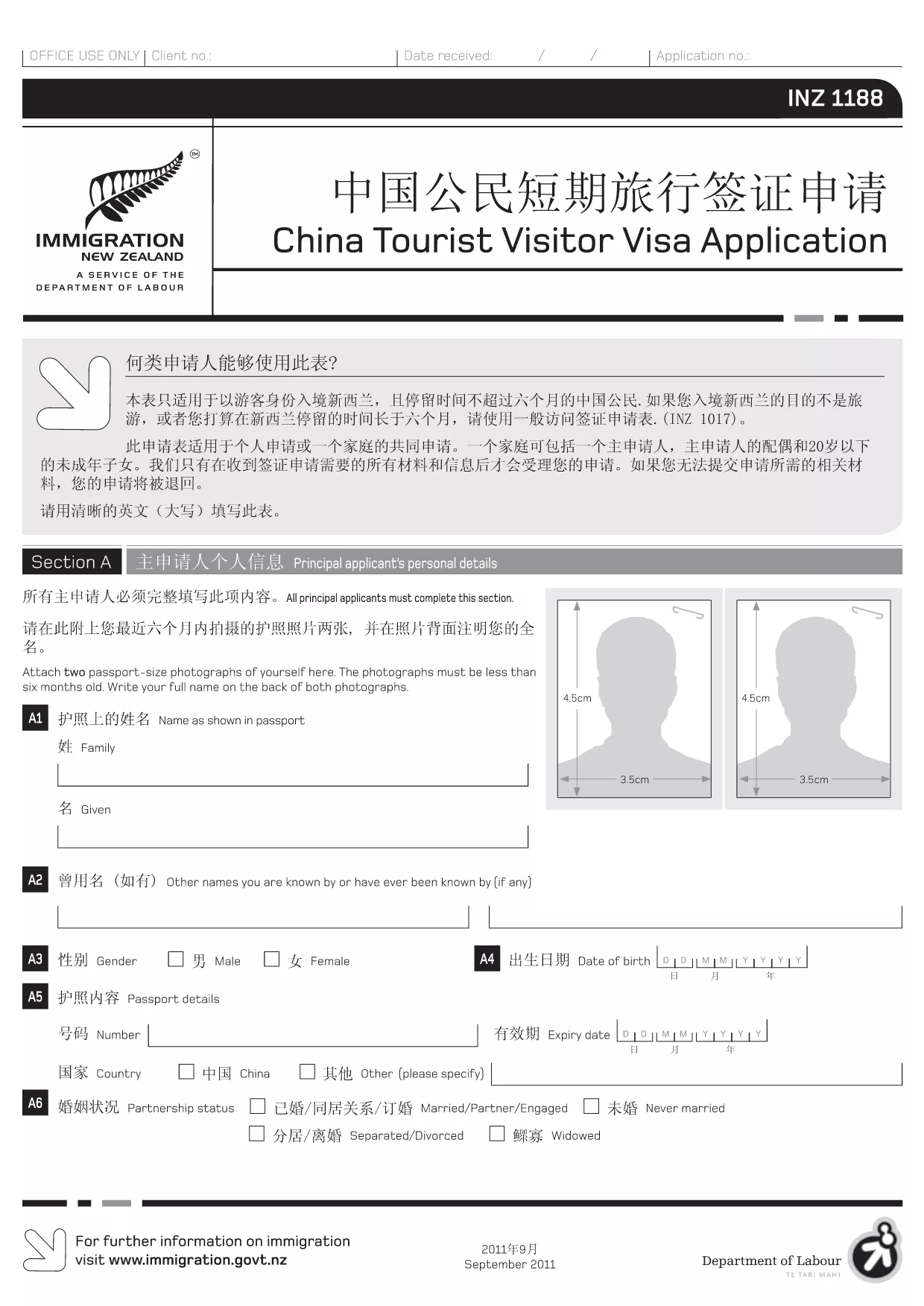
INZ 1188 Tourist Visitor Visa Application – Fillable PDF

  1. 言語 中国語(簡体字) 英語
  2. ニュージーランド
  3. アクティビティ 訪問と観光 移民
INZ 1188 Tourist Visitor Visa Application – Fillable PDF

The INZ 1188 is the official application form for Chinese citizens applying for a short‑term tourist visa to New Zealand. With the Formize PDF Filler, you can fill out the form directly in your browser – no extra software required.

What is the INZ 1188 Form?

This form collects personal details, travel plans, health information, and a declaration by the applicant or an assisting person. It is used by Immigration New Zealand to assess eligibility for a visitor visa.

How to Complete the INZ 1188 Form Online

Follow these simple steps to fill the form quickly and accurately:

  • Click the "Fill out this form" button on this page.
  • Wait for the Formize PDF Filler app to load (usually a few seconds).
  • Enter your information in each fillable field. The interface highlights required fields.
  • Use the "Save" button to store progress or the "Download" button to get a completed PDF.

Common Mistakes to Avoid

  • Using lowercase letters in fields that require capital letters – the form validates case.
  • Leaving any required field blank; the filler will show an error before you can submit.
  • Providing outdated passport numbers – double‑check your passport before entering.
  • Skipping the declaration section (Section J). Both applicant and assisting person must sign.

Download & Fill the PDF Instantly

Our direct link gives you the latest official INZ 1188 PDF. The file is hosted by the New Zealand immigration authority and is fully compatible with the Formize online filler.

Where to Get Help

If you have questions about specific sections, consult the Immigration New Zealand website or contact the nearest New Zealand Visa Office. The Formize platform also provides inline tips for most fields.

よくある質問
  • Do I need to print the INZ 1188 form after filling it online?

    No. The Formize filler lets you download a completed PDF that you can submit electronically or print if required by the visa office.

  • Can I save my progress and finish later?

    Yes. Click the "Save" button to download a partially completed PDF. Re‑upload it later to continue editing.

  • What language should I use to fill the form?

    The official INZ 1188 form is in English. All fields must be completed in English, even if your native language is Chinese.

  • Is there a fee to use the Formize PDF Filler?

    No. Formize provides free online filling for this form. There may be visa processing fees charged by Immigration New Zealand.

  • What if I make a mistake after downloading the PDF?

    You can open the downloaded file in any PDF editor, correct the error, and re‑upload it if needed. Alternatively, start a new session with the filler.

  • Do I need a supporting letter from a New Zealand resident?

    Only if the visa category you are applying for requires sponsorship. The INZ 1188 form includes a section for a sponsor’s declaration.

方法

オンラインで 4 回の簡単なステップで INZ 1188 を無料で入力する方法:

  1. 1
    Open the Fillable Form
    Click the "Fill out this form" button on this page. The Formize PDF Filler will open in a new tab.
  2. 2
    Load the PDF
    Wait a few seconds while the INZ 1188 PDF loads into the online editor.
  3. 3
    Enter Your Information
    Complete each highlighted field. Required fields are marked with an asterisk.
  4. 4
    Review and Save
    Use the "Review" button to check for missing data, then click "Save" or "Download" to get your finished PDF.
Formize PDF Filler アプリ
だいたい

観光フォーム

INZ 1188 は、観光目的で旅行を計画している個人またはグループが使用する文書である観光フォームの 1 つです。これらのフォームは、目的地の国または旅行サービス プロバイダーによって異なる場合がありますが、通常、旅行者、旅程、およびその他の関連する詳細に関する情報が含まれています。

一般的な観光形態には次のものがあります。

旅程: このフォームには、フライト、宿泊施設、ツアー、その他の活動の日付、時刻、場所など、旅行者が計画している活動が一覧表示されます。

ビザ申請: 多くの国では、観光客は入国前にビザを取得する必要があります。ビザ申請書では、通常、個人情報、旅行の詳細、パスポート、写真、財務諸表などの補足書類の提出を求められます。

健康申告フォーム: このフォームは、病状や、COVID-19 などの伝染病にかかる可能性を申告するために使用されます。一部の国では、渡航者は入国前に COVID-19 検査の陰性結果を提出する必要があります。

旅行保険フォーム: このフォームには、保険の種類、補償範囲、緊急連絡先情報など、旅行者の旅行保険に関する情報が記載されています。

税関申告書: 一部の国では、贈答品、お土産、電子機器など、国に持ち込まれる物品を申告するためにこの用紙が必要です。

宿泊予約フォーム: このフォームには、滞在日、部屋のタイプ、特別なリクエストなど、旅行者の宿泊施設に関する情報が記載されています。

観光フォームは、航空会社、旅行代理店、ホテル、またはその他の旅行サービス プロバイダーによって要求される場合があり、電子形式または紙形式で入手できる場合があります。スムーズで手間のかからない旅行体験を確保するために、必要なすべてのフォームを慎重に確認して記入することが重要です。

特徴

PDFフィラー

オンラインで PDF フォームに記入する最も簡単な方法

  • INZ 1188 をすばやく入力してください
    INZ 1188 をオンラインですばやく入力する方法をお探しですか?オンラインの無料 PDF フォーム フィラーを使用すると、この PDF ドキュメントを 1 分以内に編集して入力する方法がわかります。
  • 使いやすいオンライン PDF エディター
    再スキャンして返送する前に、編集できるように PDF ファイルを印刷することにうんざりしていませんか? PDFドキュメントをオンラインで無料で編集.当社のオンライン PDF エディターを使用して、時間と紙を節約してください。
  • 優れたツール、すべてのプラットフォーム
    Mac で INZ 1188 を入力する方法や、PDF フィラーを無料で使用する方法を知りたいですか?当社のオンライン PDF ツールは、すべてのプラットフォームで動作します。
  • 安全なファイル ストレージ
    完成した「INZ 1188」ファイルは、Amazon クラウド ホスティングが管理する安全なデータベースに保存されます。いつでもシステムからファイルを削除できます。いずれにせよ、これらのファイルは 24 時間後に自動的に削除されます。
  • {キーワード} とチャットする
    無料の PDF リーダー アシスタントである Chatize で「INZ 1188」とチャットします。質問すると、「INZ 1188」から回答が得られます。上の [ドキュメントとチャット] ボタンをクリックするだけです。

フィルセッションを削除

選択したフィルセッションを削除しますか?この場合、フォームへの記入の進捗状況は失われます。

編集セッションを削除する

選択した編集セッションを削除しますか?この場合、フォームの作成および編集の進行状況は失われます。