
言語を選択する

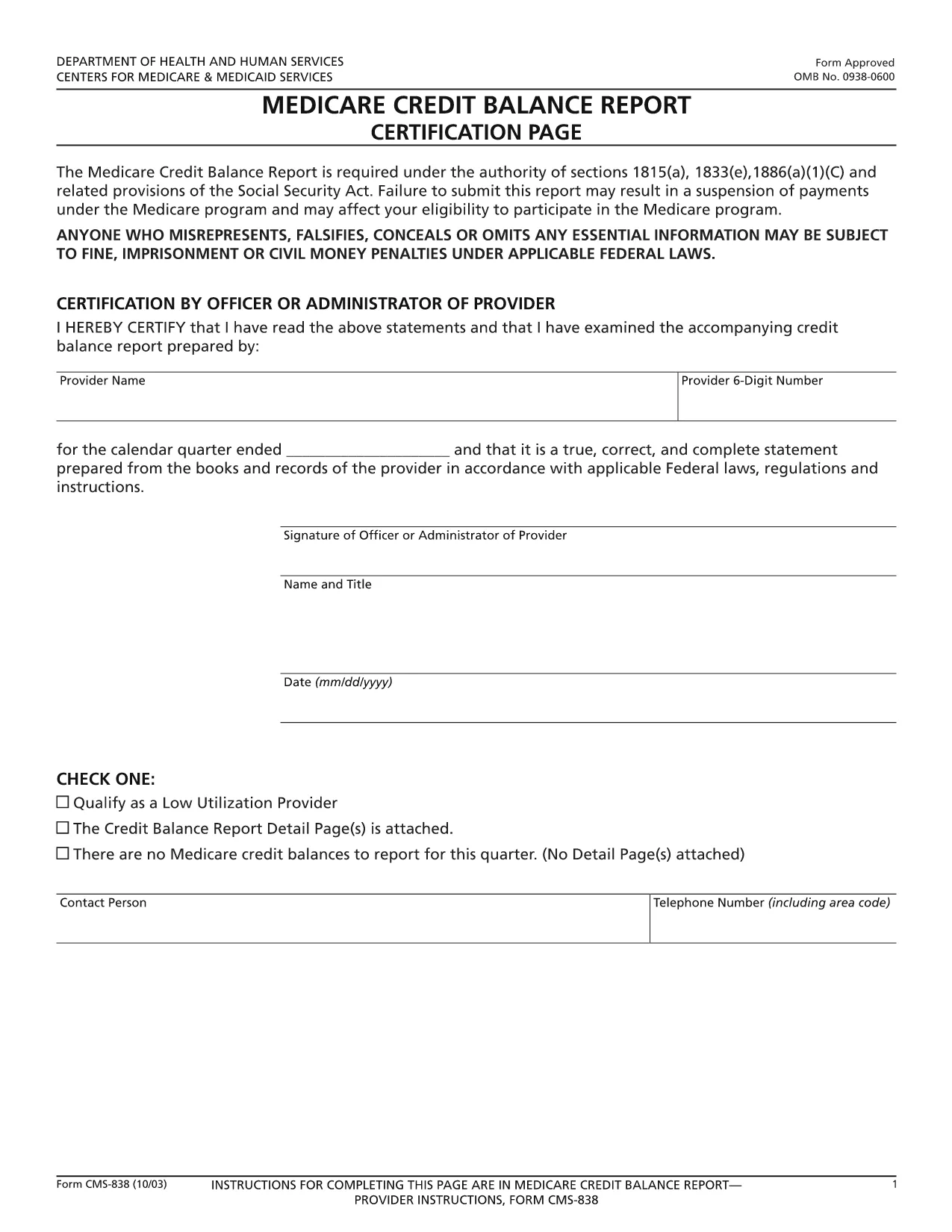
CMS‑838 Medicare Credit Balance Report – Fillable PDF

  1. 言語 英語
  2. アメリカ合衆国
  3. デパートメント Centers for Medicare & Medicaid Services
  4. アクティビティ Medicare
CMS‑838 Medicare Credit Balance Report – Fillable PDF

The CMS‑838 Medicare Credit Balance Report is the official form used by providers and suppliers to report excess or improper Medicare payments. Completing this form accurately helps you avoid penalties and ensures timely reimbursement.

What Is the CMS‑838 Form?

Form CMS‑838 captures detailed information about credit balances, over‑payments, and any adjustments that need to be reported back to the Centers for Medicare & Medicaid Services (CMS). It is a required filing for anyone who has received a Medicare credit balance during the reporting period.

Who Must File the CMS‑838?

  • Hospitals, clinics, and independent practice sites that have received Medicare credit balances.
  • Durable medical equipment (DME) suppliers and home health agencies.
  • Any Medicare‑eligible entity that identifies an over‑payment and must report it to CMS.

How to Complete the Fillable CMS‑838 Online

Instead of downloading the PDF and editing it in a separate program, simply click the “Fill out this form” button on this page. The Formize PDF Filler app will load the fillable version directly in your browser.

  1. Click Fill out this form and wait for the Formize editor to appear.
  2. Enter the required data in each field – the form validates entries in real time.
  3. Save your progress at any time; the app stores a secure copy in your browser.
  4. When finished, click Submit to download the completed PDF, then upload it to the CMS portal as instructed.

Common Mistakes to Avoid

  • Leaving mandatory fields blank: The Formize filler highlights missing required fields before you can submit.
  • Mismatched dates: Ensure the reporting period matches the dates on your credit balance statements.
  • Incorrect provider identifiers: Double‑check your NPI and TIN numbers.
  • Failing to attach supporting documentation: Upload any audit reports or reconciliation sheets as separate files when you submit to CMS.

Download the Fillable PDF

Ready to start? Click the button below to open the fillable CMS‑838 form instantly. No software download required – just a modern web browser.

よくある質問
  • What is the purpose of the CMS‑838 form?

    The CMS‑838 reports any Medicare credit balances, over‑payments, or adjustments that a provider must return to CMS. It helps maintain compliance and prevents future penalties.

  • Can I edit the CMS‑838 after I download it?

    Yes, but using the Formize fillable version is recommended. It prevents formatting errors and ensures all required fields are completed before you submit.

  • Do I need a digital signature on the CMS‑838?

    CMS accepts a typed signature in the fillable PDF. After completing the form, you can add a digital signature within the Formize app or print, sign, and scan the document.

  • How often must the CMS‑838 be filed?

    The form is required each time a credit balance is identified. Most providers file it quarterly, but frequency depends on your organization’s payment cycle.

  • What supporting documents should I attach?

    Include reconciliation statements, audit reports, and any correspondence with Medicare that explains the credit balance. Attach them as separate PDFs when you submit to the CMS portal.

  • Is there a fee to use the Formize PDF filler?

    No. Formize offers the fillable CMS‑838 at no cost. You only need an internet connection and a modern web browser.

方法

オンラインで 4 回の簡単なステップで CMS-838 を無料で入力する方法:

  1. 1
    Open the Fillable Form
    Click the “Fill out this form” button on the page. The Formize PDF Filler app loads the CMS‑838 directly in your browser.
  2. 2
    Enter Required Information
    Complete each highlighted field. Real‑time validation ensures numbers, dates, and identifiers are entered correctly.
  3. 3
    Save and Review
    Use the “Save” option to store a draft. Review all entries, paying special attention to mandatory sections.
  4. 4
    Download and Submit
    When the form is complete, click “Download PDF” to save a copy, then upload it to the CMS portal as instructed in your provider handbook.
Formize PDF Filler アプリ
だいたい

CMS-838 テンプレート

PDF ドキュメントを表示および入力するための従来の一連の機能に、Web アプリケーションおよびレスポンシブ レイアウトの利点を組み合わせることで、数分で CMS-838 を完成させることができます。
特徴

PDFフィラー

オンラインで PDF フォームに記入する最も簡単な方法

  • CMS-838 をすばやく入力してください
    CMS-838 をオンラインですばやく入力する方法をお探しですか?オンラインの無料 PDF フォーム フィラーを使用すると、この PDF ドキュメントを 1 分以内に編集して入力する方法がわかります。
  • 使いやすいオンライン PDF エディター
    再スキャンして返送する前に、編集できるように PDF ファイルを印刷することにうんざりしていませんか? PDFドキュメントをオンラインで無料で編集.当社のオンライン PDF エディターを使用して、時間と紙を節約してください。
  • 優れたツール、すべてのプラットフォーム
    Mac で CMS-838 を入力する方法や、PDF フィラーを無料で使用する方法を知りたいですか?当社のオンライン PDF ツールは、すべてのプラットフォームで動作します。
  • 安全なファイル ストレージ
    完成した「CMS-838」ファイルは、Amazon クラウド ホスティングが管理する安全なデータベースに保存されます。いつでもシステムからファイルを削除できます。いずれにせよ、これらのファイルは 24 時間後に自動的に削除されます。
  • {キーワード} とチャットする
    無料の PDF リーダー アシスタントである Chatize で「CMS-838」とチャットします。質問すると、「CMS-838」から回答が得られます。上の [ドキュメントとチャット] ボタンをクリックするだけです。

フィルセッションを削除

選択したフィルセッションを削除しますか?この場合、フォームへの記入の進捗状況は失われます。

編集セッションを削除する

選択した編集セッションを削除しますか?この場合、フォームの作成および編集の進行状況は失われます。