
言語を選択する

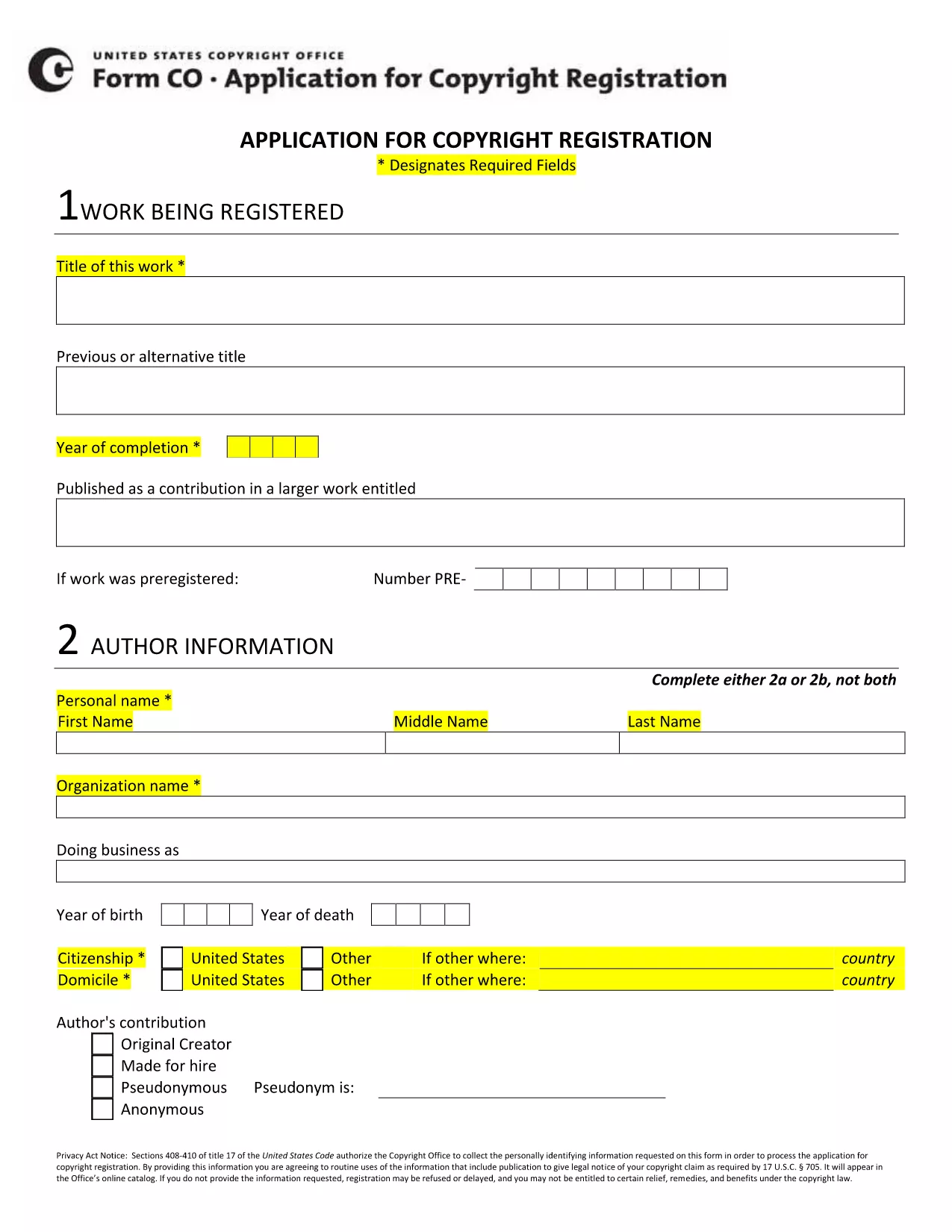
Copyright Application Form XIV – Fillable PDF

  1. 言語 英語
  2. 国 アメリカ合衆国
  3. デパートメント 著作権局
  4. アクティビティ Intellectual Property
Copyright Application Form XIV – Fillable PDF

The Copyright Application Form XIV is the official document used to register a new work with the U.S. Copyright Office. This fillable PDF lets you enter all required information electronically, eliminating the need for paper copies and reducing processing time.

Our page integrates the Formize PDF Filler app, so you can complete the form directly in your browser. No extra software is required—just click the button, fill in the fields, and download the finished PDF ready for submission.

Below you’ll find everything you need to know about Form XIV, step‑by‑step instructions for online completion, and tips to avoid common errors that could delay your registration.

  • Eligibility: Use Form XIV for original literary, musical, or artistic works that have not been previously registered.
  • Required Information: Title, author(s), year of creation, rights holder, and a brief description of the work.
  • Submission: After completing the form, you can either upload the PDF through the Copyright Office’s e‑file portal or mail a printed copy.

Start your copyright registration today—click the button below to launch the fillable form.

よくある質問
  • What types of works can I register with Form XIV?

    Form XIV is used for original literary, musical, dramatic, and artistic works that have not been previously registered.

  • Do I need a PDF editor to fill out Form XIV?

    No. The Formize PDF Filler runs in your browser, so you can fill out the form without any additional software.

  • Can I save my progress and return later?

    Yes. Use the "Save" button in the filler to store a copy locally, then reopen the saved file to continue.

  • What is the filing fee for a Form XIV registration?

    As of 2024, the standard fee for a basic online registration is $65. Check the Copyright Office website for the latest fee schedule.

  • How long does the registration process take?

    Electronic filings are typically processed within 3‑5 business days, whereas mailed submissions can take several weeks.

  • Is the information I provide public?

    Yes. All registration data becomes part of the public record once the Copyright Office accepts the application.

  • What if I make a mistake on the form?

    You can correct errors before submission by editing the PDF in the filler. After submission, you must file a supplemental amendment.

  • Do I need to include a copy of my work?

    A copy of the work (or a representative excerpt) must be submitted with the application, either digitally or on paper.

方法

オンラインで 5 回の簡単なステップで copyright application form xiv を無料で入力する方法:

  1. 1
    Click the Fill‑out Button
    Press the "Fill out this form" button on the page to launch the Formize PDF Filler app.
  2. 2
    Wait for the Filler to Load
    The fillable PDF loads in your browser within a few seconds. No download or installation is needed.
  3. 3
    Enter Your Information
    Complete each field (title, author, year, etc.) using the on‑screen prompts. Required fields are marked with an asterisk.
  4. 4
    Save or Download
    When all sections are filled, click "Save" to store a copy in your browser or "Download" to get the finished PDF.
  5. 5
    Submit to the Copyright Office
    Upload the completed PDF through the Copyright Office’s e‑file portal or print and mail it according to the filing instructions.
Formize PDF Filler アプリ
だいたい

著作権局のフォーム

copyright application form xiv は、米国議会図書館の一部門である米国著作権局が著作権を登録および保護するために使用する公式フォームの 1 つです。著作権局は、著作権の登録、著作権の譲渡とライセンスの記録、著作権に関連する情報とサービスの提供など、米国の著作権法の管理を担当します。

著作権局のフォームの例をいくつか示します。

著作権登録申請: これは、米国著作権局に著作権を登録するために使用される主なフォームです。文学作品、美術作品、楽曲、録音物、映画など、作品の種類ごとに異なる応募フォームが用意されています。アプリケーションは、登録されている作品、作者、申立人、およびその他の関連詳細に関する情報を収集します。

文書記録フォーム: これらのフォームは、譲渡やライセンスなどの著作権の譲渡を著作権局に記録するために使用されます。これらは、著作権所有権の譲渡に関する公的記録を確立する方法を提供します。

DMCA 指定代理人ディレクトリ フォーム: このフォームは、デジタル ミレニアム著作権法 (DMCA) に基づいて著作権局の代理人を指定するために使用されます。指定された代理人は、オンライン著作権侵害に関連する削除通知を受信して​​処理する責任を負います。

著作権局の料金表: 特定の形式ではありませんが、料金表には、登録、記録、その他の関連サービスを含む、さまざまな著作権サービスに関連する料金に関する情報が記載されています。

特定の形式と要件は時間の経過とともに変更される可能性があり、著作権登録やサービスの種類によっては異なる形式が必要になる場合があることに注意することが重要です。正確で最新の情報を入手するには、米国著作権局の公式 Web サイト (www.copyright.gov) にアクセスするか、著作権法を専門とする法律専門家に相談することをお勧めします。著作権関連のニーズに関連する著作権局の特定のフォームについて。

特徴

PDFフィラー

オンラインで PDF フォームに記入する最も簡単な方法

  • copyright application form xiv をすばやく入力してください
    copyright application form xiv をオンラインですばやく入力する方法をお探しですか?オンラインの無料 PDF フォーム フィラーを使用すると、この PDF ドキュメントを 1 分以内に編集して入力する方法がわかります。
  • 使いやすいオンライン PDF エディター
    再スキャンして返送する前に、編集できるように PDF ファイルを印刷することにうんざりしていませんか? PDFドキュメントをオンラインで無料で編集.当社のオンライン PDF エディターを使用して、時間と紙を節約してください。
  • 優れたツール、すべてのプラットフォーム
    Mac で copyright application form xiv を入力する方法や、PDF フィラーを無料で使用する方法を知りたいですか?当社のオンライン PDF ツールは、すべてのプラットフォームで動作します。
  • 安全なファイル ストレージ
    完成した「copyright application form xiv」ファイルは、Amazon クラウド ホスティングが管理する安全なデータベースに保存されます。いつでもシステムからファイルを削除できます。いずれにせよ、これらのファイルは 24 時間後に自動的に削除されます。
  • {キーワード} とチャットする
    無料の PDF リーダー アシスタントである Chatize で「copyright application form xiv」とチャットします。質問すると、「copyright application form xiv」から回答が得られます。上の [ドキュメントとチャット] ボタンをクリックするだけです。

フィルセッションを削除

選択したフィルセッションを削除しますか?この場合、フォームへの記入の進捗状況は失われます。

編集セッションを削除する

選択した編集セッションを削除しますか?この場合、フォームの作成および編集の進行状況は失われます。