
言語を選択する

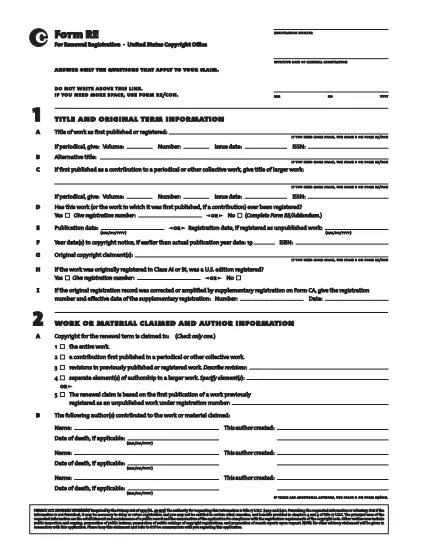
Form RE – Official Copyright Registration Form (Fillable PDF)

  1. 言語 英語
  2. アメリカ合衆国
  3. デパートメント 著作権局
Form RE – Official Copyright Registration Form (Fillable PDF)

Form RE is the United States Copyright Office’s standard registration form for works that were not registered during their original term. Whether you are filing for a literary, musical, or visual work, the fillable PDF version lets you complete the entire process quickly and accurately.

Using Formize’s secure PDF filler, you can edit, sign, and save Form RE directly in your browser – no extra software required. Once completed, simply download the signed PDF and submit it to the Copyright Office.

Below you’ll find a quick guide to each section of the form, tips for avoiding common errors, and step‑by‑step instructions for an effortless online filing experience.

よくある質問
  • What is the purpose of Form RE?

    Form RE is used to register a work that was not registered during its original term, or to add an addendum to an existing registration.

  • Can I submit Form RE electronically?

    Yes. After completing the fillable PDF with Formize, you can upload the signed file through the Copyright Office’s electronic filing portal.

  • Do I need a lawyer to fill out Form RE?

    No. The form is designed for creators to complete on their own. However, you may consult an attorney for complex copyright issues.

  • What happens if I make a mistake on the form?

    The Formize filler highlights missing or invalid entries before you can save. If an error is discovered after submission, you can file a correction using Form RE/Addendum.

  • Is there a filing fee for Form RE?

    Yes. The current fee schedule is available on the Copyright Office website. Fees must be paid at the time of submission.

  • How long does it take for the Copyright Office to process Form RE?

    Standard processing takes approximately 3‑6 months, but expedited processing is available for an additional fee.

  • Can I use Form RE for works created outside the United States?

    Form RE is intended for works that are eligible for U.S. copyright protection. Foreign works may require additional documentation.

  • What format should I use when submitting the completed form?

    Submit the signed PDF file exactly as downloaded from the Formize filler. Do not convert it to another format.

方法

オンラインで 5 回の簡単なステップで Form RE を無料で入力する方法:

  1. 1
    Open the Fillable Form
    Click the “Fill out this form” button on the page. The Formize PDF Filler app will load directly in your browser.
  2. 2
    Complete All Required Fields
    Enter the requested information for each section of Form RE. The filler validates entries in real time.
  3. 3
    Add Your Electronic Signature
    Use the built‑in signature tool to sign the form electronically. This satisfies the Copyright Office’s signing requirement.
  4. 4
    Review and Save
    Double‑check every field, then click “Save” to download the completed PDF to your device.
  5. 5
    Submit to the Copyright Office
    Mail or upload the saved PDF according to the Copyright Office’s submission guidelines.
Formize PDF Filler アプリ
だいたい

著作権局のフォーム

Form RE は、米国議会図書館の一部門である米国著作権局が著作権を登録および保護するために使用する公式フォームの 1 つです。著作権局は、著作権の登録、著作権の譲渡とライセンスの記録、著作権に関連する情報とサービスの提供など、米国の著作権法の管理を担当します。

著作権局のフォームの例をいくつか示します。

著作権登録申請: これは、米国著作権局に著作権を登録するために使用される主なフォームです。文学作品、美術作品、楽曲、録音物、映画など、作品の種類ごとに異なる応募フォームが用意されています。アプリケーションは、登録されている作品、作者、申立人、およびその他の関連詳細に関する情報を収集します。

文書記録フォーム: これらのフォームは、譲渡やライセンスなどの著作権の譲渡を著作権局に記録するために使用されます。これらは、著作権所有権の譲渡に関する公的記録を確立する方法を提供します。

DMCA 指定代理人ディレクトリ フォーム: このフォームは、デジタル ミレニアム著作権法 (DMCA) に基づいて著作権局の代理人を指定するために使用されます。指定された代理人は、オンライン著作権侵害に関連する削除通知を受信して​​処理する責任を負います。

著作権局の料金表: 特定の形式ではありませんが、料金表には、登録、記録、その他の関連サービスを含む、さまざまな著作権サービスに関連する料金に関する情報が記載されています。

特定の形式と要件は時間の経過とともに変更される可能性があり、著作権登録やサービスの種類によっては異なる形式が必要になる場合があることに注意することが重要です。正確で最新の情報を入手するには、米国著作権局の公式 Web サイト (www.copyright.gov) にアクセスするか、著作権法を専門とする法律専門家に相談することをお勧めします。著作権関連のニーズに関連する著作権局の特定のフォームについて。

特徴

PDFフィラー

オンラインで PDF フォームに記入する最も簡単な方法

  • Form RE をすばやく入力してください
    Form RE をオンラインですばやく入力する方法をお探しですか?オンラインの無料 PDF フォーム フィラーを使用すると、この PDF ドキュメントを 1 分以内に編集して入力する方法がわかります。
  • 使いやすいオンライン PDF エディター
    再スキャンして返送する前に、編集できるように PDF ファイルを印刷することにうんざりしていませんか? PDFドキュメントをオンラインで無料で編集.当社のオンライン PDF エディターを使用して、時間と紙を節約してください。
  • 優れたツール、すべてのプラットフォーム
    Mac で Form RE を入力する方法や、PDF フィラーを無料で使用する方法を知りたいですか?当社のオンライン PDF ツールは、すべてのプラットフォームで動作します。
  • 安全なファイル ストレージ
    完成した「Form RE」ファイルは、Amazon クラウド ホスティングが管理する安全なデータベースに保存されます。いつでもシステムからファイルを削除できます。いずれにせよ、これらのファイルは 24 時間後に自動的に削除されます。
  • {キーワード} とチャットする
    無料の PDF リーダー アシスタントである Chatize で「Form RE」とチャットします。質問すると、「Form RE」から回答が得られます。上の [ドキュメントとチャット] ボタンをクリックするだけです。

フィルセッションを削除

選択したフィルセッションを削除しますか?この場合、フォームへの記入の進捗状況は失われます。

編集セッションを削除する

選択した編集セッションを削除しますか?この場合、フォームの作成および編集の進行状況は失われます。