
言語を選択する

Short Form Registration Statement – Fillable PDF

  1. 言語 英語
  2. アメリカ合衆国
  3. デパートメント 司法省
Short Form Registration Statement – Fillable PDF

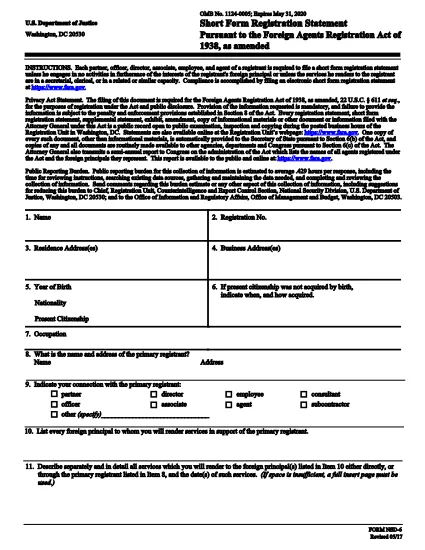
The Short Form Registration Statement is a concise filing required by the Attorney General for certain businesses and securities offerings. It provides essential information about the entity, its ownership, and the purpose of the registration.

Our fillable PDF version lets you complete the form directly in your browser—no need for a separate PDF editor. Simply click the "Fill out this form" button, enter the required data, and download or submit the finished document.

Key benefits:

  • Fully searchable and editable fields
  • Automatic validation to reduce errors
  • Instant download in PDF format
  • Secure handling through Formize's cloud‑based filler

Use the step‑by‑step guide below to ensure a smooth filing experience.

よくある質問
  • What is the purpose of a Short Form Registration Statement?

    It provides a streamlined way for businesses to disclose basic information to the Attorney General, satisfying legal requirements for certain registrations.

  • Do I need special software to fill this PDF?

    No. Our online Formize PDF Filler works in any modern browser, so you can complete the form without installing additional software.

  • Can I edit the form after I download it?

    Yes, but it’s best to finalize all entries in the online filler before downloading to avoid version‑control issues.

  • Is my data secure while using the Formize filler?

    All data is transmitted over SSL encryption and processed in a secure cloud environment, complying with U.S. privacy standards.

  • Where do I submit the completed Short Form Registration Statement?

    Submit the PDF to the appropriate Attorney General office as indicated in the form instructions, either electronically or by mail.

方法

オンラインで 3 回の簡単なステップで short form registration statement を無料で入力する方法:

  1. 1
    Step 1 – Click the Fill‑out Button
    On this page, press the orange "Fill out this form" button. The Formize PDF Filler app will open in a new tab.
  2. 2
    Step 2 – Complete the Fields
    Enter all required information into the highlighted fields. The app provides on‑screen prompts and validation to help you avoid mistakes.
  3. 3
    Step 3 – Save or Submit
    When every field is completed, click "Save" to download the finished PDF or use the built‑in submit option if your agency accepts electronic filing.
Formize PDF Filler アプリ
だいたい

司法省 (DOJ) のフォーム

short form registration statement は、米国司法省とそのさまざまな部門、機関、およびコンポーネントで使用される公式フォームの 1 つです。司法省は、連邦法の施行、法的事項における米国の利益の擁護、および司法の執行を担当する連邦行政府です。

司法省のフォームの例をいくつか示します。

連邦援助申請書 (SF-424): このフォームは、司法省またはその部門が管理する連邦助成金または財政援助を申請する組織によって使用されます。組織、提案されたプロジェクト、予算に関する情報を収集します。

公民権苦情フォーム: このフォームは、人種、性別、障害、国籍に基づく差別など、公民権法違反の疑いに関して司法省の公民権部門に苦情を申し立てるために使用されます。

被害者通知リクエスト フォーム: このフォームは、司法省による犯罪被害者への情報提供と支援の一環として、犯罪被害者が連邦刑事事件の状況と手続きに関する通知をリクエストするために使用されます。

移民フォーム: 司法省の移民審査事務局 (EOIR) が移民裁判所と移民関連の手続きを管理します。入国管理裁判所の手続きでは、退去救済申請用のフォーム EOIR-42B や控訴用のフォーム EOIR-28 など、さまざまなフォームが使用されます。

ATF フォーム: 司法省の一部であるアルコール・タバコ・銃器・爆発物局 (ATF) は、以前の回答で述べたように、さまざまな目的のための独自のフォームを持っています。

麻薬取締局 (DEA) フォーム: DOJ のもう 1 つの構成要素である DEA は、登録、報告、記録保持要件の申請など、規制物質に関連する事項について独自のフォームを使用します。

これらの例では、DOJ フォームのいくつかのカテゴリーを取り上げていますが、司法省が使用する特定のフォームは、関係する部門、機関、コンポーネント、およびサービスや手続きの性質によって異なる場合があります。あなたの状況に関連する特定の司法省フォームに関する正確かつ最新の情報を入手するには、司法省内の特定の部門または機関の公式 Web サイトを参照するか、法的アドバイスを求めることをお勧めします。

特徴

PDFフィラー

オンラインで PDF フォームに記入する最も簡単な方法

  • short form registration statement をすばやく入力してください
    short form registration statement をオンラインですばやく入力する方法をお探しですか?オンラインの無料 PDF フォーム フィラーを使用すると、この PDF ドキュメントを 1 分以内に編集して入力する方法がわかります。
  • 使いやすいオンライン PDF エディター
    再スキャンして返送する前に、編集できるように PDF ファイルを印刷することにうんざりしていませんか? PDFドキュメントをオンラインで無料で編集.当社のオンライン PDF エディターを使用して、時間と紙を節約してください。
  • 優れたツール、すべてのプラットフォーム
    Mac で short form registration statement を入力する方法や、PDF フィラーを無料で使用する方法を知りたいですか?当社のオンライン PDF ツールは、すべてのプラットフォームで動作します。
  • 安全なファイル ストレージ
    完成した「short form registration statement」ファイルは、Amazon クラウド ホスティングが管理する安全なデータベースに保存されます。いつでもシステムからファイルを削除できます。いずれにせよ、これらのファイルは 24 時間後に自動的に削除されます。
  • {キーワード} とチャットする
    無料の PDF リーダー アシスタントである Chatize で「short form registration statement」とチャットします。質問すると、「short form registration statement」から回答が得られます。上の [ドキュメントとチャット] ボタンをクリックするだけです。

フィルセッションを削除

選択したフィルセッションを削除しますか?この場合、フォームへの記入の進捗状況は失われます。

編集セッションを削除する

選択した編集セッションを削除しますか?この場合、フォームの作成および編集の進行状況は失われます。