
言語を選択する

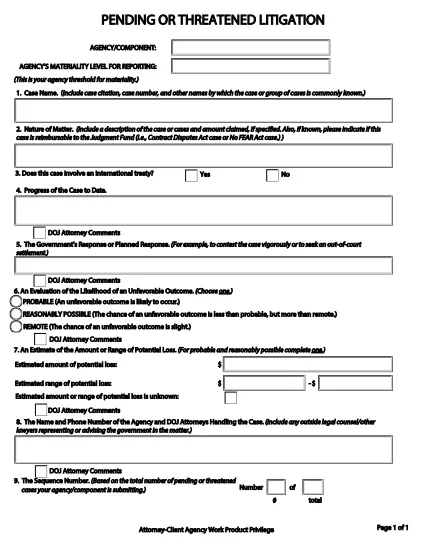
Pending or Threatened Litigation Form (Fillable PDF)

  1. 言語 英語
  2. アメリカ合衆国
  3. デパートメント 司法省
  4. エージェンシー 民事課
Pending or Threatened Litigation Form (Fillable PDF)

The Pending or Threatened Litigation Form is a required reporting document for federal agencies that need to disclose pending or threatened legal actions. Historically the form is provided as a static PDF, but with Formize you can complete it directly in your browser—no Adobe Acrobat or other editor needed.

This page gives you everything you need to know: what the form covers, step‑by‑step instructions for filling it out, common pitfalls to avoid, and a direct link to the official PDF supplied by the U.S. Department of Justice.

When you click the Fill out this form button below, Formize’s PDF Filler app loads the official document, transforms it into a fillable web form, and saves your entries securely.

Key sections of the form include:

  • Case identification and docket numbers
  • Agency or component submitting the report
  • Attorney‑client privilege and work‑product claims
  • Brief description of the litigation or threat

Accurate completion helps your agency stay compliant with DOJ reporting requirements and ensures transparency for congressional oversight.

よくある質問
  • Do I need Adobe Acrobat to fill out this form?

    No. Formize converts the PDF into a web‑based fillable form, so any modern browser is sufficient.

  • Is the information I enter saved securely?

    Yes. All data is stored temporarily in your browser session and never shared with third parties unless you choose to download or submit it.

  • Can I edit the form after I’ve saved it?

    Absolutely. Use the **Save** button to create a draft, then return to the same URL to continue editing.

  • What if I make a mistake in a field?

    Formize highlights validation errors instantly. You can correct the entry before saving or downloading the final PDF.

  • Is this the official DOJ form?

    Yes. The PDF linked below is the exact version provided by the U.S. Department of Justice (Civil Division).

  • Can I print a hard copy after filling it out?

    After completing the form, click **Download** to get a filled PDF, then print it like any standard document.

  • Do I need an account to use Formize?

    No account is required for one‑time use. Simply click the button, fill the form, and download or submit as needed.

方法

オンラインで 4 回の簡単なステップで pending litigation form を無料で入力する方法:

  1. 1
    Open the Fillable Form
    Click the **Fill out this form** button on this page. Formize will load the official DOJ PDF directly in your browser.
  2. 2
    Enter Required Information
    Type into each field—case numbers, agency name, privilege claims, and a concise case description. The interface validates required fields in real time.
  3. 3
    Save & Review
    Use the **Save** button to store a draft. Review all entries for accuracy; Formize highlights any missing or incorrectly formatted data.
  4. 4
    Submit or Print
    When finished, you can either download a completed PDF for internal filing or submit the form electronically if your agency’s workflow allows it.
Formize PDF Filler アプリ
だいたい

司法省 (DOJ) のフォーム

pending litigation form は、米国司法省とそのさまざまな部門、機関、およびコンポーネントで使用される公式フォームの 1 つです。司法省は、連邦法の施行、法的事項における米国の利益の擁護、および司法の執行を担当する連邦行政府です。

司法省のフォームの例をいくつか示します。

連邦援助申請書 (SF-424): このフォームは、司法省またはその部門が管理する連邦助成金または財政援助を申請する組織によって使用されます。組織、提案されたプロジェクト、予算に関する情報を収集します。

公民権苦情フォーム: このフォームは、人種、性別、障害、国籍に基づく差別など、公民権法違反の疑いに関して司法省の公民権部門に苦情を申し立てるために使用されます。

被害者通知リクエスト フォーム: このフォームは、司法省による犯罪被害者への情報提供と支援の一環として、犯罪被害者が連邦刑事事件の状況と手続きに関する通知をリクエストするために使用されます。

移民フォーム: 司法省の移民審査事務局 (EOIR) が移民裁判所と移民関連の手続きを管理します。入国管理裁判所の手続きでは、退去救済申請用のフォーム EOIR-42B や控訴用のフォーム EOIR-28 など、さまざまなフォームが使用されます。

ATF フォーム: 司法省の一部であるアルコール・タバコ・銃器・爆発物局 (ATF) は、以前の回答で述べたように、さまざまな目的のための独自のフォームを持っています。

麻薬取締局 (DEA) フォーム: DOJ のもう 1 つの構成要素である DEA は、登録、報告、記録保持要件の申請など、規制物質に関連する事項について独自のフォームを使用します。

これらの例では、DOJ フォームのいくつかのカテゴリーを取り上げていますが、司法省が使用する特定のフォームは、関係する部門、機関、コンポーネント、およびサービスや手続きの性質によって異なる場合があります。あなたの状況に関連する特定の司法省フォームに関する正確かつ最新の情報を入手するには、司法省内の特定の部門または機関の公式 Web サイトを参照するか、法的アドバイスを求めることをお勧めします。

特徴

PDFフィラー

オンラインで PDF フォームに記入する最も簡単な方法

  • pending litigation form をすばやく入力してください
    pending litigation form をオンラインですばやく入力する方法をお探しですか?オンラインの無料 PDF フォーム フィラーを使用すると、この PDF ドキュメントを 1 分以内に編集して入力する方法がわかります。
  • 使いやすいオンライン PDF エディター
    再スキャンして返送する前に、編集できるように PDF ファイルを印刷することにうんざりしていませんか? PDFドキュメントをオンラインで無料で編集.当社のオンライン PDF エディターを使用して、時間と紙を節約してください。
  • 優れたツール、すべてのプラットフォーム
    Mac で pending litigation form を入力する方法や、PDF フィラーを無料で使用する方法を知りたいですか?当社のオンライン PDF ツールは、すべてのプラットフォームで動作します。
  • 安全なファイル ストレージ
    完成した「pending litigation form」ファイルは、Amazon クラウド ホスティングが管理する安全なデータベースに保存されます。いつでもシステムからファイルを削除できます。いずれにせよ、これらのファイルは 24 時間後に自動的に削除されます。
  • {キーワード} とチャットする
    無料の PDF リーダー アシスタントである Chatize で「pending litigation form」とチャットします。質問すると、「pending litigation form」から回答が得られます。上の [ドキュメントとチャット] ボタンをクリックするだけです。

フィルセッションを削除

選択したフィルセッションを削除しますか?この場合、フォームへの記入の進捗状況は失われます。

編集セッションを削除する

選択した編集セッションを削除しますか?この場合、フォームの作成および編集の進行状況は失われます。