
言語を選択する

DE-VID1 Fillable PDF Form – Complete Online

  1. 言語 英語
  2. アメリカ合衆国
  3. アクティビティ 車両登録
  4. デパートメント Department of Motor Vehicles
DE-VID1 Fillable PDF Form – Complete Online

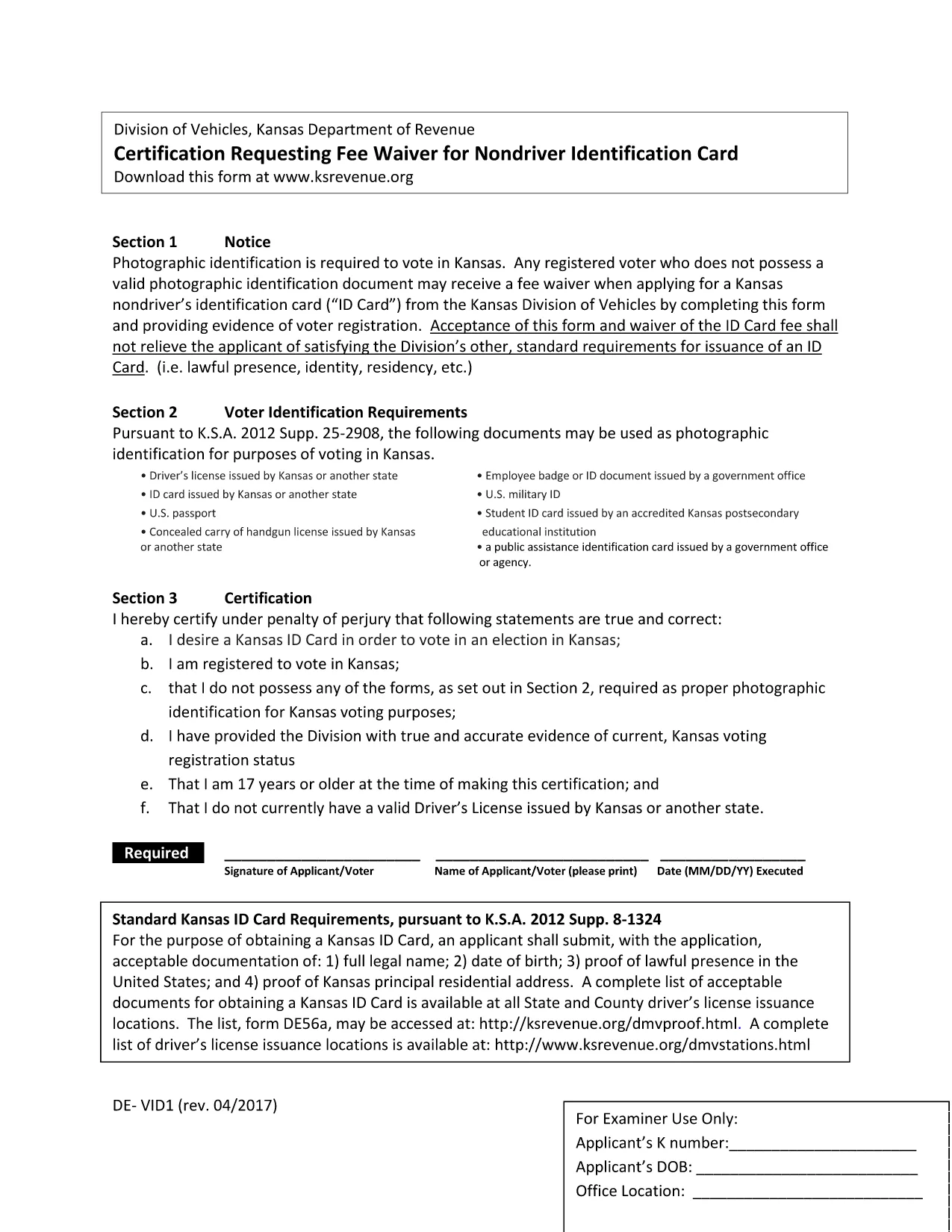
The DE-VID1 form is a standard fillable PDF used for reporting vehicle identification details to the relevant authority. Whether you need it for registration, insurance, or compliance, Formize lets you complete the form instantly in your browser – no software download required.

What Is the DE-VID1 Form?

The DE-VID1 is a single‑page, fillable PDF that captures:

  • Vehicle make, model, and year
  • Vehicle Identification Number (VIN)
  • Owner’s personal and contact information
  • Registration and insurance details

It is commonly required by state motor vehicle departments and insurance carriers across the United States.

How to Fill the DE-VID1 Form Online

Instead of downloading the PDF and opening it in a desktop editor, simply click the "Fill out this form" button below. The Formize PDF Filler app will load in seconds, presenting a clean, responsive interface.

  1. Click Fill out this form and wait for the Formize PDF Filler to appear.
  2. Enter the requested information in each field. The filler validates data in real time.
  3. Use the Save button to download a completed copy or the Submit button to send it directly to the designated email address.

Common Mistakes to Avoid

  • Incorrect VIN format: The VIN must be exactly 17 characters – letters and numbers only.
  • Leaving required fields blank: Required fields are highlighted in red until completed.
  • Mismatched addresses: Ensure the mailing address matches the one on the vehicle title.

Where to Submit the Completed Form

After you finish, you can:

  • Download the filled PDF and upload it to your state DMV portal.
  • Email the PDF to your insurance provider.
  • Print a hard copy for in‑person submission.

Need Help?

Formize’s built‑in help tooltip appears next to every field, offering brief explanations. For detailed guidance, refer to the official DE-VID1 instructions provided by the issuing agency.

よくある質問
  • Do I need Adobe Acrobat to fill the DE-VID1 form?

    No. Formize’s online PDF filler works in any modern browser without additional software.

  • Can I save my progress and return later?

    Yes. Click the "Save Draft" button to download a partially completed PDF that you can reopen later.

  • Is my data secure while using Formize?

    All data is encrypted in transit (HTTPS) and never stored on our servers after you download or submit the form.

  • What if I make a mistake after submitting?

    You can download the completed PDF, correct the error in any PDF editor, and re‑submit it to the appropriate agency.

  • Which browsers are supported?

    Formize works with Chrome, Firefox, Edge, Safari, and most up‑to‑date browsers.

  • Do I need to print the form after filling it online?

    Only if the receiving agency requires a hard copy. Otherwise, a digital PDF is usually accepted.

方法

オンラインで 4 回の簡単なステップで DE-VID1 を無料で入力する方法:

  1. 1
    Click the Fill Button
    Press the "Fill out this form" button on the page. The Formize PDF Filler will open in a new window.
  2. 2
    Wait for the Filler to Load
    The app loads in seconds. You’ll see a preview of the DE-VID1 form with editable fields.
  3. 3
    Enter Your Information
    Type directly into each field. Real‑time validation helps you avoid errors.
  4. 4
    Review and Save
    Use the "Save" button to download a completed PDF or the "Submit" button to email it directly.
Formize PDF Filler アプリ
だいたい

車両登録フォーム

自動車、トレーラー、またはボートを所有またはリースしている場合は、車両を合法的に登録し、安全に保つという特定の義務を果たさなければなりません。

DE-VID1 は、車両登録フォームの 1 つで、自動車を関連する州または地方当局に登録するために使用される書類です。これらのフォームは通常、人が新車または中古車を購入するとき、または車を持って新しい州または州に移動するときに必要です。

車両登録に必要な正確な要件とフォームは場所によって異なる場合がありますが、一般的に、プロセスには車両、所有者、および車両の先取特権に関する情報を提供することが含まれます。

登録フォームと手数料が提出されると、州または地方当局は車両の所有者に登録証明書またはナンバープレートを発行します。この登録により、車両は公道および高速道路で合法的に運転することができます。

特徴

PDFフィラー

オンラインで PDF フォームに記入する最も簡単な方法

  • DE-VID1 をすばやく入力してください
    DE-VID1 をオンラインですばやく入力する方法をお探しですか?オンラインの無料 PDF フォーム フィラーを使用すると、この PDF ドキュメントを 1 分以内に編集して入力する方法がわかります。
  • 使いやすいオンライン PDF エディター
    再スキャンして返送する前に、編集できるように PDF ファイルを印刷することにうんざりしていませんか? PDFドキュメントをオンラインで無料で編集.当社のオンライン PDF エディターを使用して、時間と紙を節約してください。
  • 優れたツール、すべてのプラットフォーム
    Mac で DE-VID1 を入力する方法や、PDF フィラーを無料で使用する方法を知りたいですか?当社のオンライン PDF ツールは、すべてのプラットフォームで動作します。
  • 安全なファイル ストレージ
    完成した「DE-VID1」ファイルは、Amazon クラウド ホスティングが管理する安全なデータベースに保存されます。いつでもシステムからファイルを削除できます。いずれにせよ、これらのファイルは 24 時間後に自動的に削除されます。
  • {キーワード} とチャットする
    無料の PDF リーダー アシスタントである Chatize で「DE-VID1」とチャットします。質問すると、「DE-VID1」から回答が得られます。上の [ドキュメントとチャット] ボタンをクリックするだけです。

フィルセッションを削除

選択したフィルセッションを削除しますか?この場合、フォームへの記入の進捗状況は失われます。

編集セッションを削除する

選択した編集セッションを削除しますか?この場合、フォームの作成および編集の進行状況は失われます。