
言語を選択する

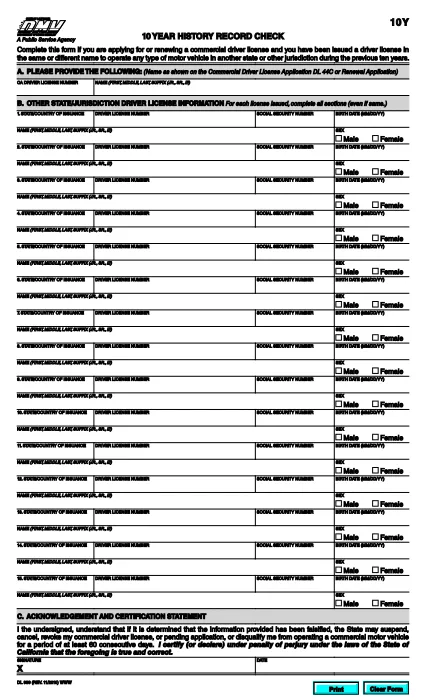
California DMV DL 939 – 10‑Year History Record Check Form

  1. 言語 英語
  2. アメリカ合衆国
  3. アクティビティ 運転免許証
  4. カリフォルニア
California DMV DL 939 – 10‑Year History Record Check Form

The DL 939 is the California Department of Motor Vehicles (DMV) 10‑Year History Record Check form. It is required when you are applying for or renewing a commercial driver’s license (CDL) and need to disclose any driver’s licenses you have held in the past ten years, even if they were issued in a different name or state.

What Is the DL 939 Form?

Form DL 939 collects detailed information about your driving history, including:

  • All driver’s licenses issued in the last ten years
  • Names, dates of issue, and issuing jurisdictions
  • Any suspensions, revocations, or restrictions

Providing accurate data helps the DMV verify your eligibility for a CDL and prevents delays in processing your application.

How to Complete the DL 939 Online with Formize

Instead of downloading, printing, and scanning the PDF, you can fill it out instantly on our site:

  1. Click the “Fill out this form” button below the PDF preview.
  2. Wait a few seconds while the Formize PDF Filler app loads.
  3. Enter the requested information into each fillable field. The interface mirrors the original DMV layout, so you’ll know exactly where to type.
  4. Review your entries for accuracy (see the “Common Mistakes” section).
  5. When you’re satisfied, click Save & Download to get a completed PDF ready for upload or printing.

Common Mistakes to Avoid

  • Leaving fields blank: Every license you held in the past ten years must be listed, even if it was cancelled.
  • Mismatching dates: Use the exact issue and expiration dates shown on your original licenses.
  • Incorrect name spelling: Include name variations (e.g., maiden name) exactly as they appear on the original documents.
  • Skipping the “Signature” field: The form is not valid without a signature or electronic acknowledgment.

Where to Submit the Completed Form

After you download the filled PDF, attach it to your CDL application packet and submit it to your nearest California DMV office or upload it through the DMV’s online portal, if available.

Need help? Review the FAQ section below or contact your local DMV office for clarification.

よくある質問
  • Who needs to fill out DL 939?

    Anyone applying for or renewing a commercial driver’s license in California who has held any driver’s license in the past ten years, even in another state or under a different name.

  • Can I submit the form electronically?

    Yes. After completing the form with Formize, you can upload the saved PDF directly to the California DMV’s online portal or email it if your local office accepts electronic submissions.

  • What happens if I leave a previous license out?

    Omitting a license can delay your CDL processing, cause a denial, or lead to penalties for providing incomplete information.

  • Is there a fee to use Formize’s PDF filler?

    No. Formize provides a free, secure filler for all California DMV forms, including DL 939.

  • Do I need a digital signature?

    If you fill the form online, you can add an electronic signature using the filler’s built‑in signature tool. The DMV accepts this as long as it’s clearly marked.

  • How long is the DL 939 valid?

    The completed DL 939 is valid for the duration of the specific CDL application or renewal it accompanies. It does not have an independent expiration date.

方法

オンラインで 5 回の簡単なステップで DL 939 を無料で入力する方法:

  1. 1
    Open the Form
    Click the “Fill out this form” button on the page. The Formize PDF Filler will open in a new window.
  2. 2
    Load the PDF Filler
    Wait a few seconds while the filler loads the DL 939 template. All fields become editable.
  3. 3
    Enter Your Information
    Type the required data into each field, matching the original DMV records exactly.
  4. 4
    Review & Save
    Check every entry for accuracy, then click “Save & Download” to get a completed PDF.
  5. 5
    Submit the Form
    Attach the saved PDF to your CDL application or upload it through the California DMV online portal.
Formize PDF Filler アプリ
だいたい

運転免許申請書

ほとんどの国では、道路に出る前に運転免許証を取得することが義務付けられています。車を運転したい人にとって、運転免許の取得は重要なマイルストーンです。

DL 939 は、運転免許を申請する人から情報を収集するために使用される文書である運転免許申請書の 1 つです。通常、申請者の名前、生年月日、ID 番号、連絡先情報、および運転免許証の履歴と経験のフィールドが含まれています。

特徴

PDFフィラー

オンラインで PDF フォームに記入する最も簡単な方法

  • DL 939 をすばやく入力してください
    DL 939 をオンラインですばやく入力する方法をお探しですか?オンラインの無料 PDF フォーム フィラーを使用すると、この PDF ドキュメントを 1 分以内に編集して入力する方法がわかります。
  • 使いやすいオンライン PDF エディター
    再スキャンして返送する前に、編集できるように PDF ファイルを印刷することにうんざりしていませんか? PDFドキュメントをオンラインで無料で編集.当社のオンライン PDF エディターを使用して、時間と紙を節約してください。
  • 優れたツール、すべてのプラットフォーム
    Mac で DL 939 を入力する方法や、PDF フィラーを無料で使用する方法を知りたいですか?当社のオンライン PDF ツールは、すべてのプラットフォームで動作します。
  • 安全なファイル ストレージ
    完成した「DL 939」ファイルは、Amazon クラウド ホスティングが管理する安全なデータベースに保存されます。いつでもシステムからファイルを削除できます。いずれにせよ、これらのファイルは 24 時間後に自動的に削除されます。
  • {キーワード} とチャットする
    無料の PDF リーダー アシスタントである Chatize で「DL 939」とチャットします。質問すると、「DL 939」から回答が得られます。上の [ドキュメントとチャット] ボタンをクリックするだけです。

フィルセッションを削除

選択したフィルセッションを削除しますか?この場合、フォームへの記入の進捗状況は失われます。

編集セッションを削除する

選択した編集セッションを削除しますか?この場合、フォームの作成および編集の進行状況は失われます。