
言語を選択する

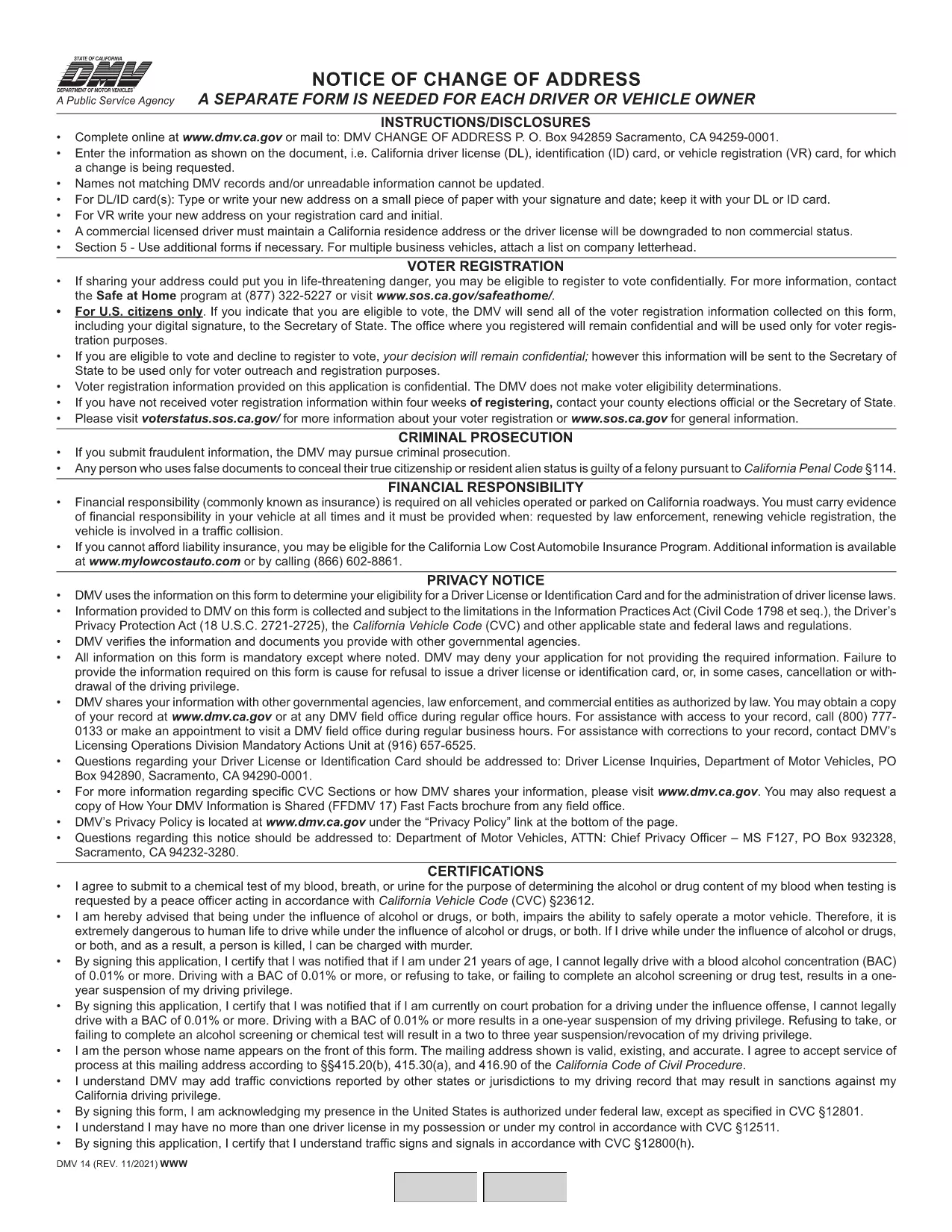
California DMV Form 14 – Notice of Change of Address

  1. 言語 英語
  2. アメリカ合衆国
  3. アクティビティ 運転免許証
  4. カリフォルニア
California DMV Form 14 – Notice of Change of Address

When you move in California, the Department of Motor Vehicles (DMV) requires you to update your address on your driver license or identification card. Form DMV‑14, also called the “Notice of Change of Address,” is the official document used for this purpose.

What Is DMV Form 14?

Form DMV‑14 is a short, printable notice that captures your new residential address, mailing address (if different), and vehicle information. The form is required for:

  • Driver licenses
  • Identification cards
  • Vehicle registrations

Submitting the form promptly helps the DMV keep your records current and ensures you receive important notices, renewal reminders, and traffic citations.

How to Fill Out the Form Online with Formize

Instead of downloading the PDF, printing it, and manually filling it in, you can complete the form instantly on our site:

  1. Click the "Fill out this form" button below the description.
  2. Our Formize PDF Filler app will load the fillable version of DMV‑14.
  3. Enter your information in the highlighted fields (address, phone, vehicle details, etc.).
  4. Review the completed form and click Submit to download a completed PDF or share it directly with the DMV.

All data stays in your browser; we never store personal details.

Common Mistakes to Avoid

  • Using the wrong ink color: If you print the form, use black or dark blue ink only.
  • Leaving fields blank: Every field marked with an asterisk (*) is mandatory.
  • Incorrect ZIP code: Double‑check the ZIP code for both old and new addresses.
  • Signing the wrong section: The signature must appear on the "Driver/Owner Signature" line.

Where to Submit Your Completed Form

After you’ve filled out and saved the PDF, you have three submission options:

  1. Mail: Send the form to DMV, P.O. Box 942859, Sacramento, CA 94259‑0001.
  2. In‑person: Bring the printed form to any California DMV office.
  3. Online (recommended): Upload the completed PDF through the California DMV website under "Change of Address".

Updating your address online is the fastest way to have the change processed, usually within 5‑7 business days.

よくある質問
  • Do I need to submit Form DMV‑14 for every vehicle I own?

    No. You only need to submit the form once for the primary address change. The DMV will automatically update the address on all vehicles linked to your driver license.

  • Can I file Form DMV‑14 online without printing?

    Yes. Use the Formize PDF Filler on this page to complete the form digitally, then download the finished PDF or upload it directly to the DMV website.

  • How long does it take for the address change to be processed?

    When submitted online, the DMV typically updates your records within 5‑7 business days. Mail submissions may take longer.

  • Is there a fee to change my address with Form DMV‑14?

    Changing your address on a driver license or ID card is free. However, if you need a new card with the updated address, a replacement fee applies.

  • What should I do if I make a mistake on the form?

    If you catch an error before submitting, simply correct it in the fillable PDF and re‑save. If you have already mailed the form, fill out a new Form DMV‑14 with the correct information.

方法

オンラインで 4 回の簡単なステップで DMV Form 14 を無料で入力する方法:

  1. 1
    Open the Fillable Form
    Click the "Fill out this form" button on the page. The Formize PDF Filler will open the DMV‑14 document in your browser.
  2. 2
    Enter Your New Address
    Type your new residential address, mailing address (if different), and any vehicle information into the highlighted fields.
  3. 3
    Review and Sign
    Double‑check all entries for accuracy, then add your electronic signature using the signature field.
  4. 4
    Download or Submit
    Click "Download PDF" to save a copy, or use the "Submit to DMV" option to upload the completed form directly to the California DMV portal.
Formize PDF Filler アプリ
だいたい

運転免許申請書

DMV Form 14 は、運転免許証書の一種で、運転免許証の申請や運転免許証に関する各種サービスの申し込みに使用する書類です。これらのフォームは通常、米国陸運局 (DMV) など、特定の管轄区域で運転免許証の発行を担当する部門または機関によって提供されます。

一般的な運転免許証の形式には次のものがあります。

運転免許証申請: このフォームは、新しい運転免許証の申請または既存の運転免許証の更新に使用されます。通常、名前、住所、生年月日、社会保障番号などの個人情報が必要です。

身分証明書: 一部の管轄区域では、申請者の身元と居住地を確認するために特定の身分証明書が必要です。これらには、出生証明書、パスポート、社会保障カードなどの形式が含まれる場合があります。

視力検査: 多くの運転免許証の申請には視力検査フォームが必要です。このフォームでは、認定された医療専門家または眼科専門医が、申請者が運転に最低限必要な視力を満たしていることを証明します。

運転者教育フォーム: 場合によっては、運転者教育修了証明書やインストラクターが署名したフォームなど、運転者教育コースを修了したことを証明する書類の提出が必要になる場合があります。

医学的評価: 特定の病状では、医療専門家による追加のフォームへの記入が必要になる場合があります。これらのフォームは、申請者の運転に対する身体的および精神的な適性を証明します。

住所変更フォーム: 運転免許証所有者が新しい住所に移動した場合、運転免許証情報を更新するために住所変更フォームに記入する必要がある場合があります。

運転免許証フォームは、地元の DMV オフィスから入手するか、DMV の Web サイトからダウンロードできます。申請やサービスのプロセスをスムーズに行うために、必要なフォームを慎重に記入し、添付書類とともに提出することが重要です。

特徴

PDFフィラー

オンラインで PDF フォームに記入する最も簡単な方法

  • DMV Form 14 をすばやく入力してください
    DMV Form 14 をオンラインですばやく入力する方法をお探しですか?オンラインの無料 PDF フォーム フィラーを使用すると、この PDF ドキュメントを 1 分以内に編集して入力する方法がわかります。
  • 使いやすいオンライン PDF エディター
    再スキャンして返送する前に、編集できるように PDF ファイルを印刷することにうんざりしていませんか? PDFドキュメントをオンラインで無料で編集.当社のオンライン PDF エディターを使用して、時間と紙を節約してください。
  • 優れたツール、すべてのプラットフォーム
    Mac で DMV Form 14 を入力する方法や、PDF フィラーを無料で使用する方法を知りたいですか?当社のオンライン PDF ツールは、すべてのプラットフォームで動作します。
  • 安全なファイル ストレージ
    完成した「DMV Form 14」ファイルは、Amazon クラウド ホスティングが管理する安全なデータベースに保存されます。いつでもシステムからファイルを削除できます。いずれにせよ、これらのファイルは 24 時間後に自動的に削除されます。
  • {キーワード} とチャットする
    無料の PDF リーダー アシスタントである Chatize で「DMV Form 14」とチャットします。質問すると、「DMV Form 14」から回答が得られます。上の [ドキュメントとチャット] ボタンをクリックするだけです。

フィルセッションを削除

選択したフィルセッションを削除しますか?この場合、フォームへの記入の進捗状況は失われます。

編集セッションを削除する

選択した編集セッションを削除しますか?この場合、フォームの作成および編集の進行状況は失われます。