
言語を選択する

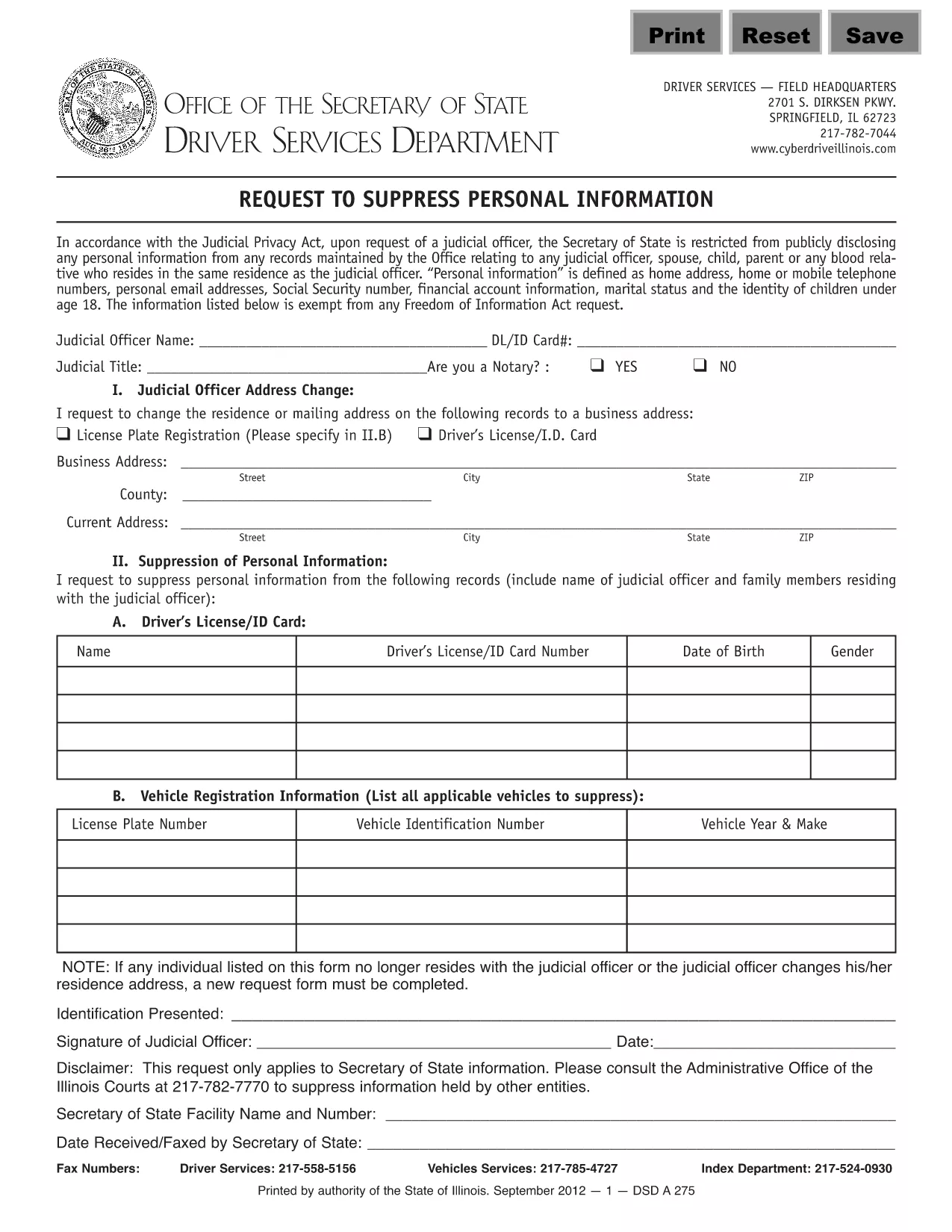
Form DSD A275 – Request to Suppress Personal Information (Fillable PDF)

  1. 言語 英語
  2. アメリカ合衆国
  3. アクティビティ 運転免許証
  4. イリノイ州
Form DSD A275 – Request to Suppress Personal Information (Fillable PDF)

The Illinois DSD A275 is the official request used to suppress or remove personal information from public court records. Whether you are a private citizen, a legal professional, or an organization, this fillable PDF lets you submit a clear, legally‑required request in minutes.

Formize.com hosts a secure, browser‑based PDF filler so you never need to download, print, or scan the document. Simply click the "Fill out this form" button, complete the highlighted fields, and save or submit directly from the browser.

Key benefits of using the online DSD A275 form:

  • All fields are pre‑highlighted for easy navigation.
  • Auto‑save feature protects your data while you work.
  • Instant PDF download or email‑ready version after completion.
  • Compliant with Illinois Secretary of State requirements.

Below you’ll find everything you need to know about the form, step‑by‑step instructions, common pitfalls, and where to send the finished request.

よくある質問
  • What does DSD A275 stand for?

    DSD A275 is the Illinois Secretary of State's "Request to Suppress Personal Information" form, used to protect privacy in court records.

  • Do I need Adobe Acrobat to fill this form?

    No. Formize provides a free, browser‑based PDF filler that works with any modern web browser.

  • Can I submit the form electronically?

    Yes. After completing the form, you can email the PDF directly to the designated address or upload it through the Secretary of State’s online portal.

  • What information is required?

    You must provide your full name, contact information, case number (if applicable), and a clear description of the personal data you wish to suppress.

  • How long does the suppression process take?

    Processing time varies, but the Secretary of State typically acknowledges receipt within 5‑7 business days and may take up to 30 days for final action.

  • Is there a fee for filing DSD A275?

    No. The request to suppress personal information is free of charge.

  • What common mistakes should I avoid?

    Do not leave required fields blank, ensure the case number is accurate, and avoid using handwritten entries on the electronic version.

  • Can I edit the form after I’ve saved it?

    Yes. Open the saved PDF in any PDF editor (or re‑load it in Formize) to make changes before final submission.

方法

オンラインで 4 回の簡単なステップで DSD A275 を無料で入力する方法:

  1. 1
    Open the Fillable Form
    Click the "Fill out this form" button on the page. The Formize PDF Filler app will load the DSD A275 document directly in your browser.
  2. 2
    Enter Your Information
    Complete each highlighted field. Use the Tab key or click to move between sections. All required fields are marked with an asterisk (*).
  3. 3
    Review and Save
    After filling out the form, click "Save" to download a copy to your computer or choose "Email" to send the completed PDF to the appropriate office.
  4. 4
    Submit the Request
    Print the saved PDF and mail it to the Illinois Secretary of State, or attach the emailed PDF to your electronic submission as instructed on the form.
Formize PDF Filler アプリ
だいたい

運転免許申請書

ほとんどの国では、道路に出る前に運転免許証を取得することが義務付けられています。車を運転したい人にとって、運転免許の取得は重要なマイルストーンです。

DSD A275 は、運転免許を申請する人から情報を収集するために使用される文書である運転免許申請書の 1 つです。通常、申請者の名前、生年月日、ID 番号、連絡先情報、および運転免許証の履歴と経験のフィールドが含まれています。
特徴

PDFフィラー

オンラインで PDF フォームに記入する最も簡単な方法

  • DSD A275 をすばやく入力してください
    DSD A275 をオンラインですばやく入力する方法をお探しですか?オンラインの無料 PDF フォーム フィラーを使用すると、この PDF ドキュメントを 1 分以内に編集して入力する方法がわかります。
  • 使いやすいオンライン PDF エディター
    再スキャンして返送する前に、編集できるように PDF ファイルを印刷することにうんざりしていませんか? PDFドキュメントをオンラインで無料で編集.当社のオンライン PDF エディターを使用して、時間と紙を節約してください。
  • 優れたツール、すべてのプラットフォーム
    Mac で DSD A275 を入力する方法や、PDF フィラーを無料で使用する方法を知りたいですか?当社のオンライン PDF ツールは、すべてのプラットフォームで動作します。
  • 安全なファイル ストレージ
    完成した「DSD A275」ファイルは、Amazon クラウド ホスティングが管理する安全なデータベースに保存されます。いつでもシステムからファイルを削除できます。いずれにせよ、これらのファイルは 24 時間後に自動的に削除されます。
  • {キーワード} とチャットする
    無料の PDF リーダー アシスタントである Chatize で「DSD A275」とチャットします。質問すると、「DSD A275」から回答が得られます。上の [ドキュメントとチャット] ボタンをクリックするだけです。

フィルセッションを削除

選択したフィルセッションを削除しますか?この場合、フォームへの記入の進捗状況は失われます。

編集セッションを削除する

選択した編集セッションを削除しますか?この場合、フォームの作成および編集の進行状況は失われます。