
言語を選択する

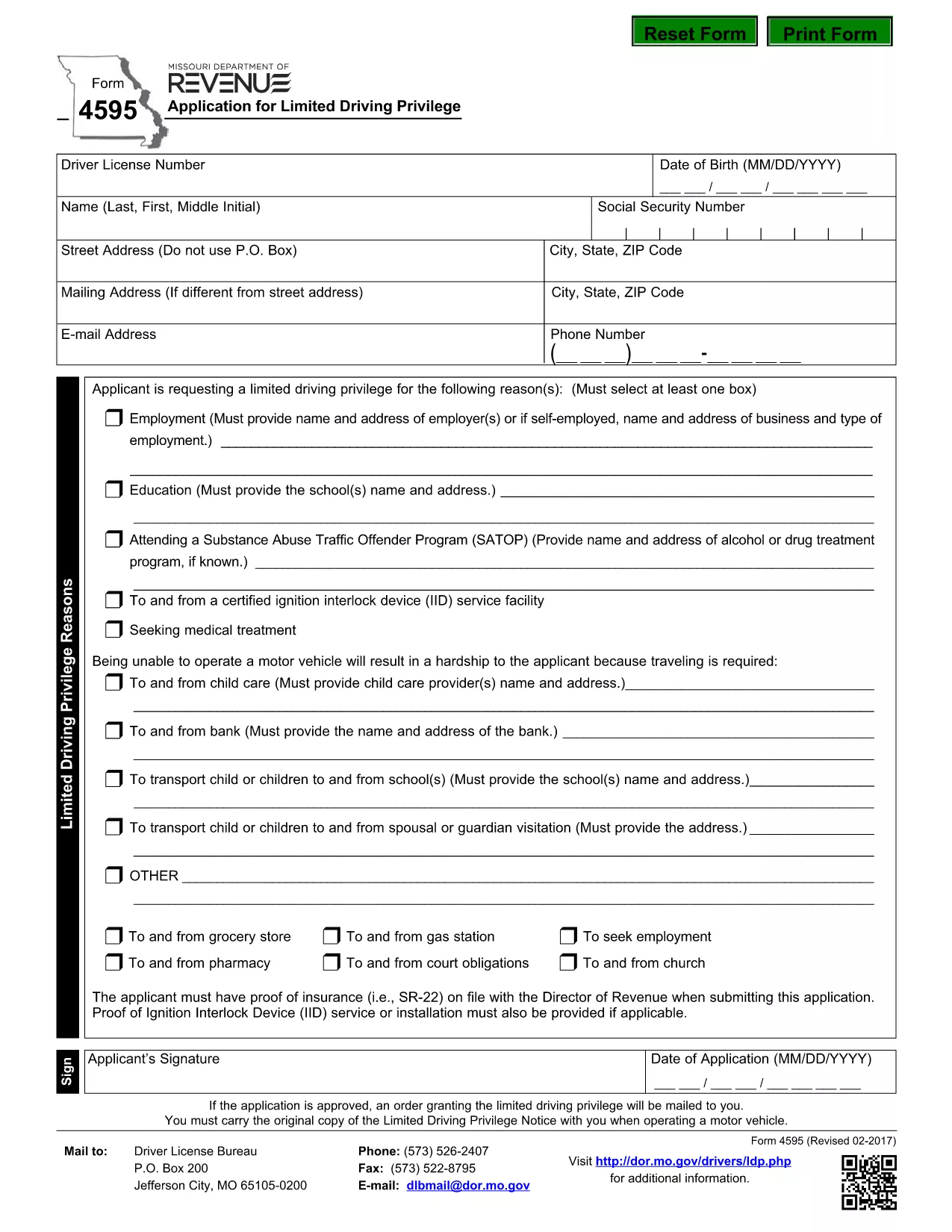
Form 4595 – Application for Limited Driving Privilege (Fillable PDF)

  1. 言語 英語
  2. アメリカ合衆国
  3. アクティビティ 運転免許証
  4. ミズーリ
Form 4595 – Application for Limited Driving Privilege (Fillable PDF)

Form 4595, officially titled Application for Limited Driving Privilege, is used by the Missouri Department of Revenue to grant drivers a restricted license when a full privilege is not possible. Whether you need a limited license for medical reasons, a court order, or other qualifying circumstances, this fillable PDF lets you complete the application quickly and accurately.

With Formize’s built‑in PDF filler, you can edit the form directly in your browser—no extra software required. Simply click the "Fill out this form" button, wait for the Formize PDF Filler to load, and start entering your information. When you’re done, download the completed PDF and submit it to the appropriate Missouri DMV office.

Below you’ll find a step‑by‑step guide, tips to avoid common errors, and answers to the most‑asked questions about Form 4595.

よくある質問
  • Who can use Form 4595?

    Anyone who needs a limited driving privilege in Missouri—such as drivers with medical restrictions, court‑ordered limitations, or temporary suspensions.

  • Do I need to print the form after filling it online?

    Most Missouri DMV locations accept a printed copy of the completed PDF, but check the submission instructions on the form for any electronic filing options.

  • What supporting documents are required?

    Attach any medical certificates, court orders, or other documentation referenced in the "Reason for Limited Privilege" section. Include them with your printed submission.

  • Can I save my progress and finish later?

    Yes. The Formize filler allows you to save the partially completed PDF to your computer and reopen it later for editing.

  • How long does it take to receive the limited privilege license?

    Processing times vary by office, but most Missouri DMV centers issue the limited license within 7‑10 business days after receiving a complete application.

  • Is there a fee for submitting Form 4595?

    A processing fee may apply depending on the type of limited privilege requested. Check the fee schedule on the Missouri Department of Revenue website.

方法

オンラインで 5 回の簡単なステップで Form 4595 を無料で入力する方法:

  1. 1
    Open the Fillable Form
    Click the "Fill out this form" button on the page. The Formize PDF Filler app will load directly in your browser.
  2. 2
    Enter Your Information
    Complete each required field—personal details, reason for limited privilege, and any supporting documentation notes.
  3. 3
    Review & Validate
    Use the built‑in validation to ensure all mandatory boxes are checked and dates are correctly formatted.
  4. 4
    Download the Completed PDF
    When you’re satisfied, click “Download” to save the filled PDF to your device.
  5. 5
    Submit to the Missouri DMV
    Print the PDF (if required) and mail or deliver it to your local Missouri Department of Revenue office as instructed on the form.
Formize PDF Filler アプリ
だいたい

運転免許申請書

ほとんどの国では、道路に出る前に運転免許証を取得することが義務付けられています。車を運転したい人にとって、運転免許の取得は重要なマイルストーンです。

Form 4595 は、運転免許を申請する人から情報を収集するために使用される文書である運転免許申請書の 1 つです。通常、申請者の名前、生年月日、ID 番号、連絡先情報、および運転免許証の履歴と経験のフィールドが含まれています。

特徴

PDFフィラー

オンラインで PDF フォームに記入する最も簡単な方法

  • Form 4595 をすばやく入力してください
    Form 4595 をオンラインですばやく入力する方法をお探しですか?オンラインの無料 PDF フォーム フィラーを使用すると、この PDF ドキュメントを 1 分以内に編集して入力する方法がわかります。
  • 使いやすいオンライン PDF エディター
    再スキャンして返送する前に、編集できるように PDF ファイルを印刷することにうんざりしていませんか? PDFドキュメントをオンラインで無料で編集.当社のオンライン PDF エディターを使用して、時間と紙を節約してください。
  • 優れたツール、すべてのプラットフォーム
    Mac で Form 4595 を入力する方法や、PDF フィラーを無料で使用する方法を知りたいですか?当社のオンライン PDF ツールは、すべてのプラットフォームで動作します。
  • 安全なファイル ストレージ
    完成した「Form 4595」ファイルは、Amazon クラウド ホスティングが管理する安全なデータベースに保存されます。いつでもシステムからファイルを削除できます。いずれにせよ、これらのファイルは 24 時間後に自動的に削除されます。
  • {キーワード} とチャットする
    無料の PDF リーダー アシスタントである Chatize で「Form 4595」とチャットします。質問すると、「Form 4595」から回答が得られます。上の [ドキュメントとチャット] ボタンをクリックするだけです。

フィルセッションを削除

選択したフィルセッションを削除しますか?この場合、フォームへの記入の進捗状況は失われます。

編集セッションを削除する

選択した編集セッションを削除しますか?この場合、フォームの作成および編集の進行状況は失われます。