
言語を選択する

Form 5839 – Physician’s Statement and Authorization (Fillable PDF)

  1. 言語 英語
  2. アメリカ合衆国
  3. アクティビティ 運転免許証
  4. ミズーリ
Form 5839 – Physician’s Statement and Authorization (Fillable PDF)

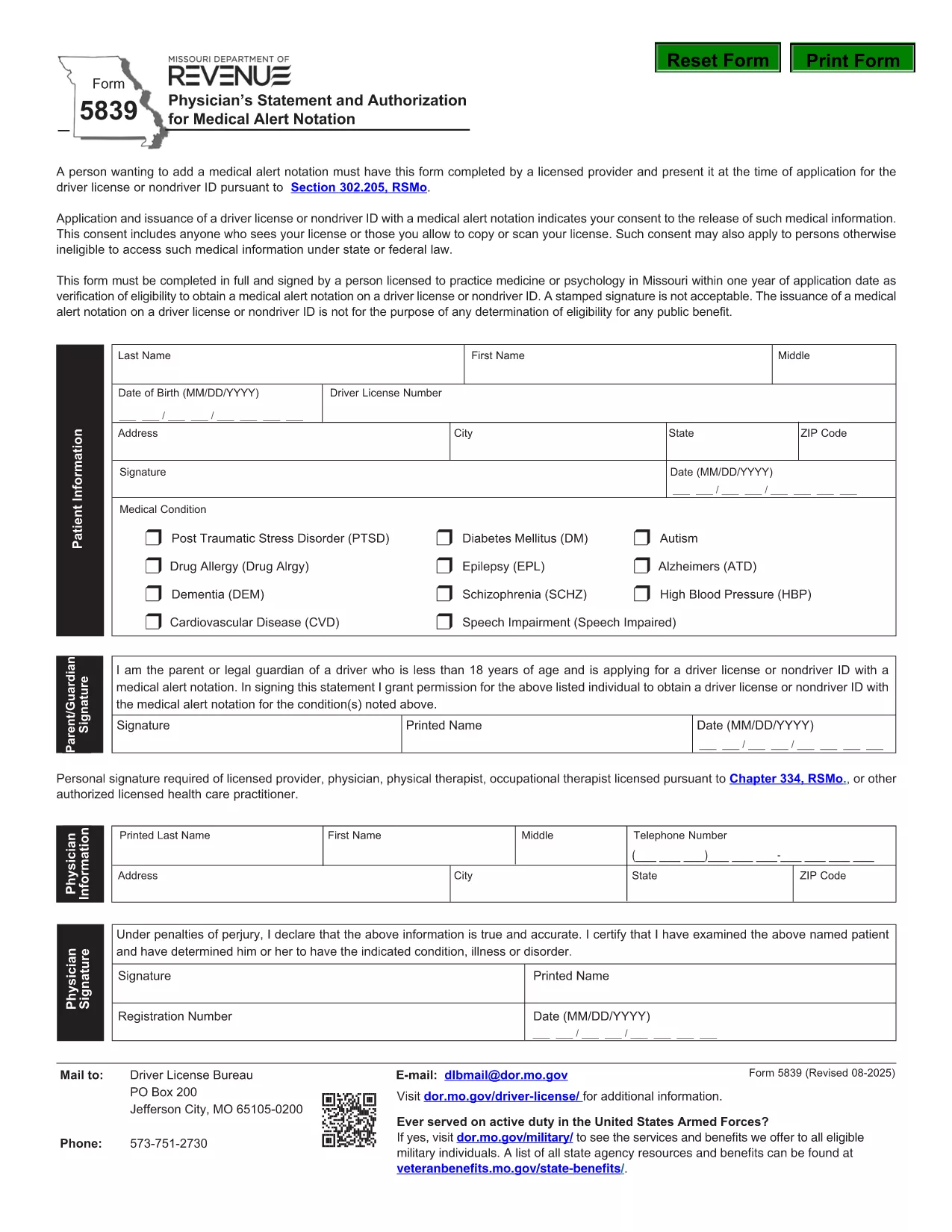
Form 5839 is the official Missouri Physician’s Statement and Authorization required when you want a medical alert notation placed on a driver’s license or non‑driver ID. The form must be completed by a licensed health‑care provider and presented at the time of application.

What Is Form 5839 and Who Needs It?

This form is used under Section 302.205, RSMo to certify medical conditions that affect driving ability. It is typically needed by individuals with conditions such as epilepsy, diabetes, vision impairments, or any health issue that the Missouri Department of Revenue deems relevant for a medical alert.

How to Complete Form 5839 Online

Instead of downloading the PDF and editing it manually, simply click the "Fill out this form" button on this page. The Formize PDF Filler app will load, allowing you to complete every field directly in your browser. Once finished, you can save or print the completed form.

Common Mistakes to Avoid on Form 5839

  • Leaving any required fields blank – the form will be rejected.
  • Using an unsigned or non‑licensed provider’s signature.
  • Providing outdated contact information for the physician.
  • Submitting a scanned copy with low resolution; use the online filler for a clear PDF.

Where to Submit the Completed Form

After filling out Form 5839, bring the printed copy (or a saved electronic version) to your local Missouri Department of Revenue office when applying for or renewing a driver’s license or ID. The office will verify the medical information before adding the alert notation.

FAQs About Form 5839

Below are answers to the most common questions about this form. For more details, refer to the downloadable PDF linked at the bottom of the page.

よくある質問
  • Who is authorized to sign Form 5839?

    Only a licensed physician, osteopathic doctor, or other qualified health‑care professional can sign the form.

  • Can I submit a scanned copy of the form?

    Yes, but the scan must be clear and legible. Using the online Formize filler ensures a high‑quality PDF.

  • Do I need to attach medical records?

    Generally no, unless the Department of Revenue specifically requests supporting documentation.

  • How long does the medical alert stay on my license?

    The alert remains until the physician provides a new statement indicating the condition has resolved.

  • Is there a fee to file Form 5839?

    No separate fee is charged for the medical statement; any standard licensing fees still apply.

  • What if my physician’s signature is missing?

    The form will be rejected. Contact the physician to obtain a proper signature before submission.

方法

オンラインで 4 回の簡単なステップで Form 5839 を無料で入力する方法:

  1. 1
    Click the Fill‑out Button
    Press the "Fill out this form" button on the page. The Formize PDF Filler loads in your browser.
  2. 2
    Enter All Required Information
    Complete each field – patient details, physician’s credentials, and the medical condition description.
  3. 3
    Save or Print the Completed Form
    When all sections are filled, click "Save" to download a copy or "Print" to obtain a hard‑copy for submission.
  4. 4
    Submit to the Missouri Department of Revenue
    Take the printed form (or a saved PDF) to your local DMV office when applying for or renewing your license.
Formize PDF Filler アプリ
だいたい

運転免許申請書

ほとんどの国では、道路に出る前に運転免許証を取得することが義務付けられています。車を運転したい人にとって、運転免許の取得は重要なマイルストーンです。

Form 5839 は、運転免許を申請する人から情報を収集するために使用される文書である運転免許申請書の 1 つです。通常、申請者の名前、生年月日、ID 番号、連絡先情報、および運転免許証の履歴と経験のフィールドが含まれています。

特徴

PDFフィラー

オンラインで PDF フォームに記入する最も簡単な方法

  • Form 5839 をすばやく入力してください
    Form 5839 をオンラインですばやく入力する方法をお探しですか?オンラインの無料 PDF フォーム フィラーを使用すると、この PDF ドキュメントを 1 分以内に編集して入力する方法がわかります。
  • 使いやすいオンライン PDF エディター
    再スキャンして返送する前に、編集できるように PDF ファイルを印刷することにうんざりしていませんか? PDFドキュメントをオンラインで無料で編集.当社のオンライン PDF エディターを使用して、時間と紙を節約してください。
  • 優れたツール、すべてのプラットフォーム
    Mac で Form 5839 を入力する方法や、PDF フィラーを無料で使用する方法を知りたいですか?当社のオンライン PDF ツールは、すべてのプラットフォームで動作します。
  • 安全なファイル ストレージ
    完成した「Form 5839」ファイルは、Amazon クラウド ホスティングが管理する安全なデータベースに保存されます。いつでもシステムからファイルを削除できます。いずれにせよ、これらのファイルは 24 時間後に自動的に削除されます。
  • {キーワード} とチャットする
    無料の PDF リーダー アシスタントである Chatize で「Form 5839」とチャットします。質問すると、「Form 5839」から回答が得られます。上の [ドキュメントとチャット] ボタンをクリックするだけです。

フィルセッションを削除

選択したフィルセッションを削除しますか?この場合、フォームへの記入の進捗状況は失われます。

編集セッションを削除する

選択した編集セッションを削除しますか?この場合、フォームの作成および編集の進行状況は失われます。