
言語を選択する

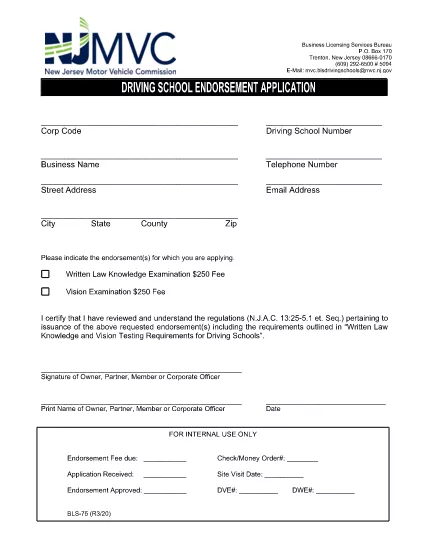
BLS‑75 Driving School Endorsement Application – Fillable PDF

  1. 言語 英語
  2. アメリカ合衆国
  3. アクティビティ 運転免許証
  4. ニュージャージー
BLS‑75 Driving School Endorsement Application – Fillable PDF

What Is the BLS‑75 Form?

The BLS‑75 is the official New Jersey Motor Vehicle Commission (MVC) application used by driving schools to request endorsement approval. It verifies that the school meets all state‑required regulations before issuing a commercial driving‑school endorsement.

Who Must Complete the BLS‑75?

Any individual or organization that operates a driving school in New Jersey and wishes to receive the MVC endorsement must submit a completed BLS‑75. This includes new schools, schools renewing their endorsement, and schools adding new locations.

How to Fill Out the BLS‑75 Online

Instead of downloading the PDF and editing it with a separate editor, simply click the "Fill out this form" button on this page. The Formize PDF Filler app will load directly in your browser, allowing you to:

  • Enter information into each field with auto‑save.
  • Validate signatures and dates instantly.
  • Preview the completed form before submission.

Common Mistakes to Avoid

  • Leaving required fields blank. The filler highlights missing information before you can submit.
  • Using an outdated version of the form. The link on this page always points to the current BLS‑75 PDF.
  • Incorrectly formatting phone numbers or dates. Follow the sample formats shown in each field.

Where to Submit the Completed Form

After you finish, you can either:

  • Download the signed PDF and mail it to the New Jersey MVC, Division of Motor Vehicles, 124 Halsey St., Trenton, NJ 08625.
  • Upload the PDF directly through the MVC online portal (if you have an account).

For any questions about eligibility or submission, contact the New Jersey MVC Business Services Division at (609) 292‑6500.

よくある質問
  • Do I need Adobe Acrobat to complete the BLS‑75?

    No. The Formize PDF Filler works in any modern browser, so you can fill out the form without installing additional software.

  • Is the online filler secure?

    Yes. All data is processed locally in your browser and transmitted over HTTPS. Formize does not store your personal information.

  • Can I save my progress and return later?

    Absolutely. Use the "Save Draft" button to download a partially completed PDF, then re‑upload it later to continue editing.

  • What if I make a mistake after submitting?

    Contact the NJ MVC Business Services Division. They will advise whether you need to submit a corrected BLS‑75 or if an amendment can be made.

  • Is there a filing fee for the BLS‑75?

    Yes, the MVC charges a processing fee. Check the latest fee schedule on the NJ MVC website or the form’s instruction page.

  • How long does the endorsement approval take?

    Processing typically takes 10‑15 business days after the MVC receives a complete and accurate BLS‑75.

方法

オンラインで 4 回の簡単なステップで BLS-75 を無料で入力する方法:

  1. 1
    Click the Fill‑out Button
    Press the "Fill out this form" button on the page. The Formize PDF Filler will open in a new browser tab.
  2. 2
    Wait for the Filler to Load
    The app loads the BLS‑75 PDF automatically. All fields become editable, and a progress bar shows the loading status.
  3. 3
    Complete Each Section
    Enter your information, upload required signatures, and double‑check the auto‑validation messages. The filler saves your work every few seconds.
  4. 4
    Save or Submit
    When finished, click "Download" to save a copy for your records or use the built‑in "Submit" button to send the PDF directly to the NJ MVC portal.
Formize PDF Filler アプリ
だいたい

運転免許申請書

BLS-75 は、運転免許証の取得または更新のプロセスで使用される書類である運転免許証のフォームの 1 つです。運転免許証は、個人が公道で自動車を運転することを許可する政府発行の公式文書です。これらのフォームは管轄区域によって異なる場合がありますが、通常は次のものが含まれます。

申請フォーム: このフォームは運転免許証の申請に使用され、通常、名前、住所、生年月日、社会保障番号などの個人情報の入力を求められます。

身分証明書: 通常、個人は申請書とともに、身元、居住地、国内での法的存在を証明するための特定の身分証明書の提出を求められます。これらには、有効なパスポート、出生証明書、社会保障カード、またはその他の政府発行の身分証明書が含まれる場合があります。

居住証明書: 多くの法域では、住所を確認するために申請者に公共料金請求書、リース契約書、銀行取引明細書などの居住証明書の提出を求めています。

健康診断フォーム: 一部の管轄区域では、申請者が安全運転に必要な身体的および精神的要件を満たしていることを確認するために健康診断を要求する場合があります。通常、医療専門家がこのフォームに記入します。

運転者教育完了フォーム: 初めて運転する場合は、運転者教育プログラムの完了が必要な場合があります。運転免許証を申請するには、正常に完了したことを示すフォームまたは証明書が必要になることがよくあります。

視力検査フォーム: 視力検査は通常、運転免許証の申請手続き中に実施されます。眼科専門家または認定職員が申請者の視力を評価し、必要なフォームに記入します。

これらのフォームは通常、地元の陸運局 (DMV) または運転免許証を管轄する同等の政府機関で入手できます。管轄区域に適用される特定の要件とフォームは異なる場合があるため、確認することが重要です。

特徴

PDFフィラー

オンラインで PDF フォームに記入する最も簡単な方法

  • BLS-75 をすばやく入力してください
    BLS-75 をオンラインですばやく入力する方法をお探しですか?オンラインの無料 PDF フォーム フィラーを使用すると、この PDF ドキュメントを 1 分以内に編集して入力する方法がわかります。
  • 使いやすいオンライン PDF エディター
    再スキャンして返送する前に、編集できるように PDF ファイルを印刷することにうんざりしていませんか? PDFドキュメントをオンラインで無料で編集.当社のオンライン PDF エディターを使用して、時間と紙を節約してください。
  • 優れたツール、すべてのプラットフォーム
    Mac で BLS-75 を入力する方法や、PDF フィラーを無料で使用する方法を知りたいですか?当社のオンライン PDF ツールは、すべてのプラットフォームで動作します。
  • 安全なファイル ストレージ
    完成した「BLS-75」ファイルは、Amazon クラウド ホスティングが管理する安全なデータベースに保存されます。いつでもシステムからファイルを削除できます。いずれにせよ、これらのファイルは 24 時間後に自動的に削除されます。
  • {キーワード} とチャットする
    無料の PDF リーダー アシスタントである Chatize で「BLS-75」とチャットします。質問すると、「BLS-75」から回答が得られます。上の [ドキュメントとチャット] ボタンをクリックするだけです。

フィルセッションを削除

選択したフィルセッションを削除しますか?この場合、フォームへの記入の進捗状況は失われます。

編集セッションを削除する

選択した編集セッションを削除しますか?この場合、フォームの作成および編集の進行状況は失われます。