
言語を選択する

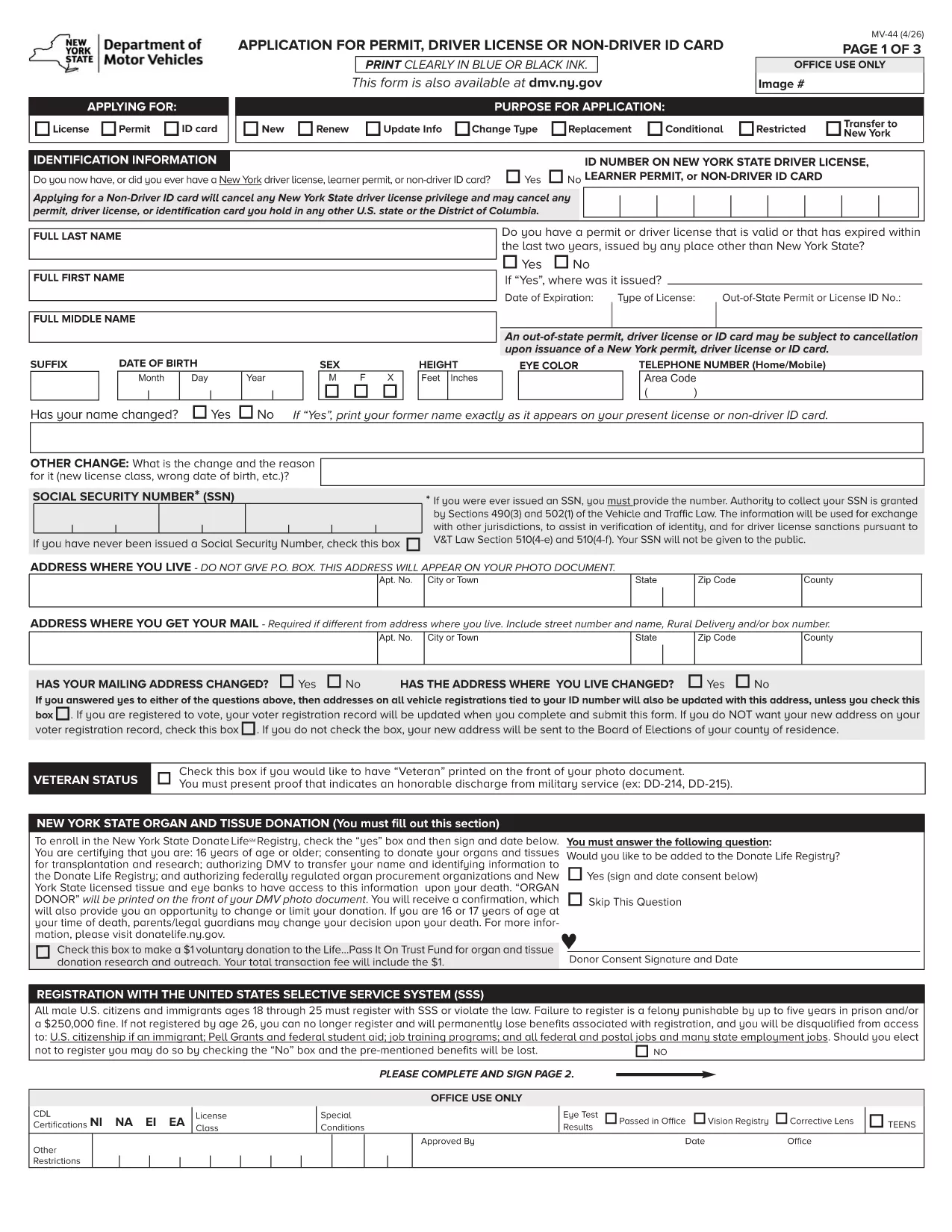
MV-44 Application Form – Permit, Driver License & Non‑Driver ID

  1. 言語 英語
  2. アメリカ合衆国
  3. アクティビティ 運転免許証
  4. ニューヨーク
MV-44 Application Form – Permit, Driver License & Non‑Driver ID

The MV-44 is the official New York State application used to request a learner’s permit, a driver’s license, or a non‑driver identification card. This form is required for first‑time applicants, renewals, and certain name‑change situations.

Formize.com offers a fully fillable PDF version of the MV‑44, so you can complete the entire application directly in your web browser—no Adobe Acrobat needed.

Below you’ll find everything you need to know about the MV‑44, step‑by‑step instructions for filling it out online, and tips to avoid common errors that can delay processing.

Key benefits of using the Formize fillable PDF:

  • Instant loading in the Formize PDF Filler app
  • Auto‑save as you type, preventing data loss
  • Built‑in validation to catch missing or incorrect information
  • Easy electronic signature and direct download of the completed form

Ready to start? Simply click the "Fill out this form" button and let the Formize PDF Filler do the rest.

よくある質問
  • Can I save my progress and finish the MV‑44 later?

    Yes. The Formize PDF Filler auto‑saves your entries locally. Simply close the tab and reopen the form to continue where you left off.

  • Do I need a PDF reader to use this form?

    No. The fillable version runs entirely in your browser via the Formize PDF Filler, eliminating the need for Adobe Acrobat or other PDF software.

  • What identification documents do I need to attach?

    You’ll need a valid photo ID (passport, existing NY driver’s license, or non‑driver ID) and proof of residency such as a utility bill or lease agreement. Upload scans after completing the form.

  • How long does the DMV take to process the MV‑44?

    Processing times vary, but most applications are reviewed within 7‑10 business days after the completed form and required documents are submitted.

  • Is the MV‑44 form free to download?

    Yes. The MV‑44 is a free, government‑provided form. Formize only hosts the fillable version at no cost.

  • Can I submit the completed MV‑44 electronically?

    The NY DMV currently requires a printed and signed copy. After downloading, print the form, sign it, and mail or deliver it to your local DMV office.

  • What should I do if I make a mistake on the form?

    If you notice an error before printing, simply go back in the Formize filler, correct the field, and re‑download the PDF. Once printed and signed, you’ll need to start a new form.

  • Do I need a separate form for a duplicate license?

    For a duplicate or replacement, you must complete Form MV‑44 and check the “Duplicate” box. Additional documentation may be required.

方法

オンラインで 4 回の簡単なステップで MV-44 を無料で入力する方法:

  1. 1
    Click the Fill‑out Button
    On this page, locate the bright "Fill out this form" button and click it. The Formize PDF Filler will open in a new tab.
  2. 2
    Wait for the PDF Filler to Load
    The fillable MV‑44 PDF loads automatically. A loading spinner indicates the app is preparing the document.
  3. 3
    Enter Your Information
    Complete each field using the on‑screen prompts. Required fields are marked with an asterisk. The filler validates dates, numbers, and signatures in real time.
  4. 4
    Review, Sign & Download
    After filling all sections, review the data, add your electronic signature, and click "Download Completed Form". You can then print or submit the PDF as instructed by the DMV.
Formize PDF Filler アプリ
だいたい

運転免許申請書

MV-44 は、運転免許証の取得または更新のプロセスで使用される書類である運転免許証のフォームの 1 つです。運転免許証は、個人が公道で自動車を運転することを許可する政府発行の公式文書です。これらのフォームは管轄区域によって異なる場合がありますが、通常は次のものが含まれます。

申請フォーム: このフォームは運転免許証の申請に使用され、通常、名前、住所、生年月日、社会保障番号などの個人情報の入力を求められます。

身分証明書: 通常、個人は申請書とともに、身元、居住地、国内での法的存在を証明するための特定の身分証明書の提出を求められます。これらには、有効なパスポート、出生証明書、社会保障カード、またはその他の政府発行の身分証明書が含まれる場合があります。

居住証明書: 多くの法域では、住所を確認するために申請者に公共料金請求書、リース契約書、銀行取引明細書などの居住証明書の提出を求めています。

健康診断フォーム: 一部の管轄区域では、申請者が安全運転に必要な身体的および精神的要件を満たしていることを確認するために健康診断を要求する場合があります。通常、医療専門家がこのフォームに記入します。

運転者教育完了フォーム: 初めて運転する場合は、運転者教育プログラムの完了が必要な場合があります。運転免許証を申請するには、正常に完了したことを示すフォームまたは証明書が必要になることがよくあります。

視力検査フォーム: 視力検査は通常、運転免許証の申請手続き中に実施されます。眼科専門家または認定職員が申請者の視力を評価し、必要なフォームに記入します。

これらのフォームは通常、地元の陸運局 (DMV) または運転免許証を管轄する同等の政府機関で入手できます。管轄区域に適用される特定の要件とフォームは異なる場合があるため、確認することが重要です。

特徴

PDFフィラー

オンラインで PDF フォームに記入する最も簡単な方法

  • MV-44 をすばやく入力してください
    MV-44 をオンラインですばやく入力する方法をお探しですか?オンラインの無料 PDF フォーム フィラーを使用すると、この PDF ドキュメントを 1 分以内に編集して入力する方法がわかります。
  • 使いやすいオンライン PDF エディター
    再スキャンして返送する前に、編集できるように PDF ファイルを印刷することにうんざりしていませんか? PDFドキュメントをオンラインで無料で編集.当社のオンライン PDF エディターを使用して、時間と紙を節約してください。
  • 優れたツール、すべてのプラットフォーム
    Mac で MV-44 を入力する方法や、PDF フィラーを無料で使用する方法を知りたいですか?当社のオンライン PDF ツールは、すべてのプラットフォームで動作します。
  • 安全なファイル ストレージ
    完成した「MV-44」ファイルは、Amazon クラウド ホスティングが管理する安全なデータベースに保存されます。いつでもシステムからファイルを削除できます。いずれにせよ、これらのファイルは 24 時間後に自動的に削除されます。
  • {キーワード} とチャットする
    無料の PDF リーダー アシスタントである Chatize で「MV-44」とチャットします。質問すると、「MV-44」から回答が得られます。上の [ドキュメントとチャット] ボタンをクリックするだけです。

フィルセッションを削除

選択したフィルセッションを削除しますか?この場合、フォームへの記入の進捗状況は失われます。

編集セッションを削除する

選択した編集セッションを削除しますか?この場合、フォームの作成および編集の進行状況は失われます。