
言語を選択する

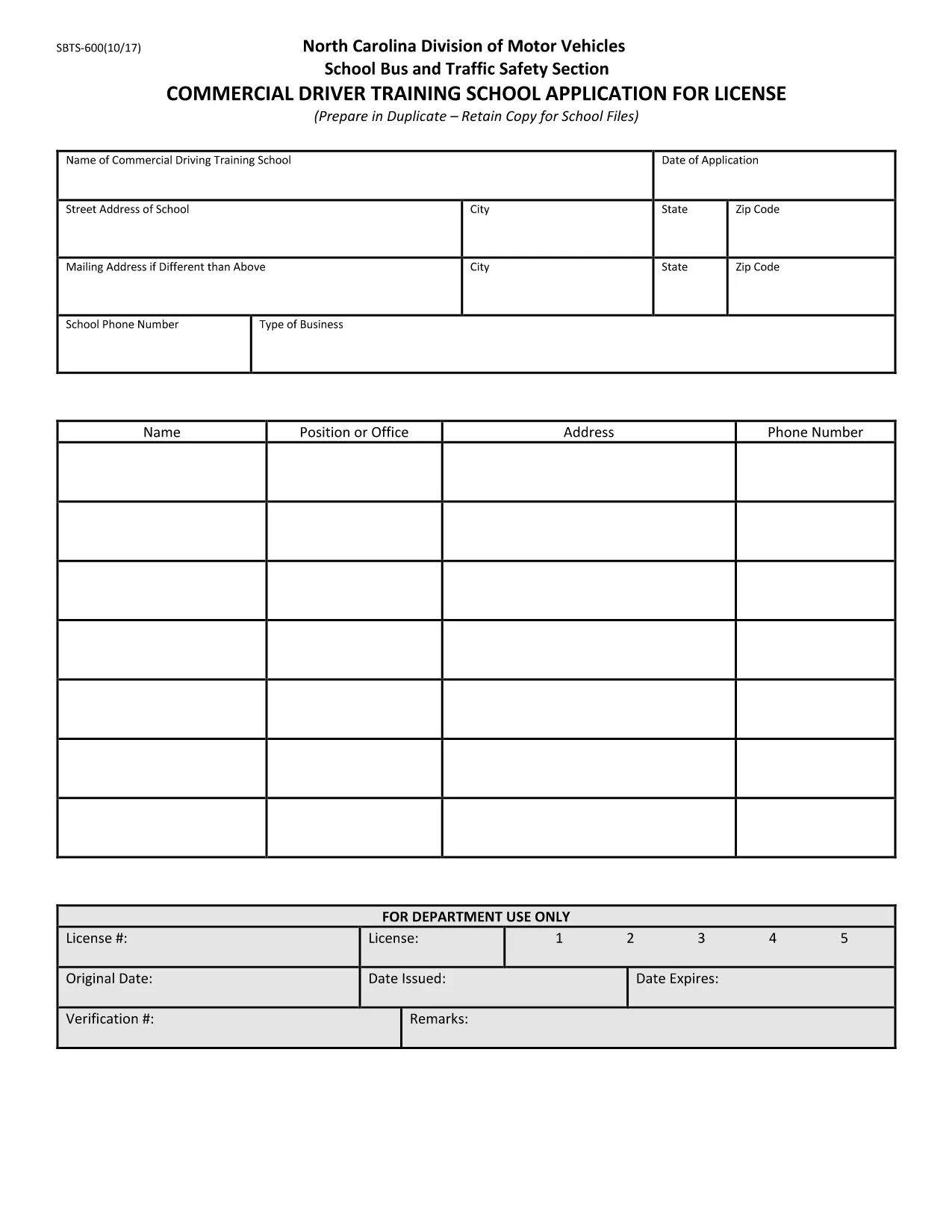
SBTS-600 Fillable PDF – North Carolina Commercial Driver Training School Application

  1. 言語 英語
  2. アメリカ合衆国
  3. アクティビティ 運転免許証
  4. ノースカロライナ州
SBTS-600 Fillable PDF – North Carolina Commercial Driver Training School Application

The SBTS-600 is the official North Carolina Department of Transportation (NCDOT) application for commercial driver training schools seeking a license to operate school buses. This fillable PDF lets you complete the form quickly, save a digital copy, and print it for submission to the NC Division of Motor Vehicles.

What Is the SBTS-600 Form?

SBTS-600 (School Bus and Traffic Safety) collects essential information about the training school, its instructors, curriculum, insurance, and vehicle fleet. The NCDOT uses this data to evaluate safety compliance before granting a school bus operator license.

Who Must Complete SBTS-600?

  • New commercial driver training schools applying for a North Carolina school‑bus license.
  • Existing schools renewing or updating their license information.
  • Organizations that provide driver‑training programs for school‑bus operators.

How to Fill Out SBTS-600 Online with Formize

Instead of downloading, printing, and scanning, use Formize’s Fill out this form button. The Formize PDF Filler loads the SBTS‑600 directly in your browser, allowing you to type, check boxes, and sign electronically.

Common Mistakes to Avoid

  • Leaving required fields blank – the form will not submit.
  • Providing outdated insurance policy numbers.
  • Using an illegible handwritten signature when printing later.
  • Submitting the form to the wrong NCDOT office.

Where to Submit Your Completed Form

After saving the completed PDF, mail or deliver it to:

North Carolina Division of Motor Vehicles
School Bus and Traffic Safety Section
300 Corporate Drive, Suite 400
Raleigh, NC 27699

Check the NCDOT website for any additional submission requirements.

よくある質問
  • Is the SBTS‑600 form available as a fillable PDF?

    Yes. Formize provides a fully fillable version of the official SBTS‑600 PDF, so you can complete it online without printing.

  • Do I need special software to fill out SBTS‑600?

    No. The Formize PDF Filler works in any modern web browser – no Adobe Acrobat or other software is required.

  • Can I save my progress and finish later?

    Absolutely. Use the **Save** button at any time to download a partially‑filled PDF and resume later.

  • What happens after I submit the form?

    After you download the completed PDF, you must mail or deliver it to the North Carolina Division of Motor Vehicles as instructed on the form.

  • Is there a fee to use Formize’s PDF filler?

    Formize offers free online filling for the SBTS‑600 form. No hidden charges apply.

  • What if I make a mistake after downloading?

    You can reopen the saved PDF in Formize, correct the error, and download a new version before submitting.

  • Do I need to print the form after filling it online?

    The NCDOT may require a hard copy with a wet signature. Print the completed PDF, sign where required, and send it.

方法

オンラインで 5 回の簡単なステップで SBTS-600 を無料で入力する方法:

  1. 1
    Click the Fill‑out Button
    On this page, click the **Fill out this form** button. Formize will open the SBTS‑600 in a secure online PDF editor.
  2. 2
    Wait for the Formize PDF Filler to Load
    The filler loads in seconds. All fields become editable directly in your browser.
  3. 3
    Complete Each Section
    Enter the requested information, upload any required documents, and use the digital signature tool to sign.
  4. 4
    Save and Download
    When finished, click **Save** to store a copy in your device and **Download** to get the completed PDF.
  5. 5
    Submit to NCDOT
    Print (if required) and send the completed form to the NC Division of Motor Vehicles address listed on the page.
Formize PDF Filler アプリ
だいたい

運転免許申請書

ほとんどの国では、道路に出る前に運転免許証を取得することが義務付けられています。車を運転したい人にとって、運転免許の取得は重要なマイルストーンです。

SBTS-600 は、運転免許を申請する人から情報を収集するために使用される文書である運転免許申請書の 1 つです。通常、申請者の名前、生年月日、ID 番号、連絡先情報、および運転免許証の履歴と経験のフィールドが含まれています。

特徴

PDFフィラー

オンラインで PDF フォームに記入する最も簡単な方法

  • SBTS-600 をすばやく入力してください
    SBTS-600 をオンラインですばやく入力する方法をお探しですか?オンラインの無料 PDF フォーム フィラーを使用すると、この PDF ドキュメントを 1 分以内に編集して入力する方法がわかります。
  • 使いやすいオンライン PDF エディター
    再スキャンして返送する前に、編集できるように PDF ファイルを印刷することにうんざりしていませんか? PDFドキュメントをオンラインで無料で編集.当社のオンライン PDF エディターを使用して、時間と紙を節約してください。
  • 優れたツール、すべてのプラットフォーム
    Mac で SBTS-600 を入力する方法や、PDF フィラーを無料で使用する方法を知りたいですか?当社のオンライン PDF ツールは、すべてのプラットフォームで動作します。
  • 安全なファイル ストレージ
    完成した「SBTS-600」ファイルは、Amazon クラウド ホスティングが管理する安全なデータベースに保存されます。いつでもシステムからファイルを削除できます。いずれにせよ、これらのファイルは 24 時間後に自動的に削除されます。
  • {キーワード} とチャットする
    無料の PDF リーダー アシスタントである Chatize で「SBTS-600」とチャットします。質問すると、「SBTS-600」から回答が得られます。上の [ドキュメントとチャット] ボタンをクリックするだけです。

フィルセッションを削除

選択したフィルセッションを削除しますか?この場合、フォームへの記入の進捗状況は失われます。

編集セッションを削除する

選択した編集セッションを削除しますか?この場合、フォームの作成および編集の進行状況は失われます。