
言語を選択する

SFN 4569 Medical Examination Report – Fillable PDF

  1. 言語 英語
  2. アメリカ合衆国
  3. アクティビティ 運転免許証
  4. ノースダコタ
SFN 4569 Medical Examination Report – Fillable PDF

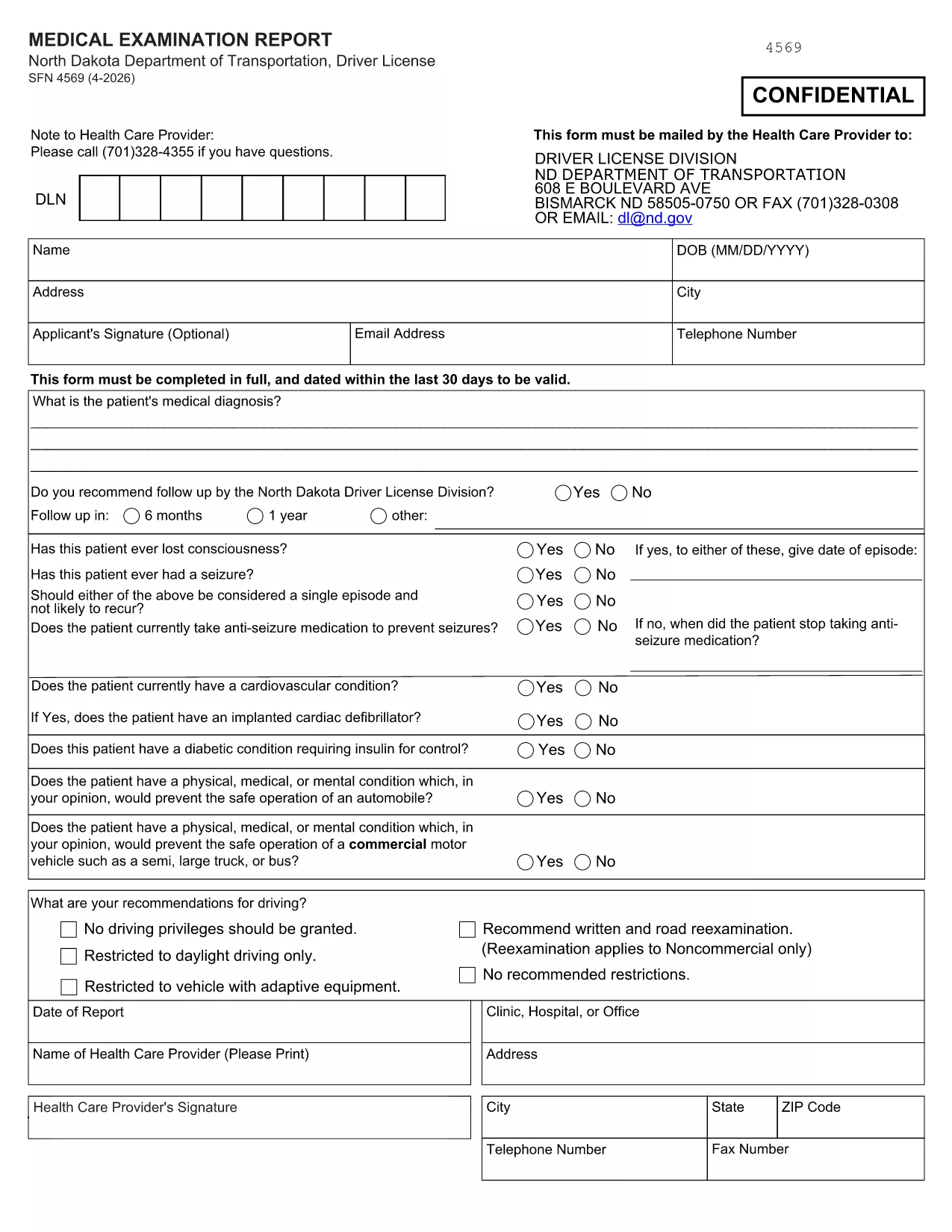
The SFN 4569 is the North Dakota Department of Transportation (NDDOT) medical examination report required for drivers who need a professional health‑care provider’s assessment. This form must be completed on a fillable PDF, signed by the provider, and submitted to the DOT.

What Is the SFN 4569 Form?

SFN 4569 is used to document a driver’s medical fitness for operating a motor vehicle. It includes sections for personal information, medical history, vision, hearing, and the provider’s certification.

How to Complete the SFN 4569 Online

Instead of printing and scanning, you can fill out the form directly in your browser using Formize’s PDF Filler app. Follow these simple steps:

  1. Click the "Fill out this form" button on this page.
  2. Wait a few seconds while the Formize PDF Filler loads.
  3. Enter the required information in each field. All fields are interactive and auto‑save.
  4. When finished, click "Save & Download" to get a completed PDF you can email or print.

Common Mistakes to Avoid

  • Leaving required fields blank: The form will not submit if mandatory sections are empty.
  • Using the wrong date format: Use MM/DD/YYYY as required by NDDOT.
  • Forgetting the provider’s signature: An unsigned form is rejected.
  • Submitting a non‑fillable PDF: Always use the official fillable version linked below.

Where to Submit the Completed Form

After saving the completed PDF, send it to the address or fax number indicated on the form’s last page, or upload it through your local NDDOT portal. Keep a copy for your records.

Need the official fillable PDF? Download SFN 4569 PDF now and start filling it out instantly.

よくある質問
  • Is the SFN 4569 form available as a fillable PDF?

    Yes. The official fillable version is provided by NDDOT and can be completed online with Formize.

  • Who must sign the SFN 4569 form?

    A licensed health‑care provider must sign and date the certification section.

  • Can I submit the form electronically?

    Most NDDOT offices accept a scanned copy of the completed PDF. Check your local office for exact submission options.

  • What if I make a mistake after saving?

    Open the saved PDF again in Formize, correct the error, and re‑save. The fillable fields remain editable.

  • Is there a fee to use Formize’s PDF filler?

    No. Formize provides a free, secure filler for public government forms like SFN 4569.

  • Do I need Adobe Reader to view the form?

    No. The form can be viewed and filled directly in any modern web browser.

方法

オンラインで 4 回の簡単なステップで SFN 4569 を無料で入力する方法:

  1. 1
    Click the Fill‑out Button
    Press the "Fill out this form" button on this page to launch the Formize PDF Filler.
  2. 2
    Wait for the Filler to Load
    The app loads in a few seconds. No download or installation is required.
  3. 3
    Enter All Required Information
    Complete each field—personal data, medical history, vision, hearing, and provider certification.
  4. 4
    Save and Download
    When finished, click "Save & Download" to get a completed PDF you can email or print.
Formize PDF Filler アプリ
だいたい

運転免許申請書

ほとんどの国では、道路に出る前に運転免許証を取得することが義務付けられています。車を運転したい人にとって、運転免許の取得は重要なマイルストーンです。

SFN 4569 は、運転免許を申請する人から情報を収集するために使用される文書である運転免許申請書の 1 つです。通常、申請者の名前、生年月日、ID 番号、連絡先情報、および運転免許証の履歴と経験のフィールドが含まれています。

特徴

PDFフィラー

オンラインで PDF フォームに記入する最も簡単な方法

  • SFN 4569 をすばやく入力してください
    SFN 4569 をオンラインですばやく入力する方法をお探しですか?オンラインの無料 PDF フォーム フィラーを使用すると、この PDF ドキュメントを 1 分以内に編集して入力する方法がわかります。
  • 使いやすいオンライン PDF エディター
    再スキャンして返送する前に、編集できるように PDF ファイルを印刷することにうんざりしていませんか? PDFドキュメントをオンラインで無料で編集.当社のオンライン PDF エディターを使用して、時間と紙を節約してください。
  • 優れたツール、すべてのプラットフォーム
    Mac で SFN 4569 を入力する方法や、PDF フィラーを無料で使用する方法を知りたいですか?当社のオンライン PDF ツールは、すべてのプラットフォームで動作します。
  • 安全なファイル ストレージ
    完成した「SFN 4569」ファイルは、Amazon クラウド ホスティングが管理する安全なデータベースに保存されます。いつでもシステムからファイルを削除できます。いずれにせよ、これらのファイルは 24 時間後に自動的に削除されます。
  • {キーワード} とチャットする
    無料の PDF リーダー アシスタントである Chatize で「SFN 4569」とチャットします。質問すると、「SFN 4569」から回答が得られます。上の [ドキュメントとチャット] ボタンをクリックするだけです。

フィルセッションを削除

選択したフィルセッションを削除しますか?この場合、フォームへの記入の進捗状況は失われます。

編集セッションを削除する

選択した編集セッションを削除しますか?この場合、フォームの作成および編集の進行状況は失われます。