
言語を選択する

DL-503 – Pennsylvania Driver Information Request Form (Fillable PDF)

  1. 言語 英語
  2. アメリカ合衆国
  3. アクティビティ 運転免許証
  4. ペンシルベニア州
DL-503 – Pennsylvania Driver Information Request Form (Fillable PDF)

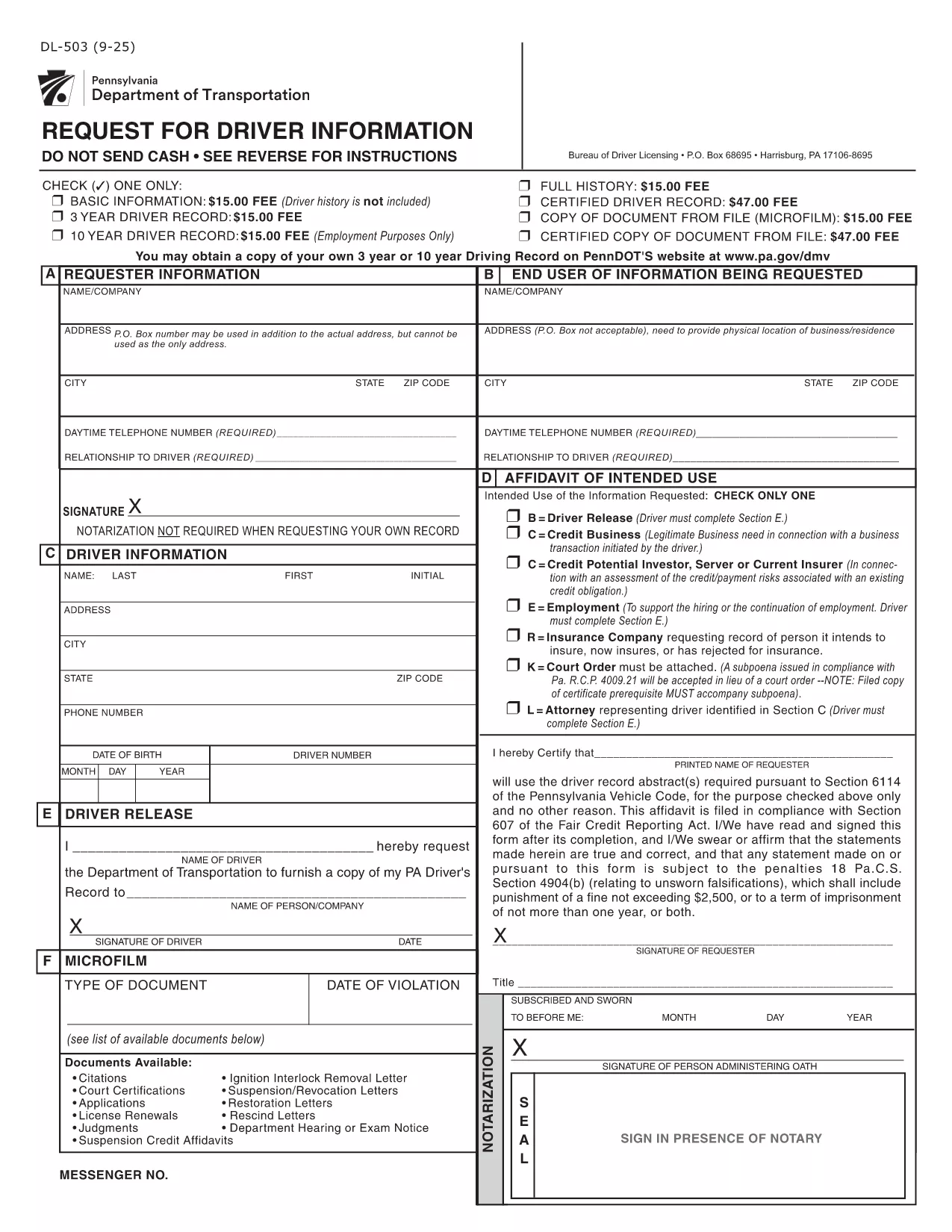
The DL-503 is the official Pennsylvania Department of Transportation (PennDOT) form used to request driver record information. Whether you need your own driving history or an authorized record for an employee, this fillable PDF lets you submit a request quickly and securely.

What Is the DL-503 Form?

The DL-503 collects basic identifying details, the purpose of the request, and the signature of the requester. It is commonly used by employers, insurance companies, and individuals who need a Motor Vehicle Record (MVR) for verification.

How to Complete the DL-503 Online

Instead of downloading, printing, and scanning, you can fill the form directly in your browser using Formize’s PDF Filler app. Follow the simple steps below.

Common Mistakes to Avoid

  • Leaving Section E unsigned when required – the driver’s signature is mandatory if any of the checkboxes in Section D are selected.
  • Providing an incorrect ZIP code – PennDOT will reject the request if the address does not match the driver’s records.
  • Omitting the purpose code – PennDOT requires a clear reason (e.g., employment, insurance) for the record request.

Where to Submit the Completed Form

After you finish filling out the DL-503, print the completed PDF and mail it to:

Bureau of Driver Licensing
P.O. Box 68695
Harrisburg, PA 17106‑8695

Alternatively, you may submit a scanned copy via fax if your organization has an established PennDOT fax line.

Frequently Used Keywords

Keywords such as "DL-503", "Pennsylvania driver record request", and "fillable PDF" help you find the right form quickly. Use them when searching online or when naming your saved file.

よくある質問
  • Can I submit the DL-503 electronically?

    PennDOT currently requires a printed and signed copy. The online filler only speeds up data entry; you still need to mail the final form.

  • Do I need a notary for my own record request?

    No. For personal requests, notarization is not required. Only third‑party requests may need additional verification.

  • How long does it take to receive the driver record?

    Processing typically takes 7‑10 business days after PennDOT receives the completed and signed form.

  • What fees are associated with the DL-503 request?

    PennDOT charges a nominal fee per request (check the latest schedule on the PennDOT website). Payment details are included on the form.

  • Can I request records for multiple drivers on one form?

    Each driver requires a separate DL-503. Submit one form per individual to avoid processing delays.

  • What should I do if I make a mistake on the form?

    Correct the error by striking through the mistake, initialing the change, and re‑signing the affected sections before mailing.

  • Is the Formize filler compatible with mobile devices?

    Yes, the filler works on most modern smartphones and tablets, but printing the final document is recommended for a clean submission.

方法

オンラインで 3 回の簡単なステップで DL-503 を無料で入力する方法:

  1. 1
    Click the Fill‑out Button
    On this page, click the bright “Fill out this form” button. The Formize PDF Filler app will open in a new tab.
  2. 2
    Wait for the PDF Filler to Load
    The app loads the DL-503 PDF automatically. No download or extra software is required.
  3. 3
    Complete and Submit
    Enter all required information, sign electronically if allowed, then print and mail the form as instructed.
Formize PDF Filler アプリ
だいたい

運転免許申請書

ほとんどの国では、道路に出る前に運転免許証を取得することが義務付けられています。車を運転したい人にとって、運転免許の取得は重要なマイルストーンです。

DL-503 は、運転免許を申請する人から情報を収集するために使用される文書である運転免許申請書の 1 つです。通常、申請者の名前、生年月日、ID 番号、連絡先情報、および運転免許証の履歴と経験のフィールドが含まれています。

特徴

PDFフィラー

オンラインで PDF フォームに記入する最も簡単な方法

  • DL-503 をすばやく入力してください
    DL-503 をオンラインですばやく入力する方法をお探しですか?オンラインの無料 PDF フォーム フィラーを使用すると、この PDF ドキュメントを 1 分以内に編集して入力する方法がわかります。
  • 使いやすいオンライン PDF エディター
    再スキャンして返送する前に、編集できるように PDF ファイルを印刷することにうんざりしていませんか? PDFドキュメントをオンラインで無料で編集.当社のオンライン PDF エディターを使用して、時間と紙を節約してください。
  • 優れたツール、すべてのプラットフォーム
    Mac で DL-503 を入力する方法や、PDF フィラーを無料で使用する方法を知りたいですか?当社のオンライン PDF ツールは、すべてのプラットフォームで動作します。
  • 安全なファイル ストレージ
    完成した「DL-503」ファイルは、Amazon クラウド ホスティングが管理する安全なデータベースに保存されます。いつでもシステムからファイルを削除できます。いずれにせよ、これらのファイルは 24 時間後に自動的に削除されます。
  • {キーワード} とチャットする
    無料の PDF リーダー アシスタントである Chatize で「DL-503」とチャットします。質問すると、「DL-503」から回答が得られます。上の [ドキュメントとチャット] ボタンをクリックするだけです。

フィルセッションを削除

選択したフィルセッションを削除しますか?この場合、フォームへの記入の進捗状況は失われます。

編集セッションを削除する

選択した編集セッションを削除しますか?この場合、フォームの作成および編集の進行状況は失われます。