
言語を選択する

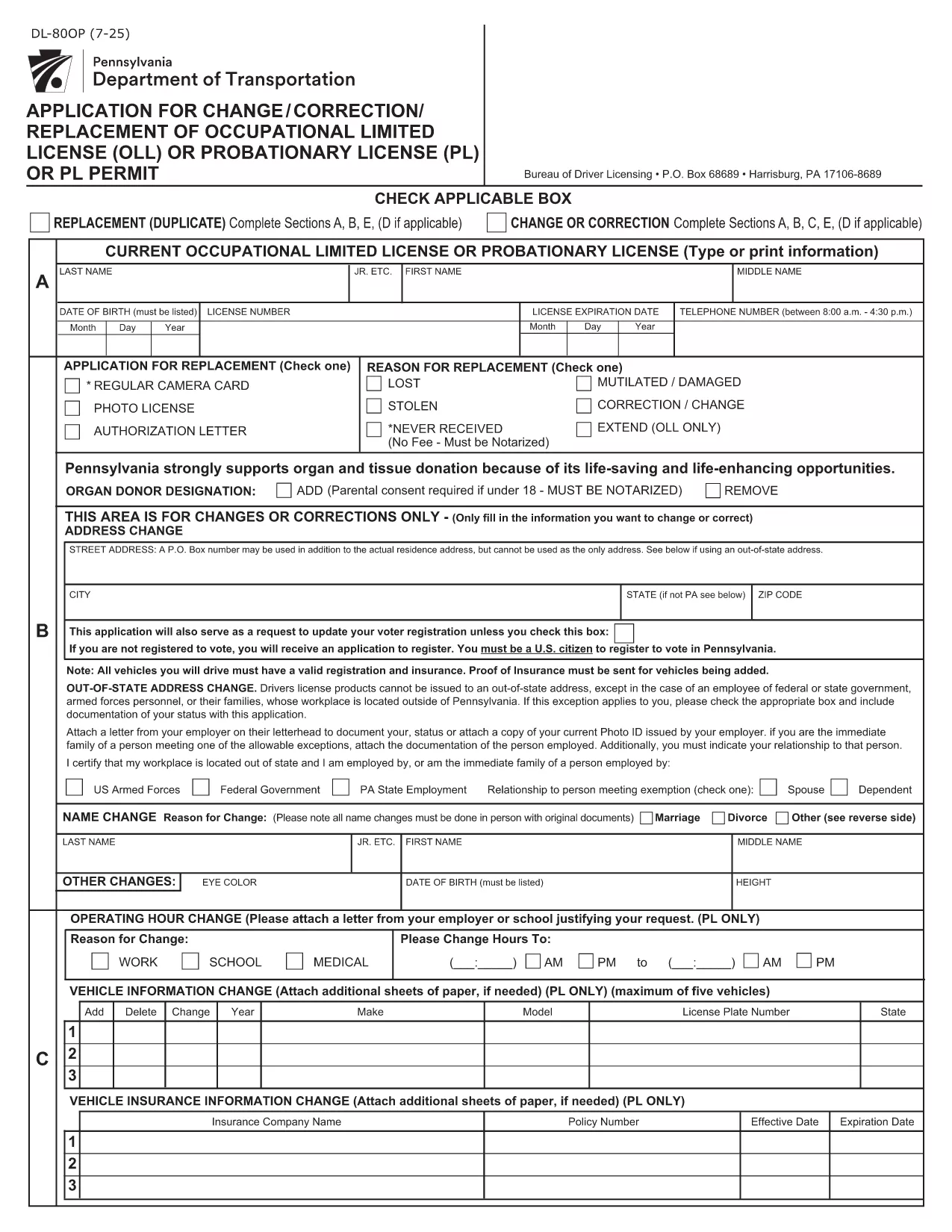
DL-80OP – Pennsylvania Occupational Driver’s License Change Form (Fillable PDF)

  1. 言語 英語
  2. アメリカ合衆国
  3. アクティビティ 運転免許証
  4. ペンシルベニア州
DL-80OP – Pennsylvania Occupational Driver’s License Change Form (Fillable PDF)

The DL-80OP is the official Pennsylvania Department of Transportation (PennDOT) application used to request a change, correction, or replacement of an occupational driver’s license. This form also lets eligible veterans add a special designation to their license.

What Is the DL-80OP Form?

The DL-80OP covers requests such as name changes, address updates, photo exemptions, and the addition of a veterans designation. It is required for any modification to an existing occupational driver’s license in the Commonwealth of Pennsylvania.

How to Complete the DL-80OP Online

Instead of downloading and printing the PDF, simply click the "Fill out this form" button on this page. The Formize PDF Filler app will load the fillable document directly in your browser:

  1. Click Fill out this form.
  2. Wait a few seconds while the Formize PDF Filler loads.
  3. Enter the required information in each field.
  4. Use the built‑in validation to correct any errors.
  5. When finished, click Submit to download a completed copy or to print.

Common Mistakes to Avoid

  • Leaving required fields blank – the filler will highlight missing data.
  • Using an outdated photo – if you request a photo exemption, be sure you qualify.
  • Incorrect veteran status wording – follow the exact phrasing shown on the form.
  • Submitting without a signature – the electronic signature field must be completed.

Veterans Designation & Special Cases

Qualified veterans may add a “Veterans” designation to their occupational license. The form requires proof of service, which can be uploaded as a PDF attachment after the main form is completed.

Where to Submit Your Completed Form

After filling out the DL-80OP, you can:

  • Mail the printed form to your local PennDOT Driver License Center.
  • Bring the completed form in person to a PennDOT office.
  • Submit electronically if your local office accepts scanned copies (check with them first).

For the most up‑to‑date submission instructions, visit the Pennsylvania Department of Transportation website.

よくある質問
  • What is the DL-80OP used for?

    The DL-80OP is the Pennsylvania form for changing, correcting, or replacing an occupational driver’s license, including adding a veterans designation.

  • Can I fill out the DL-80OP on a mobile device?

    Yes. The Formize PDF Filler works on most smartphones and tablets, allowing you to complete the form anywhere with an internet connection.

  • Do I need to upload proof of veteran status?

    If you request the veterans designation, you must attach a copy of your DD‑214 or other approved proof of service after completing the main form.

  • Is there a fee for submitting the DL-80OP?

    PennDOT may charge a processing fee depending on the type of change. Check the latest fee schedule on the PennDOT website.

  • How long does it take to receive my updated license?

    Processing times vary by office, but most applicants receive their new occupational license within 7‑10 business days after submission.

  • Can I submit the form electronically?

    Some PennDOT locations accept scanned copies of the completed form. Verify with your local Driver License Center before sending an electronic version.

方法

オンラインで 5 回の簡単なステップで DL-80OP を無料で入力する方法:

  1. 1
    Open the Fillable Form
    Click the "Fill out this form" button on the page. The Formize PDF Filler will open the DL-80OP directly in your browser.
  2. 2
    Enter Your Information
    Complete each field—personal details, address, license number, and any veteran designation—using the on‑screen prompts.
  3. 3
    Review & Validate
    The filler checks for missing or incorrectly formatted data. Correct any highlighted errors before proceeding.
  4. 4
    Submit & Save
    When all fields are valid, click Submit. Download the completed PDF or save it to your device.
  5. 5
    Print or Email Confirmation
    Print the finished form for mailing or bring it to a PennDOT office. You can also email the PDF if your local office accepts electronic submissions.
Formize PDF Filler アプリ
だいたい

運転免許申請書

ほとんどの国では、道路に出る前に運転免許証を取得することが義務付けられています。車を運転したい人にとって、運転免許の取得は重要なマイルストーンです。

DL-80OP は、運転免許を申請する人から情報を収集するために使用される文書である運転免許申請書の 1 つです。通常、申請者の名前、生年月日、ID 番号、連絡先情報、および運転免許証の履歴と経験のフィールドが含まれています。

特徴

PDFフィラー

オンラインで PDF フォームに記入する最も簡単な方法

  • DL-80OP をすばやく入力してください
    DL-80OP をオンラインですばやく入力する方法をお探しですか?オンラインの無料 PDF フォーム フィラーを使用すると、この PDF ドキュメントを 1 分以内に編集して入力する方法がわかります。
  • 使いやすいオンライン PDF エディター
    再スキャンして返送する前に、編集できるように PDF ファイルを印刷することにうんざりしていませんか? PDFドキュメントをオンラインで無料で編集.当社のオンライン PDF エディターを使用して、時間と紙を節約してください。
  • 優れたツール、すべてのプラットフォーム
    Mac で DL-80OP を入力する方法や、PDF フィラーを無料で使用する方法を知りたいですか?当社のオンライン PDF ツールは、すべてのプラットフォームで動作します。
  • 安全なファイル ストレージ
    完成した「DL-80OP」ファイルは、Amazon クラウド ホスティングが管理する安全なデータベースに保存されます。いつでもシステムからファイルを削除できます。いずれにせよ、これらのファイルは 24 時間後に自動的に削除されます。
  • {キーワード} とチャットする
    無料の PDF リーダー アシスタントである Chatize で「DL-80OP」とチャットします。質問すると、「DL-80OP」から回答が得られます。上の [ドキュメントとチャット] ボタンをクリックするだけです。

フィルセッションを削除

選択したフィルセッションを削除しますか?この場合、フォームへの記入の進捗状況は失われます。

編集セッションを削除する

選択した編集セッションを削除しますか?この場合、フォームの作成および編集の進行状況は失われます。