
言語を選択する

DL-56 National Driver Register File Check (Fillable PDF)

  1. アメリカ合衆国
  2. 言語 英語
  3. アクティビティ 運転免許証
  4. バージニア州
DL-56 National Driver Register File Check (Fillable PDF)

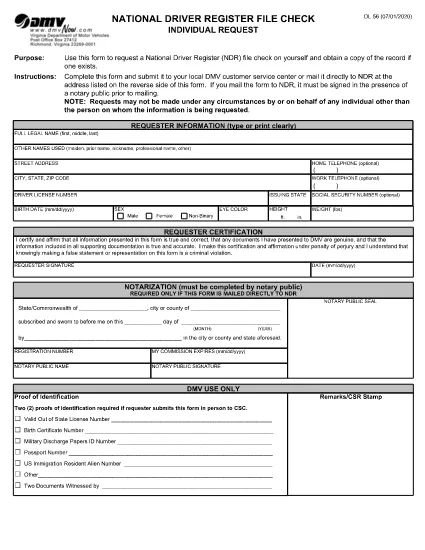
The DL-56 is the official request form used to obtain a file check from the National Driver Register (NDR). This government‑issued form lets you verify whether your driving record contains any cancellations, suspensions, or revocations that could affect licensing, employment, or insurance.

What Is the DL-56 Form?

The DL‑56 form is a simple, one‑page PDF that collects basic personal information (name, address, driver’s license number) and a notarized signature. Once submitted, the NDR returns a copy of any existing file entries associated with your driver’s license.

Who Needs a DL-56 File Check?

  • Job applicants whose position requires a clean driving record.
  • Individuals applying for a commercial driver’s license or occupational license.
  • Insurance companies assessing risk.
  • Drivers who have had a license suspended, revoked, or cancelled and need to confirm the status.

How to Complete the DL-56 Form Online

Instead of downloading the PDF and editing it in a separate editor, simply click the "Fill out this form" button on the page. The Formize PDF Filler app will load, allowing you to fill, sign, and save the document directly in your browser.

Common Mistakes to Avoid

  • Missing notarization: The NDR requires a notarized signature for mailed submissions.
  • Incorrect driver’s license number: Double‑check the number to prevent delays.
  • Leaving blank fields: Even optional fields should be marked "N/A" if not applicable.

Submit Your Request & What Happens Next

After completing the form, you can either:

  1. Download the completed PDF, have it notarized, and mail it to the address listed on the form.
  2. Save the PDF, upload it through the DMV’s online portal (if available), and follow any additional electronic submission instructions.

The NDR will process your request within 10‑15 business days and send the file check results to the address you provided.

よくある質問
  • What does the DL-56 form request?

    It requests a file check from the National Driver Register to see if any adverse actions (cancellation, suspension, revocation) are recorded against your driver’s license.

  • Do I need a notary for the DL-56 form?

    Yes, if you are submitting the form by mail. The notarized signature verifies your identity for the NDR.

  • How long does it take to receive the file check?

    The NDR typically processes requests within 10‑15 business days and mails the results to the address you provide.

  • Can I submit the DL-56 form electronically?

    Many states accept a digitally completed form that you later notarize and mail. Check your state DMV’s website for any fully online options.

  • Is there a fee to request a DL-56 file check?

    The federal NDR service is free. However, some states may charge a processing fee for handling the request.

  • What if my name has changed since my license was issued?

    Enter your current legal name and include any supporting documentation (e.g., marriage certificate) that explains the name change.

方法

オンラインで 5 回の簡単なステップで DL-56 form を無料で入力する方法:

  1. 1
    Open the Fillable Form
    Click the "Fill out this form" button on this page. The Formize PDF Filler will load instantly in your browser.
  2. 2
    Enter Your Personal Information
    Complete all required fields: full legal name, mailing address, driver’s license number, and date of birth.
  3. 3
    Attach Supporting Documents
    If the form requests additional proof (e.g., identification), upload the files using the attachment field.
  4. 4
    Sign Electronically
    Use the built‑in e‑signature tool to sign the form. Remember, a notarized signature is required for mailed submissions.
  5. 5
    Save and Submit
    Download the completed PDF, have it notarized if you plan to mail it, or follow any online submission instructions provided by your state DMV.
Formize PDF Filler アプリ
だいたい

運転免許申請書

ほとんどの国では、道路に出る前に運転免許証を取得することが義務付けられています。車を運転したい人にとって、運転免許の取得は重要なマイルストーンです。

DL-56 form は、運転免許を申請する人から情報を収集するために使用される文書である運転免許申請書の 1 つです。通常、申請者の名前、生年月日、ID 番号、連絡先情報、および運転免許証の履歴と経験のフィールドが含まれています。
特徴

PDFフィラー

オンラインで PDF フォームに記入する最も簡単な方法

  • DL-56 form をすばやく入力してください
    DL-56 form をオンラインですばやく入力する方法をお探しですか?オンラインの無料 PDF フォーム フィラーを使用すると、この PDF ドキュメントを 1 分以内に編集して入力する方法がわかります。
  • 使いやすいオンライン PDF エディター
    再スキャンして返送する前に、編集できるように PDF ファイルを印刷することにうんざりしていませんか? PDFドキュメントをオンラインで無料で編集.当社のオンライン PDF エディターを使用して、時間と紙を節約してください。
  • 優れたツール、すべてのプラットフォーム
    Mac で DL-56 form を入力する方法や、PDF フィラーを無料で使用する方法を知りたいですか?当社のオンライン PDF ツールは、すべてのプラットフォームで動作します。
  • 安全なファイル ストレージ
    完成した「DL-56 form」ファイルは、Amazon クラウド ホスティングが管理する安全なデータベースに保存されます。いつでもシステムからファイルを削除できます。いずれにせよ、これらのファイルは 24 時間後に自動的に削除されます。
  • {キーワード} とチャットする
    無料の PDF リーダー アシスタントである Chatize で「DL-56 form」とチャットします。質問すると、「DL-56 form」から回答が得られます。上の [ドキュメントとチャット] ボタンをクリックするだけです。

フィルセッションを削除

選択したフィルセッションを削除しますか?この場合、フォームへの記入の進捗状況は失われます。

編集セッションを削除する

選択した編集セッションを削除しますか?この場合、フォームの作成および編集の進行状況は失われます。