
言語を選択する

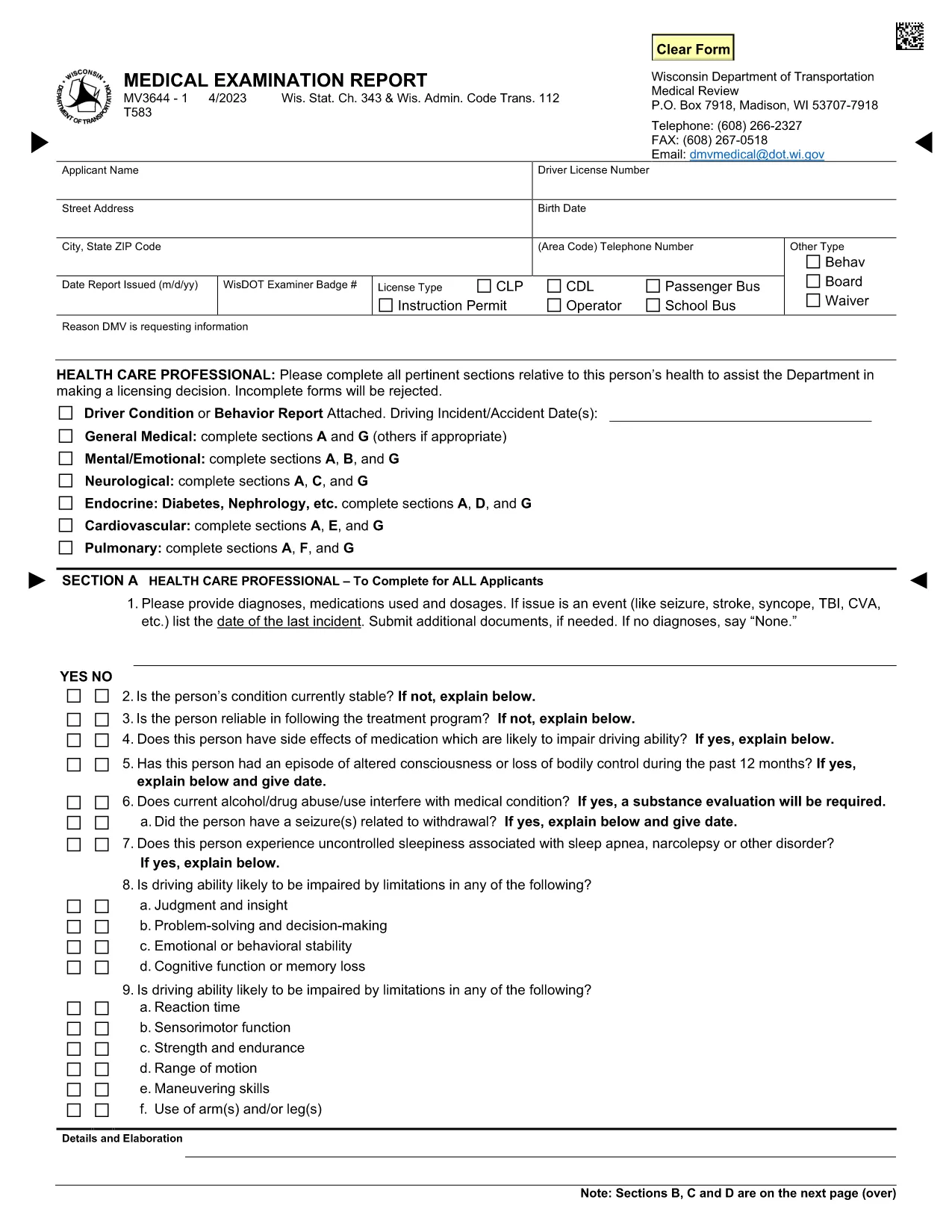
MV3644 Medical Examination Report – Fillable PDF Form

  1. 言語 英語
  2. アメリカ合衆国
  3. アクティビティ 運転免許証
  4. ウィスコンシン州
MV3644 Medical Examination Report – Fillable PDF Form

The MV3644 Medical Examination Report is the official form used by the Wisconsin Department of Transportation (WisDOT) to evaluate the medical fitness of commercial driver’s license (CDL) applicants and renewals. This fillable PDF lets healthcare providers record vital health information quickly and securely.

Using the online fillable PDF MV3644 saves you time, eliminates the need for printing, scanning, or faxing, and ensures that every required field is completed correctly. The form is accepted by the Wisconsin DMV for all CDL medical examinations.

Key sections of the MV3644 include applicant details, medical history, physical examination findings, medications, and the provider’s certification. Accurate completion helps avoid delays in license processing.

よくある質問
  • Who must complete the MV3644 form?

    The MV3644 must be completed by a licensed healthcare provider for any driver applying for or renewing a commercial driver’s license (CDL) in Wisconsin.

  • Can I print the MV3644 form and fill it by hand?

    While a handwritten version is technically accepted, using the fillable PDF reduces errors and speeds up processing. Many DMV offices prefer the electronic version.

  • How often do I need a new MV3644?

    A new MV3644 is required for each CDL application, renewal, or when the examiner determines a follow‑up examination is necessary (usually every 2‑5 years depending on age and medical history).

  • What happens if I miss a required field?

    The Wisconsin DMV will reject an incomplete MV3644, causing delays. The Formize filler highlights missing data, helping you avoid this issue.

  • Do I need to submit the original signed form?

    WisDOT accepts the electronically signed PDF as the original document. Keep a copy for your records.

  • Is the MV3644 form accepted for non‑commercial licenses?

    No. The MV3644 is specifically for commercial driver’s licenses and related endorsements.

  • Can I save my progress and return later?

    Yes. The Formize PDF Filler allows you to save a draft locally and continue editing at any time before final submission.

  • Where do I send the completed MV3644?

    Submit the completed form to the Wisconsin Department of Transportation’s Driver Licensing division, either electronically via their portal or by mailing the printed copy to the address on the form.

方法

オンラインで 6 回の簡単なステップで MV3644 を無料で入力する方法:

  1. 1
    Click the Fill‑out Button
    On this page, click the “Fill out this form” button. The Formize PDF Filler app will open in a new tab.
  2. 2
    Formize PDF Filler Loads
    The fillable MV3644 PDF loads instantly. No download or extra software is required.
  3. 3
    Enter the Required Information
    Complete each section – applicant data, medical history, physical exam findings, medications, and examiner certification – using your keyboard or touch screen.
  4. 4
    Review and Validate
    Use the built‑in validation to ensure all mandatory fields are filled. Correct any highlighted errors before proceeding.
  5. 5
    E‑sign or Add a Signature Image
    When the examiner is ready, click the signature field to add an electronic signature or upload a scanned signature image.
  6. 6
    Save or Download the Completed Form
    After confirming all data, click “Save” to store the form in your browser or “Download” to get a copy you can submit to WisDOT.
Formize PDF Filler アプリ
だいたい

運転免許申請書

ほとんどの国では、道路に出る前に運転免許証を取得することが義務付けられています。車を運転したい人にとって、運転免許の取得は重要なマイルストーンです。

MV3644 は、運転免許を申請する人から情報を収集するために使用される文書である運転免許申請書の 1 つです。通常、申請者の名前、生年月日、ID 番号、連絡先情報、および運転免許証の履歴と経験のフィールドが含まれています。

特徴

PDFフィラー

オンラインで PDF フォームに記入する最も簡単な方法

  • MV3644 をすばやく入力してください
    MV3644 をオンラインですばやく入力する方法をお探しですか?オンラインの無料 PDF フォーム フィラーを使用すると、この PDF ドキュメントを 1 分以内に編集して入力する方法がわかります。
  • 使いやすいオンライン PDF エディター
    再スキャンして返送する前に、編集できるように PDF ファイルを印刷することにうんざりしていませんか? PDFドキュメントをオンラインで無料で編集.当社のオンライン PDF エディターを使用して、時間と紙を節約してください。
  • 優れたツール、すべてのプラットフォーム
    Mac で MV3644 を入力する方法や、PDF フィラーを無料で使用する方法を知りたいですか?当社のオンライン PDF ツールは、すべてのプラットフォームで動作します。
  • 安全なファイル ストレージ
    完成した「MV3644」ファイルは、Amazon クラウド ホスティングが管理する安全なデータベースに保存されます。いつでもシステムからファイルを削除できます。いずれにせよ、これらのファイルは 24 時間後に自動的に削除されます。
  • {キーワード} とチャットする
    無料の PDF リーダー アシスタントである Chatize で「MV3644」とチャットします。質問すると、「MV3644」から回答が得られます。上の [ドキュメントとチャット] ボタンをクリックするだけです。

フィルセッションを削除

選択したフィルセッションを削除しますか?この場合、フォームへの記入の進捗状況は失われます。

編集セッションを削除する

選択した編集セッションを削除しますか?この場合、フォームの作成および編集の進行状況は失われます。