
言語を選択する

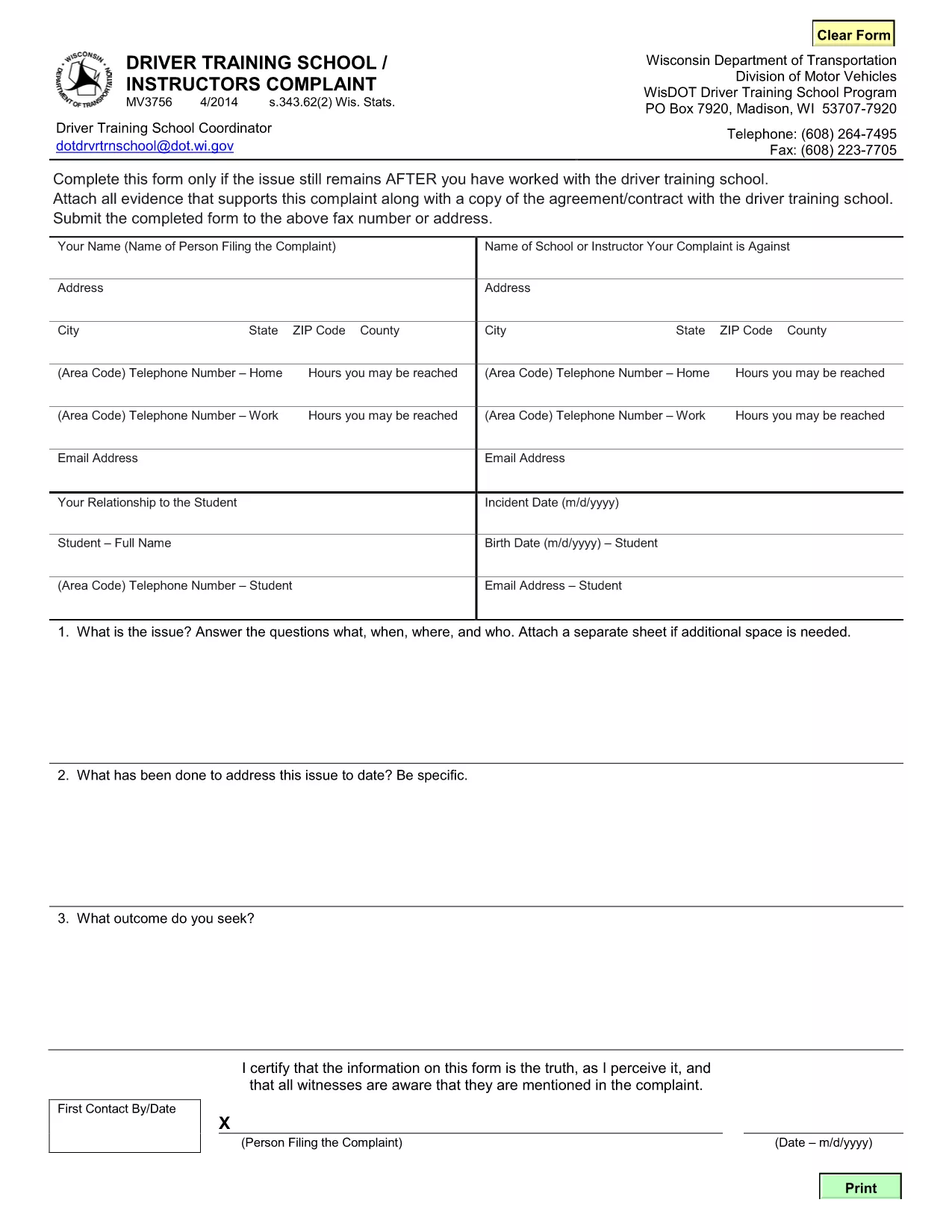
MV3756 Driver Training School & Instructor Complaint Form

  1. 言語 英語
  2. アメリカ合衆国
  3. アクティビティ 運転免許証
  4. ウィスコンシン州
MV3756 Driver Training School & Instructor Complaint Form

The MV3756 is the official Wisconsin Department of Transportation (WisDOT) complaint form used to report issues with driver training schools or instructors. Whether you experienced inadequate instruction, contract violations, or safety concerns, this fillable PDF lets you submit a detailed complaint quickly.

Formize hosts a secure, browser‑based PDF filler so you never need to download, print, or scan the document. Just click the button, fill the fields, and submit the completed form directly to WisDOT.

Below you’ll find step‑by‑step instructions, common pitfalls to watch out for, and answers to the most frequently asked questions about the MV3756 form.

よくある質問
  • What type of issues can I report with MV3756?

    The form covers any misconduct by a driver‑training school or instructor, including contract breaches, unsafe training practices, or failure to provide promised services.

  • Do I need a Wisconsin address to use this form?

    No. The MV3756 can be submitted by anyone who has taken a driver‑training course in Wisconsin, regardless of where you currently reside.

  • Can I submit the form without attachments?

    While attachments are optional, providing copies of agreements, receipts, or photos greatly strengthens your complaint and speeds up processing.

  • How long does it take for WisDOT to respond?

    WisDOT typically acknowledges receipt within 5‑7 business days and may request additional information before taking action.

  • Is there a fee to file an MV3756 complaint?

    No. Filing the MV3756 form is completely free.

  • What if I make a mistake after submitting?

    Contact the WisDOT Complaint Unit directly (phone or email) and reference your submission ID. They can guide you on amending the complaint.

  • Can I save my progress and finish later?

    Yes. The Formize PDF filler allows you to save a draft locally on your device and reload it when you’re ready to finish.

  • Is my personal information secure?

    Formize uses SSL encryption, and the PDF is stored only for the duration of the session. No data is retained after you submit the form.

方法

オンラインで 5 回の簡単なステップで MV3756 を無料で入力する方法:

  1. 1
    Open the Fillable Form
    Click the **Fill out this form** button on the page. Formize will load the MV3756 PDF directly in your browser.
  2. 2
    Enter Your Information
    Complete each required field—your name, contact details, school name, and a clear description of the issue.
  3. 3
    Attach Supporting Documents
    Use the attachment fields to upload copies of contracts, receipts, or any evidence that supports your complaint.
  4. 4
    Review & Sign
    Double‑check all entries for accuracy, then add your electronic signature using the built‑in signing tool.
  5. 5
    Submit the Form
    Press **Submit**. The completed MV3756 will be securely sent to the Wisconsin DOT’s complaint processing center.
Formize PDF Filler アプリ
だいたい

運転免許申請書

MV3756 は、運転免許証書の一種で、運転免許証の申請や運転免許証に関する各種サービスの申し込みに使用する書類です。これらのフォームは通常、米国陸運局 (DMV) など、特定の管轄区域で運転免許証の発行を担当する部門または機関によって提供されます。

一般的な運転免許証の形式には次のものがあります。

運転免許証申請: このフォームは、新しい運転免許証の申請または既存の運転免許証の更新に使用されます。通常、名前、住所、生年月日、社会保障番号などの個人情報が必要です。

身分証明書: 一部の管轄区域では、申請者の身元と居住地を確認するために特定の身分証明書が必要です。これらには、出生証明書、パスポート、社会保障カードなどの形式が含まれる場合があります。

視力検査: 多くの運転免許証の申請には視力検査フォームが必要です。このフォームでは、認定された医療専門家または眼科専門医が、申請者が運転に最低限必要な視力を満たしていることを証明します。

運転者教育フォーム: 場合によっては、運転者教育修了証明書やインストラクターが署名したフォームなど、運転者教育コースを修了したことを証明する書類の提出が必要になる場合があります。

医学的評価: 特定の病状では、医療専門家による追加のフォームへの記入が必要になる場合があります。これらのフォームは、申請者の運転に対する身体的および精神的な適性を証明します。

住所変更フォーム: 運転免許証所有者が新しい住所に移動した場合、運転免許証情報を更新するために住所変更フォームに記入する必要がある場合があります。

運転免許証フォームは、地元の DMV オフィスから入手するか、DMV の Web サイトからダウンロードできます。申請やサービスのプロセスをスムーズに行うために、必要なフォームを慎重に記入し、添付書類とともに提出することが重要です。

特徴

PDFフィラー

オンラインで PDF フォームに記入する最も簡単な方法

  • MV3756 をすばやく入力してください
    MV3756 をオンラインですばやく入力する方法をお探しですか?オンラインの無料 PDF フォーム フィラーを使用すると、この PDF ドキュメントを 1 分以内に編集して入力する方法がわかります。
  • 使いやすいオンライン PDF エディター
    再スキャンして返送する前に、編集できるように PDF ファイルを印刷することにうんざりしていませんか? PDFドキュメントをオンラインで無料で編集.当社のオンライン PDF エディターを使用して、時間と紙を節約してください。
  • 優れたツール、すべてのプラットフォーム
    Mac で MV3756 を入力する方法や、PDF フィラーを無料で使用する方法を知りたいですか?当社のオンライン PDF ツールは、すべてのプラットフォームで動作します。
  • 安全なファイル ストレージ
    完成した「MV3756」ファイルは、Amazon クラウド ホスティングが管理する安全なデータベースに保存されます。いつでもシステムからファイルを削除できます。いずれにせよ、これらのファイルは 24 時間後に自動的に削除されます。
  • {キーワード} とチャットする
    無料の PDF リーダー アシスタントである Chatize で「MV3756」とチャットします。質問すると、「MV3756」から回答が得られます。上の [ドキュメントとチャット] ボタンをクリックするだけです。

フィルセッションを削除

選択したフィルセッションを削除しますか?この場合、フォームへの記入の進捗状況は失われます。

編集セッションを削除する

選択した編集セッションを削除しますか?この場合、フォームの作成および編集の進行状況は失われます。