
言語を選択する

HSMV 83039 Application Form – Fillable PDF

  1. 言語 英語
  2. アメリカ合衆国
  3. デパートメント Florida Department of Highway Safety and Motor Vehicles
  4. アクティビティ 車両登録
HSMV 83039 Application Form – Fillable PDF

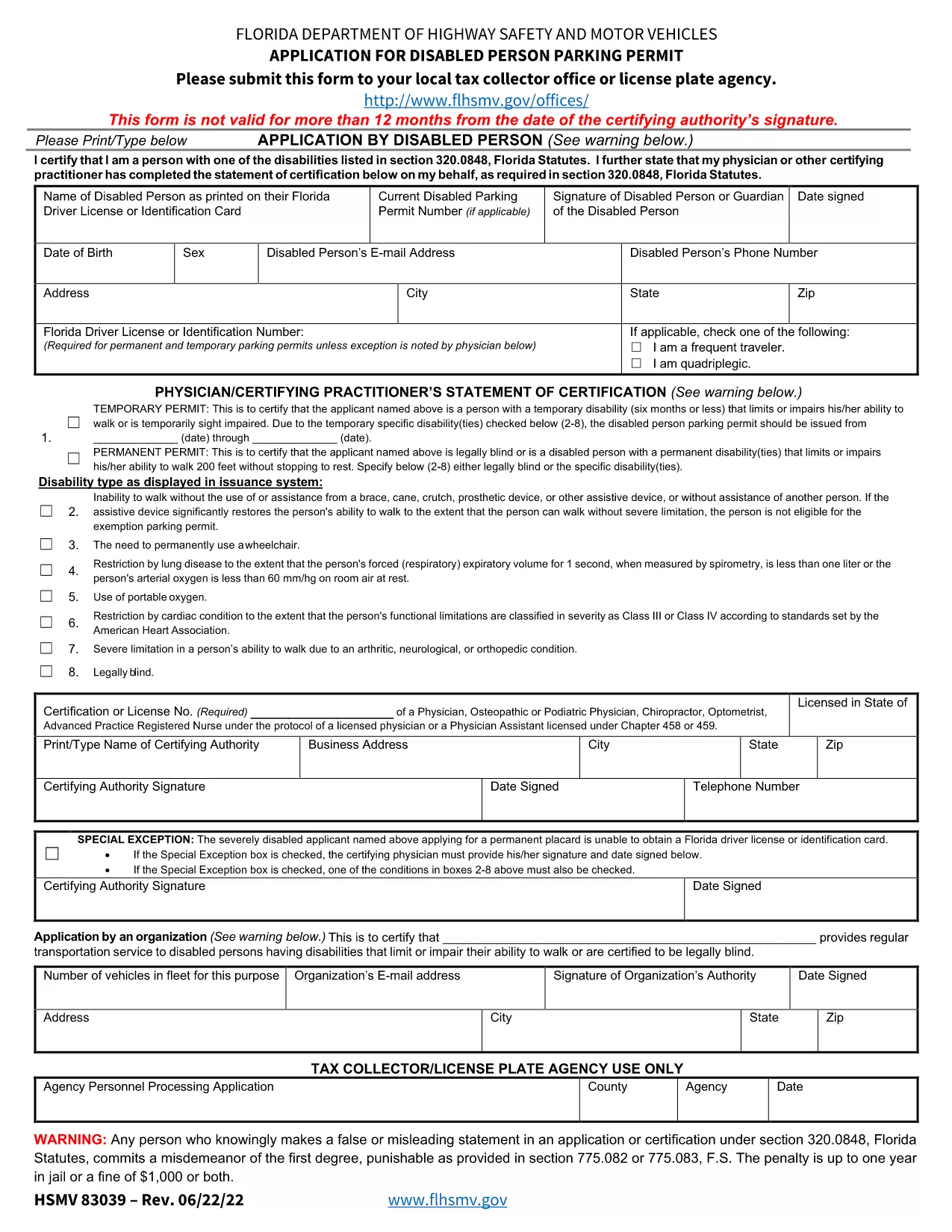
The Form HSMV 83039 is the official Florida Department of Highway Safety and Motor Vehicles (FLHSMV) application for a Disabled Person Parking Permit. Whether you need a permanent or temporary permit, this fillable PDF lets you submit accurate information quickly and securely.

What Is Form HSMV 83039?

This form collects personal details, vehicle information, and a medical certification from an approved health professional. It is required for:

  • Permanent disabled parking permits (valid up to 4 years)
  • Temporary permits for short‑term mobility impairments
  • Replacement permits if the original is lost or stolen

How to Complete the Form Online

Instead of downloading, printing, and scanning, simply click the "Fill out this form" button on this page. The Formize PDF Filler app will load, allowing you to type directly into each field, add signatures, and save a completed copy.

  1. Click Fill out this form and wait for the filler to load.
  2. Enter your personal and vehicle information exactly as it appears on your driver’s license and registration.
  3. Upload a scanned signature or use the built‑in drawing tool for the certifying medical authority.
  4. Review all entries for accuracy; the filler highlights required fields.
  5. Click Download Completed PDF and print or email it to your local tax collector office.

Common Mistakes to Avoid

  • Out‑of‑date medical certification: The physician’s signature must be dated within 12 months of submission.
  • Missing vehicle VIN: The VIN is required for every permit application.
  • Incorrect address: Use the address on your current Florida driver’s license.
  • Skipping the "Physician/Certifying Practitioner’s Statement": This section validates the disability and must be fully completed.

Where to Submit Your Application

After completing the form, you have two options:

  • In‑person: Bring the printed form to any Florida tax collector office or license plate agency.
  • Fax: Certified medical authorities can fax the signed form directly to your local tax collector.

Download the Official PDF

For reference or offline use, you can also download the original PDF from the FLHSMV website.

よくある質問
  • Who can sign the HSMV 83039 form?

    A licensed physician, osteopathic doctor, chiropractor, podiatrist, optometrist, advanced practice registered nurse, or physician assistant may sign. Out‑of‑state physicians are allowed if they provide proof of licensure.

  • How recent must the medical certification be?

    The certifying professional’s signature must be dated within the 12 months preceding your submission.

  • Can I submit the form electronically?

    Only the medical authority can fax the signed form. The applicant must still present a printed copy at the tax collector office.

  • What is the fee for a temporary disabled parking permit?

    A temporary permit costs $15. Permanent permits are issued free of charge.

  • Do I need a separate form to replace a lost permit?

    Yes. Use Form HSMV 83146 for replacement permits, along with a completed HSMV 83039.

  • Is the fillable PDF compatible with mobile devices?

    The Formize PDF Filler works on most modern smartphones and tablets. For best results, use a desktop browser.

  • What happens if I make a mistake on the form?

    You can edit any field before downloading the final PDF. Once printed and signed, you must start a new form if errors are discovered.

  • Where can I find the official PDF version of HSMV 83039?

    The official PDF is available from the Florida DHSMV website at the link provided below.

方法

オンラインで 5 回の簡単なステップで HSMV 83039 を無料で入力する方法:

  1. 1
    Open the Fillable Form
    Click the "Fill out this form" button on the page. The Formize PDF Filler app will launch in your browser.
  2. 2
    Enter Your Information
    Type your personal, vehicle, and medical details into the highlighted fields. Use the drop‑down menus where provided.
  3. 3
    Add Signatures
    Upload a scanned signature for yourself and the certifying medical professional, or use the built‑in drawing tool.
  4. 4
    Validate & Download
    Review the completed form, click the validation button, then download the finished PDF to print or email.
  5. 5
    Submit the Application
    Take the printed form to your local tax collector office or have the certifying authority fax it directly.
Formize PDF Filler アプリ
だいたい

車両登録フォーム

HSMV 83039 は車両登録フォームの 1 つで、関連する政府機関 (通常は陸運局 (DMV) または同等の機関) に自動車を登録するために使用される文書です。これらのフォームは、人が新車または中古車を購入する場合、車の所有権を譲渡する場合、または車を持って新しい管轄区域に移動する場合に必要となります。

特定の車両登録フォームは管轄区域によって異なる場合がありますが、通常は次の情報が必要です。

車両情報: これには、メーカー、モデル、年式、車両識別番号 (VIN)、走行距離計の読み取り値などの車両に関する詳細が含まれます。

所有者情報: フォームには、名前、住所、連絡先情報、運転免許証番号など、車両の所有者に関する情報が必要です。

所有権の証明: 状況に応じて、権利証明書、販売請求書、メーカーの製造元証明書 (新車の場合) などの所有権の証明が必要になる場合があります。

保険情報: 通常、有効な車両保険補償の証明が必要です。これには、保険証券番号、補償期間、保険会社の詳細の提供が含まれる場合があります。

料金の支払い: 車両の登録には、登録手数料、税金、場合によっては管轄区域に固有のその他の料金など、さまざまな料金の支払いが伴います。

これらの基本要件に加えて、一部の管轄区域では追加のフォームまたは文書要件がある場合があります。たとえば、特定の地域では、排出ガス試験の結果、安全検査、居住証明が必要になる場合があります。

車両登録フォームに記入して提出すると、政府当局は登録証明書、ナンバープレート、登録ステッカーを発行します。これらの書類は、車両が法的に登録され、公道での走行が許可されていることを示します。

車両の登録要件は管轄区域によって大きく異なる場合があることに注意することが重要です。したがって、お住まいの地域に適用される特定のフォームおよび手順については、地元の DMV または同等の機関に問い合わせることをお勧めします。

特徴

PDFフィラー

オンラインで PDF フォームに記入する最も簡単な方法

  • HSMV 83039 をすばやく入力してください
    HSMV 83039 をオンラインですばやく入力する方法をお探しですか?オンラインの無料 PDF フォーム フィラーを使用すると、この PDF ドキュメントを 1 分以内に編集して入力する方法がわかります。
  • 使いやすいオンライン PDF エディター
    再スキャンして返送する前に、編集できるように PDF ファイルを印刷することにうんざりしていませんか? PDFドキュメントをオンラインで無料で編集.当社のオンライン PDF エディターを使用して、時間と紙を節約してください。
  • 優れたツール、すべてのプラットフォーム
    Mac で HSMV 83039 を入力する方法や、PDF フィラーを無料で使用する方法を知りたいですか?当社のオンライン PDF ツールは、すべてのプラットフォームで動作します。
  • 安全なファイル ストレージ
    完成した「HSMV 83039」ファイルは、Amazon クラウド ホスティングが管理する安全なデータベースに保存されます。いつでもシステムからファイルを削除できます。いずれにせよ、これらのファイルは 24 時間後に自動的に削除されます。
  • {キーワード} とチャットする
    無料の PDF リーダー アシスタントである Chatize で「HSMV 83039」とチャットします。質問すると、「HSMV 83039」から回答が得られます。上の [ドキュメントとチャット] ボタンをクリックするだけです。

フィルセッションを削除

選択したフィルセッションを削除しますか?この場合、フォームへの記入の進捗状況は失われます。

編集セッションを削除する

選択した編集セッションを削除しますか?この場合、フォームの作成および編集の進行状況は失われます。