
言語を選択する

New Voter Registration Application – Fillable PDF

  1. 言語 英語
  2. アメリカ合衆国
  3. アクティビティ Elections
  4. デパートメント Florida Department of State
New Voter Registration Application – Fillable PDF

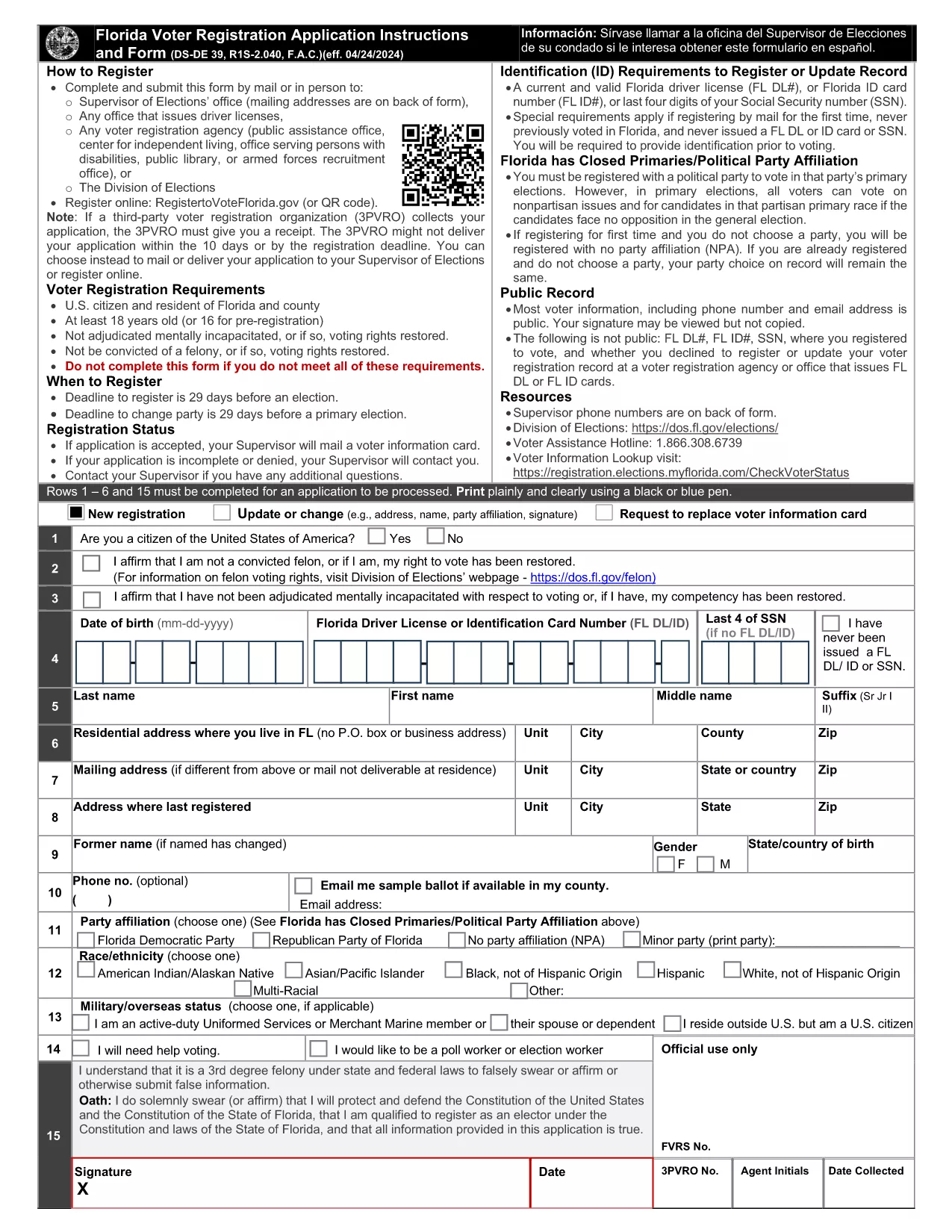
Registering to vote is a civic duty, and the easiest way to get started is with a fillable PDF voter registration form. The Florida New Voter Application is available for instant download, and with Formize’s PDF Filler you can complete it entirely online—no printing, scanning, or faxing required.

Why Choose a Fillable PDF Form?

  • Fully searchable and editable fields that guide you step‑by‑step.
  • Save time: fill, sign, and submit in minutes.
  • Secure and compliant with state election standards.
  • Accessible on any device—desktop, tablet, or smartphone.

How to Complete the Form Online with Formize

Simply click the "Fill out this form" button on this page. The Formize PDF Filler app will load the PDF directly in your browser. Follow the on‑screen prompts to enter your personal details, address, and citizenship information.

Common Mistakes to Avoid

  • Leaving required fields blank – the filler will highlight missing information.
  • Using an outdated address – double‑check spelling and ZIP code.
  • Forgetting to sign electronically – the signature field is mandatory.
  • Submitting an unsigned form – the system will block incomplete submissions.

Submission Guidelines & What Happens Next

After you finish, click "Submit" to download a completed copy. Print the signed page (if required by your county) and mail it to the address listed on the form, or deliver it in person to a local Florida Department of State office.

Eligibility Requirements

To be eligible for this form you must be a U.S. citizen, at least 18 years old on Election Day, and a resident of Florida. If you are 16‑17 years old, you may complete the form but cannot vote until you turn 18.

Ready to become a registered voter? Click the button below and start the process instantly.

よくある質問
  • Do I need to print the form after filling it online?

    Most Florida counties accept a printed copy of the completed form. If your local office accepts electronic submissions, you can email the PDF directly.

  • Can I save my progress and finish later?

    Yes. The Formize PDF Filler allows you to save a draft to your device and resume at any time before you submit.

  • What if I make a mistake after submitting?

    Contact your county Supervisor of Elections to request a correction. You may need to fill out a new form if the error is significant.

  • Is the electronic signature legally binding?

    Florida law recognizes electronic signatures on voter registration forms as long as the signer follows the on‑screen instructions.

  • How long does it take for my registration to be processed?

    The state typically processes paper registrations within 30 days. You can check your status online using the Florida Voter Registration portal.

方法

オンラインで 4 回の簡単なステップで new voter registration を無料で入力する方法:

  1. 1
    Open the Fillable Form
    Click the "Fill out this form" button on the page. The Formize PDF Filler will load the voter application directly in your browser.
  2. 2
    Enter Your Information
    Complete each highlighted field—name, address, date of birth, citizenship, and party affiliation. The filler validates entries in real time.
  3. 3
    Sign Electronically
    Use the signature field to add your electronic signature. This step is required for the form to be accepted.
  4. 4
    Review & Submit
    Double‑check all information, then click "Submit" to generate a completed PDF. Download, print (if needed), and mail it to the address on the form.
Formize PDF Filler アプリ
だいたい

new voter registration テンプレート

PDF ドキュメントを表示および入力するための従来の一連の機能に、Web アプリケーションおよびレスポンシブ レイアウトの利点を組み合わせることで、数分で new voter registration を完成させることができます。
特徴

PDFフィラー

オンラインで PDF フォームに記入する最も簡単な方法

  • new voter registration をすばやく入力してください
    new voter registration をオンラインですばやく入力する方法をお探しですか?オンラインの無料 PDF フォーム フィラーを使用すると、この PDF ドキュメントを 1 分以内に編集して入力する方法がわかります。
  • 使いやすいオンライン PDF エディター
    再スキャンして返送する前に、編集できるように PDF ファイルを印刷することにうんざりしていませんか? PDFドキュメントをオンラインで無料で編集.当社のオンライン PDF エディターを使用して、時間と紙を節約してください。
  • 優れたツール、すべてのプラットフォーム
    Mac で new voter registration を入力する方法や、PDF フィラーを無料で使用する方法を知りたいですか?当社のオンライン PDF ツールは、すべてのプラットフォームで動作します。
  • 安全なファイル ストレージ
    完成した「new voter registration」ファイルは、Amazon クラウド ホスティングが管理する安全なデータベースに保存されます。いつでもシステムからファイルを削除できます。いずれにせよ、これらのファイルは 24 時間後に自動的に削除されます。
  • {キーワード} とチャットする
    無料の PDF リーダー アシスタントである Chatize で「new voter registration」とチャットします。質問すると、「new voter registration」から回答が得られます。上の [ドキュメントとチャット] ボタンをクリックするだけです。

フィルセッションを削除

選択したフィルセッションを削除しますか?この場合、フォームへの記入の進捗状況は失われます。

編集セッションを削除する

選択した編集セッションを削除しますか?この場合、フォームの作成および編集の進行状況は失われます。