言語を選択する

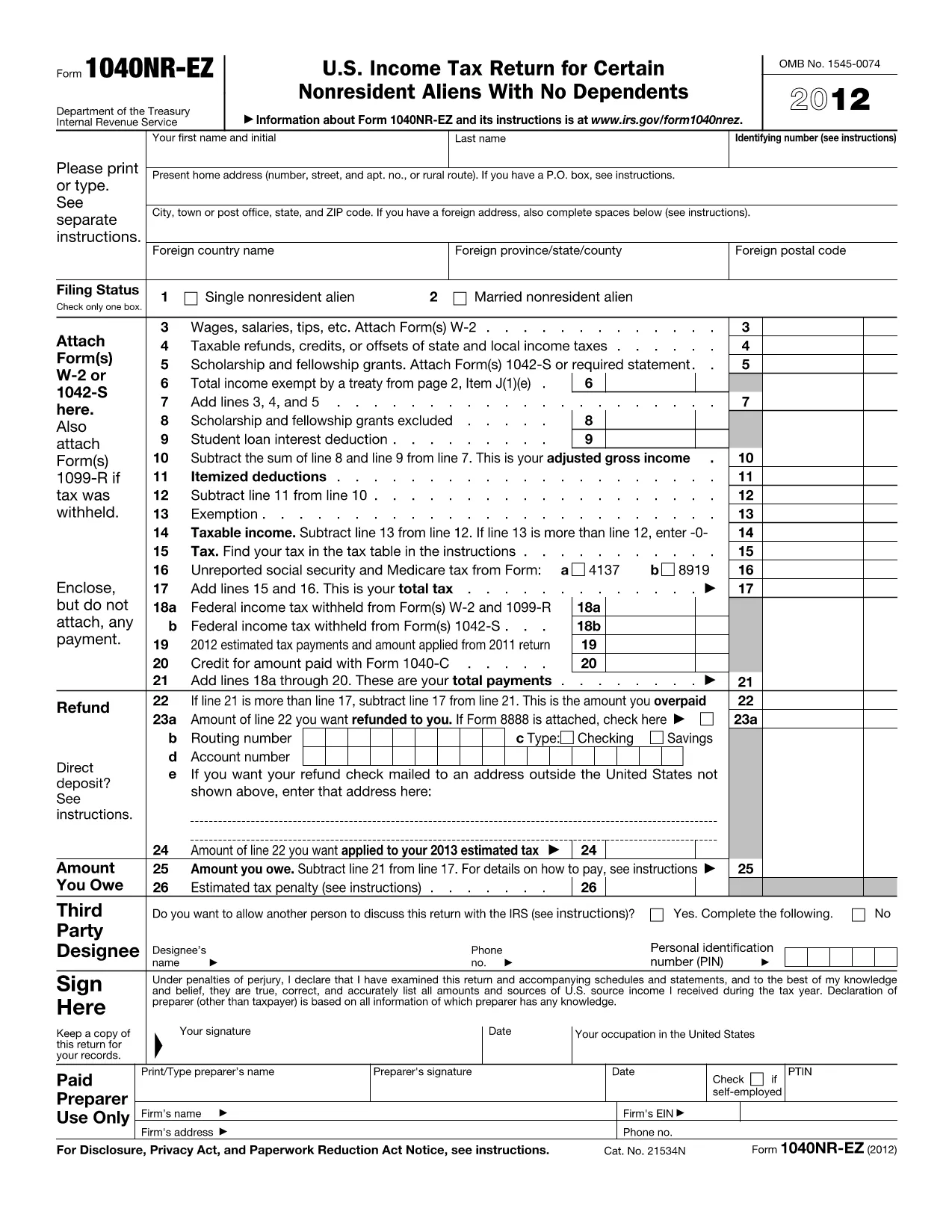
1040NR EZ Tax Form – Download Fillable PDF

  1. アメリカ合衆国
  2. 言語 英語
  3. アクティビティ 税金
  4. デパートメント IRS
1040NR EZ Tax Form – Download Fillable PDF

Looking for a quick way to download and complete the IRS 1040NR EZ tax form? You’ve come to the right place. Our fillable PDF lets you enter all required information directly in your browser, then save or print the final document for submission.

Why Choose the Fillable 1040NR EZ PDF?

The fillable version eliminates the hassle of printing, writing, and scanning. It’s fully compatible with Formize’s online PDF filler, which automatically validates fields, calculates totals, and ensures the layout matches the official IRS version.

How to Complete the 1040NR EZ Form Online

Follow these simple steps to finish your non‑resident tax return without leaving the page:

  1. Click the "Fill out this form" button below.
  2. Wait a few seconds while the Formize PDF Filler app loads.
  3. Enter your personal details, income information, and any applicable deductions.
  4. Review the automatically calculated tax amount.
  5. Save the completed PDF to your computer or export it directly to your preferred cloud storage.

Common Mistakes to Avoid on the 1040NR EZ

  • Incorrect filing status: Verify you qualify for the "EZ" version before starting.
  • Missing Social Security Number or ITIN: The form will flag empty required fields.
  • Math errors: The online filler auto‑calculates totals, preventing simple arithmetic mistakes.
  • Wrong address format: Use the exact mailing address shown on your IRS notice.

Where to Submit Your Completed Form

After saving the filled PDF, mail it to the IRS address listed in the form’s instructions, or submit it electronically if you’re using an authorized e‑file provider. Keep a copy for your records.

Ready to get started? Click the button below and let Formize handle the rest.

よくある質問
  • Is the 1040NR EZ form available for free?

    Yes. The fillable PDF is free to download and complete using Formize’s online filler.

  • Can I edit the form after I save it?

    Absolutely. Open the saved PDF again in Formize’s filler to make changes before final submission.

  • Do I need a special PDF reader to fill the form?

    No. The Formize PDF Filler works directly in your web browser—no extra software required.

  • What if I make a mistake while filling the form?

    The online filler validates required fields and calculations, but you can always go back and edit any section before saving.

  • Where should I mail the completed 1040NR EZ?

    The mailing address is printed on the last page of the form’s instructions. Use the address that corresponds to your state of residence.

  • Is the fillable PDF accepted by the IRS?

    Yes. The PDF maintains the exact layout and field positions of the official IRS version, so it is fully compliant.

方法

オンラインで 5 回の簡単なステップで 1040NR EZ を無料で入力する方法:

  1. 1
    Open the Fillable Form
    Click the "Fill out this form" button on the page to launch the Formize PDF Filler.
  2. 2
    Load the Formize App
    Wait a few seconds while the online filler loads – it works in all modern browsers.
  3. 3
    Enter Your Information
    Fill each field with your personal and income details. Required fields are highlighted.
  4. 4
    Review and Save
    Check the auto‑calculated totals, then save the completed PDF to your computer or cloud storage.
  5. 5
    Submit to the IRS
    Print and mail the form to the IRS address, or use an approved e‑file service if you prefer electronic submission.
Formize PDF Filler アプリ
だいたい

納税フォーム

1040NR EZ は税務フォームの 1 つで、個人または企業の収入、控除、納税義務に関する情報を関連する税務当局に報告するために使用される文書です。これらのフォームは税法を遵守し、納税義務を果たすために必要です。納税フォームは国と適用される特定の税金要件によって異なります。一般的な納税フォームのいくつかを次に示します。

個人納税フォーム: これらのフォームは、個人の納税者が個人所得を報告し、控除、控除、免除を申請するために使用します。例としては、米国の1040 フォームや英国の自己申告納税申告書などがあります。

事業税フォーム: 事業税フォームは、企業、パートナーシップ、または自営業者が事業収入、経費、その他の税関連情報を報告するために使用します。例には、米国のスケジュール C フォーム (事業からの損益) や英国の CT600 フォーム (法人税申告書) が含まれます。

給与税フォーム: これらのフォームは、雇用主が従業員の給与から源泉徴収された賃金、給与、税金を報告するために使用されます。例としては、米国の W-2 形式や英国の P60 形式などが挙げられます。

売上税フォーム: 売上税フォームは、企業が課税対象の商品またはサービスに対して徴収した売上税を報告および納付するために使用されます。特定の売上税フォームは管轄区域によって異なります。

付加価値税 (VAT) フォーム: VAT フォームは、販売に対して徴収された VAT を報告および送金し、購入に対する VAT クレジットを請求するために、付加価値税を課す国で使用されます。例には、多くの国で使用されている VAT 申告書が含まれます。

見積納税フォーム: 見積納税フォームは、自営業収入や投資収入など、源泉徴収の対象とならない所得に対する見積税を報告し、支払うために使用されます。

これらは、存在する可能性のある多数の納税フォームのほんの一例です。必要な特定のフォームは、お住まいの国または管轄区域の税法および規制によって異なります。どのフォームが自分の状況に適用できるかを判断するには、税務当局のガイドラインを参照するか、専門家のアドバイスを求めることが重要です。

特徴

PDFフィラー

オンラインで PDF フォームに記入する最も簡単な方法

  • 1040NR EZ をすばやく入力してください
    1040NR EZ をオンラインですばやく入力する方法をお探しですか?オンラインの無料 PDF フォーム フィラーを使用すると、この PDF ドキュメントを 1 分以内に編集して入力する方法がわかります。
  • 使いやすいオンライン PDF エディター
    再スキャンして返送する前に、編集できるように PDF ファイルを印刷することにうんざりしていませんか? PDFドキュメントをオンラインで無料で編集.当社のオンライン PDF エディターを使用して、時間と紙を節約してください。
  • 優れたツール、すべてのプラットフォーム
    Mac で 1040NR EZ を入力する方法や、PDF フィラーを無料で使用する方法を知りたいですか?当社のオンライン PDF ツールは、すべてのプラットフォームで動作します。
  • 安全なファイル ストレージ
    完成した「1040NR EZ」ファイルは、Amazon クラウド ホスティングが管理する安全なデータベースに保存されます。いつでもシステムからファイルを削除できます。いずれにせよ、これらのファイルは 24 時間後に自動的に削除されます。
  • {キーワード} とチャットする
    無料の PDF リーダー アシスタントである Chatize で「1040NR EZ」とチャットします。質問すると、「1040NR EZ」から回答が得られます。上の [ドキュメントとチャット] ボタンをクリックするだけです。

フィルセッションを削除

選択したフィルセッションを削除しますか?この場合、フォームへの記入の進捗状況は失われます。

編集セッションを削除する

選択した編集セッションを削除しますか?この場合、フォームの作成および編集の進行状況は失われます。