言語を選択する

IRS Form 14039 – Fillable Identity Theft Affidavit PDF

  1. 国 アメリカ合衆国
  2. 言語 英語
  3. アクティビティ 税金
  4. デパートメント IRS
IRS Form 14039 – Fillable Identity Theft Affidavit PDF

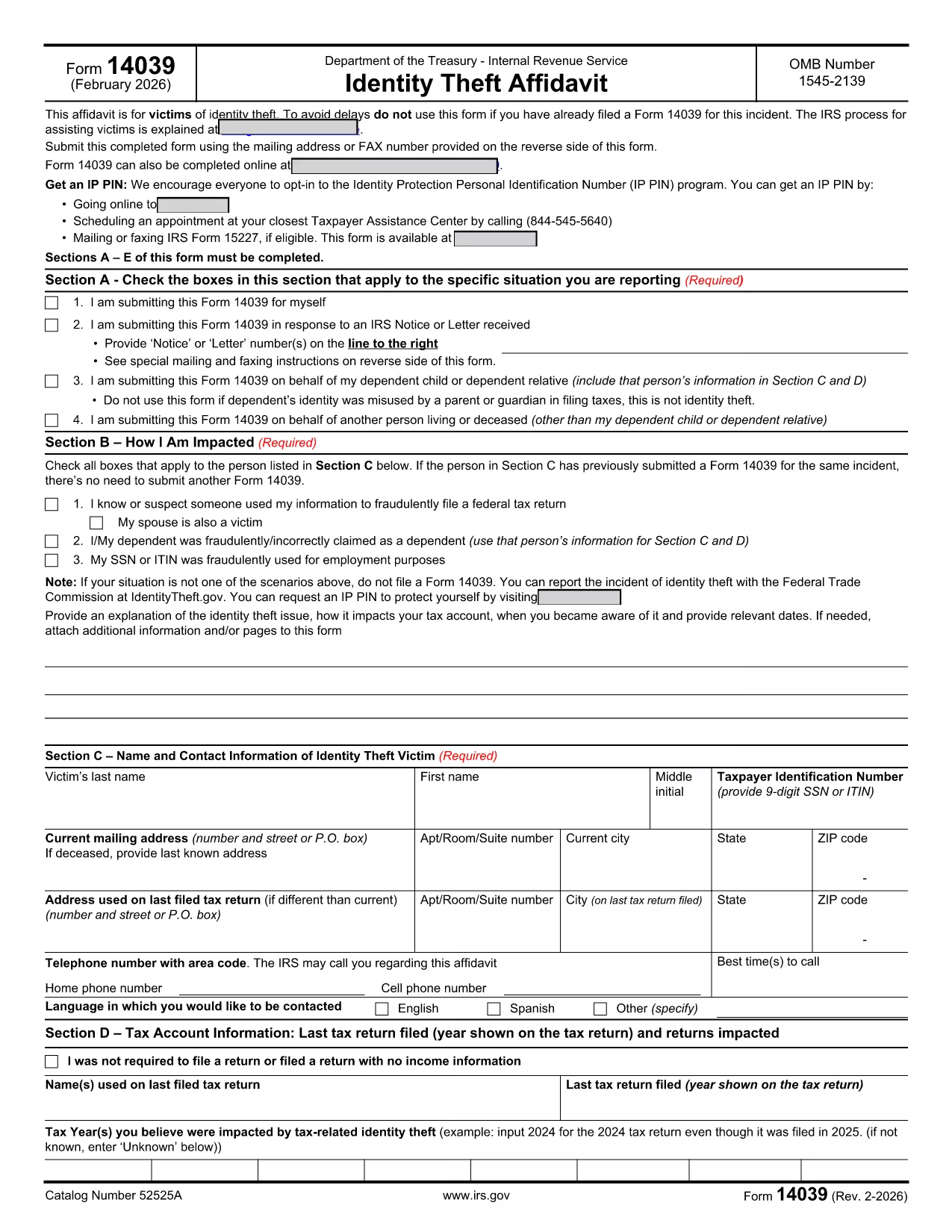
IRS Form 14039, also known as the Identity Theft Affidavit, is the official document you use to report tax‑related identity theft to the Internal Revenue Service. Whether your Social Security number or ITIN has been misused for a fraudulent return, employment, or any other purpose, this form lets you alert the IRS quickly and securely.

Formize.com hosts a fully fillable PDF version of Form 14039, so you can complete the affidavit directly in your browser—no extra software required. Just click the “Fill out this form” button, wait for the Formize PDF Filler app to load, and start entering your information.

What Is IRS Form 14039?

The form is a two‑page affidavit that collects personal details, a description of the identity‑theft incident, and the tax years affected. It is required whenever the IRS notifies you of a suspected fraud or when you discover unauthorized use of your taxpayer information.

Key Sections of the Form

  • Section A – Type of Situation: Choose why you are filing (self‑initiated, response to IRS notice, etc.).
  • Section B – How You Are Impacted: Check the boxes that match your experience (e.g., fraudulent return filed, SSN used for employment).
  • Section C – Victim Contact Information: Provide your name, SSN/ITIN, mailing address, and phone number.
  • Section D – Tax Account Information: List the tax year(s) you believe were compromised.
  • Section E – Penalty of Perjury & Signature: Sign under penalty of perjury to certify the information is true.
  • Section F – Representative Information: Fill out only if you are filing on behalf of someone else.

How to Complete the Form Online

Follow the simple steps below to submit a completed Form 14039 using Formize’s fillable PDF:

Common Mistakes to Avoid

  • Leaving any required field blank – the PDF validator will block submission.
  • Using an outdated version of the form. Always download the latest PDF (Rev. 2‑2026) from the IRS.
  • Forgetting to sign the affidavit. An unsigned form will be returned.
  • Submitting the form to the wrong address. Follow the mailing/fax instructions on the reverse side.

Where to Submit the Completed Form

After you finish, you can either:

  • Print the PDF and mail it to the address listed in the form’s instructions.
  • Fax it to the number provided on the reverse side.
  • Attach the PDF to a secure message in your IRS online account (if available).

Using Formize’s fillable version ensures the PDF is correctly formatted, reducing the chance of processing delays.

よくある質問
  • Who should file IRS Form 14039?

    Anyone who believes their SSN or ITIN has been used fraudulently for tax filing, employment, or other purposes should file Form 14039.

  • Can I file Form 14039 electronically?

    The IRS does not currently accept an electronic submission of Form 14039. You must print and mail or fax the completed form.

  • Do I need a lawyer to complete the Identity Theft Affidavit?

    No. The form is designed for individuals to complete on their own. If you have a representative, you can fill out Section F.

  • What if I file the wrong tax year?

    Specify the tax year(s) you suspect were compromised in Section D. If you’re unsure, write “Unknown” and provide any supporting details.

  • How long does the IRS take to respond?

    Processing times vary, but the IRS typically acknowledges receipt within 30 days. They may contact you for additional information.

  • Is the Formize fillable PDF free?

    Yes. Formize provides the fillable version of Form 14039 at no cost.

  • Can I use the same Form 14039 for multiple incidents?

    Each incident should be reported on a separate, newly completed Form 14039.

方法

オンラインで 5 回の簡単なステップで IRS Form 14039 を無料で入力する方法:

  1. 1
    Open the Fillable Form
    Click the “Fill out this form” button on the page. The Formize PDF Filler app will load in a new window.
  2. 2
    Enter Your Information
    Complete each section (A‑F) directly in the browser. The form validates required fields in real time.
  3. 3
    Review and Sign
    Double‑check all entries, then use the built‑in e‑signature tool to add your signature under penalty of perjury.
  4. 4
    Save or Print
    Save the completed PDF to your computer, or print it if you need to mail or fax the affidavit to the IRS.
  5. 5
    Submit to the IRS
    Follow the mailing or fax instructions on the reverse side of the form, or upload the PDF through your IRS online account.
Formize PDF Filler アプリ
だいたい

連邦税フォーム

IRS Form 14039 は連邦税フォームの 1 つで、米国の内国歳入庁 (IRS) に連邦所得税を報告および提出するために使用される文書です。これらのフォームは、個人、企業、組織が連邦税負担の計算に必要な所得、控除、その他の関連情報を報告するために使用されます。

最も一般的に使用される連邦税フォームはフォーム 1040 で、個人の納税者が個人所得税を報告するために使用します。その他の一般的に使用されるフォームには、パートナーシップ用の フォーム 1065、フォーム 1120、非課税組織の場合はフォーム 990。

連邦税フォームでは通常、納税者に対し、賃金、給与、チップなどのさまざまな収入源のほか、投資、賃貸不動産、その他の収入源からの収入を報告するよう求めています。このフォームを使用すると、納税者は慈善寄付金、住宅ローン利子、医療費などのさまざまな費用の控除やクレジットを請求することもできます。

連邦税フォームを正確かつ期限内に提出することが重要です。これを怠ると、IRS から罰金や利息が課される可能性があります。

特徴

PDFフィラー

オンラインで PDF フォームに記入する最も簡単な方法

  • IRS Form 14039 をすばやく入力してください
    IRS Form 14039 をオンラインですばやく入力する方法をお探しですか?オンラインの無料 PDF フォーム フィラーを使用すると、この PDF ドキュメントを 1 分以内に編集して入力する方法がわかります。
  • 使いやすいオンライン PDF エディター
    再スキャンして返送する前に、編集できるように PDF ファイルを印刷することにうんざりしていませんか? PDFドキュメントをオンラインで無料で編集.当社のオンライン PDF エディターを使用して、時間と紙を節約してください。
  • 優れたツール、すべてのプラットフォーム
    Mac で IRS Form 14039 を入力する方法や、PDF フィラーを無料で使用する方法を知りたいですか?当社のオンライン PDF ツールは、すべてのプラットフォームで動作します。
  • 安全なファイル ストレージ
    完成した「IRS Form 14039」ファイルは、Amazon クラウド ホスティングが管理する安全なデータベースに保存されます。いつでもシステムからファイルを削除できます。いずれにせよ、これらのファイルは 24 時間後に自動的に削除されます。
  • {キーワード} とチャットする
    無料の PDF リーダー アシスタントである Chatize で「IRS Form 14039」とチャットします。質問すると、「IRS Form 14039」から回答が得られます。上の [ドキュメントとチャット] ボタンをクリックするだけです。

フィルセッションを削除

選択したフィルセッションを削除しますか?この場合、フォームへの記入の進捗状況は失われます。

編集セッションを削除する

選択した編集セッションを削除しますか?この場合、フォームの作成および編集の進行状況は失われます。