
言語を選択する

IRS Form 56F – Fillable PDF Fiduciary Notice

  1. アメリカ合衆国
  2. 言語 英語
  3. アクティビティ 税金
  4. デパートメント IRS
IRS Form 56F – Fillable PDF Fiduciary Notice

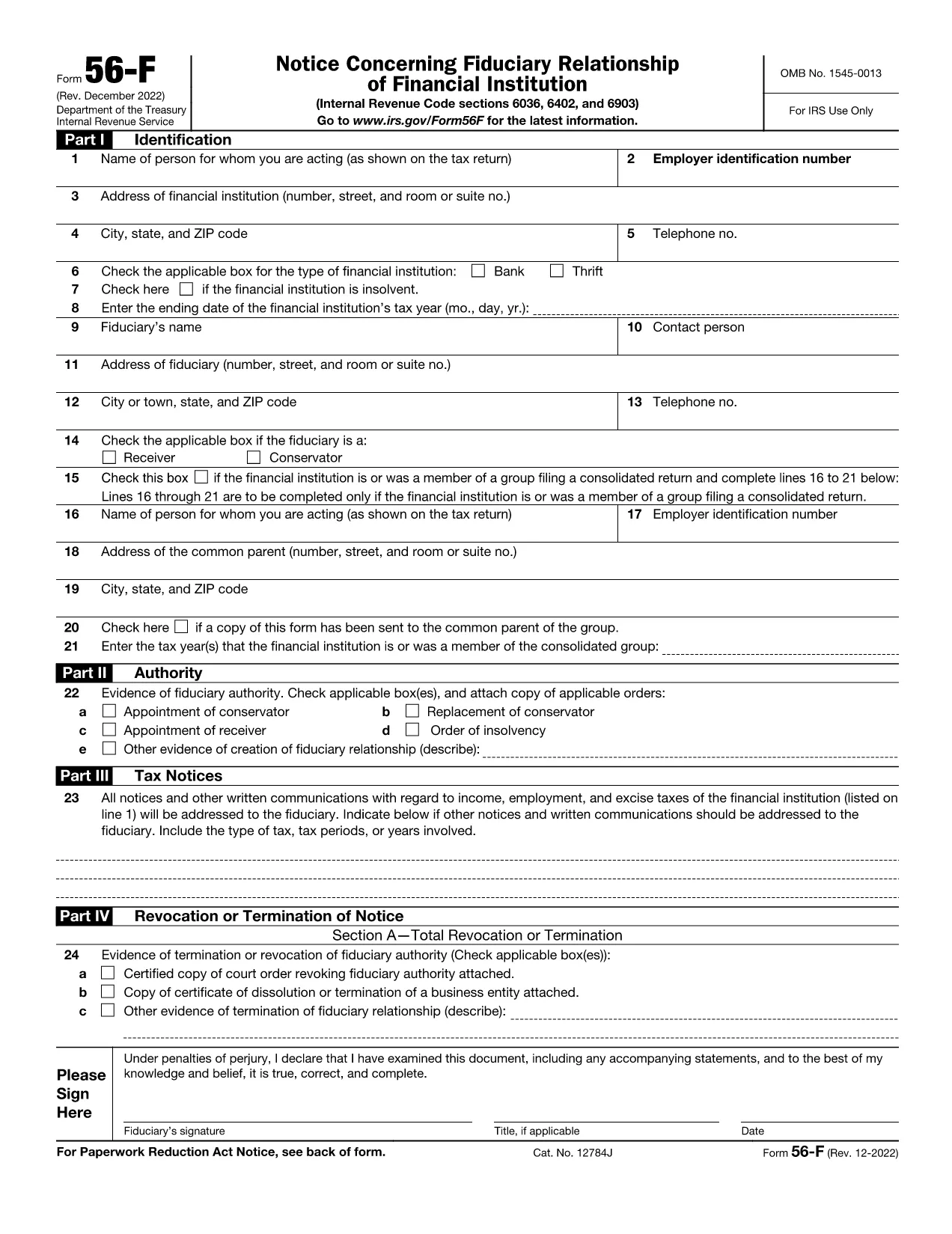
The IRS Form 56F (Fiduciary Notice) is used to inform the Internal Revenue Service of a fiduciary relationship for tax purposes. Whether you are an executor, trustee, or administrator, the form lets the IRS know who is responsible for filing tax returns on behalf of another person or estate.

What Is IRS Form 56F?

Form 56F is required when a fiduciary is appointed to manage the tax affairs of a decedent, an estate, a trust, or another taxpayer. It establishes a clear line of communication between the fiduciary and the IRS, helping prevent mis‑filings and potential penalties.

How to Fill Out Form 56F Online

Instead of downloading the PDF and opening a separate editor, simply click the "Fill out this form" button on this page. The Formize PDF Filler app loads directly in your browser, allowing you to:

  • Enter information into each field with auto‑save.
  • Upload supporting documents.
  • Add an electronic signature that meets IRS requirements.
  • Download, print, or email the completed form instantly.

Common Mistakes to Avoid

  • Leaving fields blank: Every required box must be completed; otherwise, the IRS may reject the submission.
  • Missing signature: Both the fiduciary and, when applicable, the person for whom you act must sign.
  • Incorrect SSN/EIN: Double‑check the numbers to avoid processing delays.
  • Outdated form version: Use the latest PDF (linked below) to ensure compliance.

Where to Submit the Completed Form

After you finish the online fillable version, you can:

  • Mail the printed form to the IRS service center listed in the instructions.
  • Fax the form if you have a fax number for the relevant IRS office.
  • Submit electronically through the IRS e‑file system (if your tax professional supports it).

Download the Fillable PDF

For users who prefer a traditional download, the official fillable PDF is available below. It is the same document that powers the Formize online editor.

Download IRS Form 56F (PDF)

よくある質問
  • Who must file IRS Form 56F?

    Any fiduciary—such as an executor, administrator, or trustee—who is responsible for filing tax returns on behalf of another person, estate, or trust must file Form 56F.

  • Can I submit Form 56F electronically?

    Yes. After completing the fillable PDF with Formize, you can download the file and submit it electronically through an authorized e‑file service or fax it to the IRS if permitted.

  • Do I need a wet ink signature?

    The IRS accepts electronic signatures that meet the requirements of the Electronic Signatures in Global and National Commerce (ESIGN) Act. Formize’s e‑sign tool provides a compliant signature.

  • What supporting documents should I attach?

    Attach a copy of the legal document that appointed you as fiduciary (will, court order, trust agreement) and a valid ID for the fiduciary. Include the decedent’s Social Security number or EIN.

  • How long does it take for the IRS to process Form 56F?

    Processing time varies, but the IRS typically acknowledges receipt within 30 days. Keep a copy of the filed form for your records.

  • Is there a fee to use Formize’s fillable PDF editor?

    Formize offers a free, no‑login version for basic fillable forms like Form 56F. Advanced features are available in paid plans, but the basic fill‑out and e‑sign functions are free.

  • What if I make a mistake after submitting?

    You can file a corrected Form 56F using the same process. Clearly mark the corrected form as “Amended” in the top margin and include an explanation of the changes.

  • Where can I find the official instructions for Form 56F?

    The official IRS instructions are included in the PDF linked above or can be accessed on the IRS website under “Form 56F Instructions.”

方法

オンラインで 5 回の簡単なステップで IRS Form 56F を無料で入力する方法:

  1. 1
    Click the Fill‑out Button
    Press the “Fill out this form” button on the page. The Formize PDF Filler loads instantly in your browser.
  2. 2
    Enter Your Information
    Complete each field. The editor auto‑saves your entries, so you won’t lose data if you navigate away.
  3. 3
    Add Your Electronic Signature
    Use the built‑in e‑sign tool to sign the form. The signature complies with IRS electronic filing rules.
  4. 4
    Review and Submit
    Double‑check all entries, then click “Download” to save a copy, or use the “Email” option to send it directly to your tax professional.
  5. 5
    Print or Mail (if required)
    If the IRS requires a hard copy, print the completed PDF and mail it to the address indicated in the form instructions.
Formize PDF Filler アプリ
だいたい

納税フォーム

IRS Form 56F は、税金に関する情報を関連する税務当局に報告するために使用される文書である納税申告書の 1 つです。納税者の状況や場所によって、連邦税、州税、地方税など、さまざまな種類の納税申告書があります。

特徴

PDFフィラー

オンラインで PDF フォームに記入する最も簡単な方法

  • IRS Form 56F をすばやく入力してください
    IRS Form 56F をオンラインですばやく入力する方法をお探しですか?オンラインの無料 PDF フォーム フィラーを使用すると、この PDF ドキュメントを 1 分以内に編集して入力する方法がわかります。
  • 使いやすいオンライン PDF エディター
    再スキャンして返送する前に、編集できるように PDF ファイルを印刷することにうんざりしていませんか? PDFドキュメントをオンラインで無料で編集.当社のオンライン PDF エディターを使用して、時間と紙を節約してください。
  • 優れたツール、すべてのプラットフォーム
    Mac で IRS Form 56F を入力する方法や、PDF フィラーを無料で使用する方法を知りたいですか?当社のオンライン PDF ツールは、すべてのプラットフォームで動作します。
  • 安全なファイル ストレージ
    完成した「IRS Form 56F」ファイルは、Amazon クラウド ホスティングが管理する安全なデータベースに保存されます。いつでもシステムからファイルを削除できます。いずれにせよ、これらのファイルは 24 時間後に自動的に削除されます。
  • {キーワード} とチャットする
    無料の PDF リーダー アシスタントである Chatize で「IRS Form 56F」とチャットします。質問すると、「IRS Form 56F」から回答が得られます。上の [ドキュメントとチャット] ボタンをクリックするだけです。

フィルセッションを削除

選択したフィルセッションを削除しますか?この場合、フォームへの記入の進捗状況は失われます。

編集セッションを削除する

選択した編集セッションを削除しますか?この場合、フォームの作成および編集の進行状況は失われます。