
言語を選択する

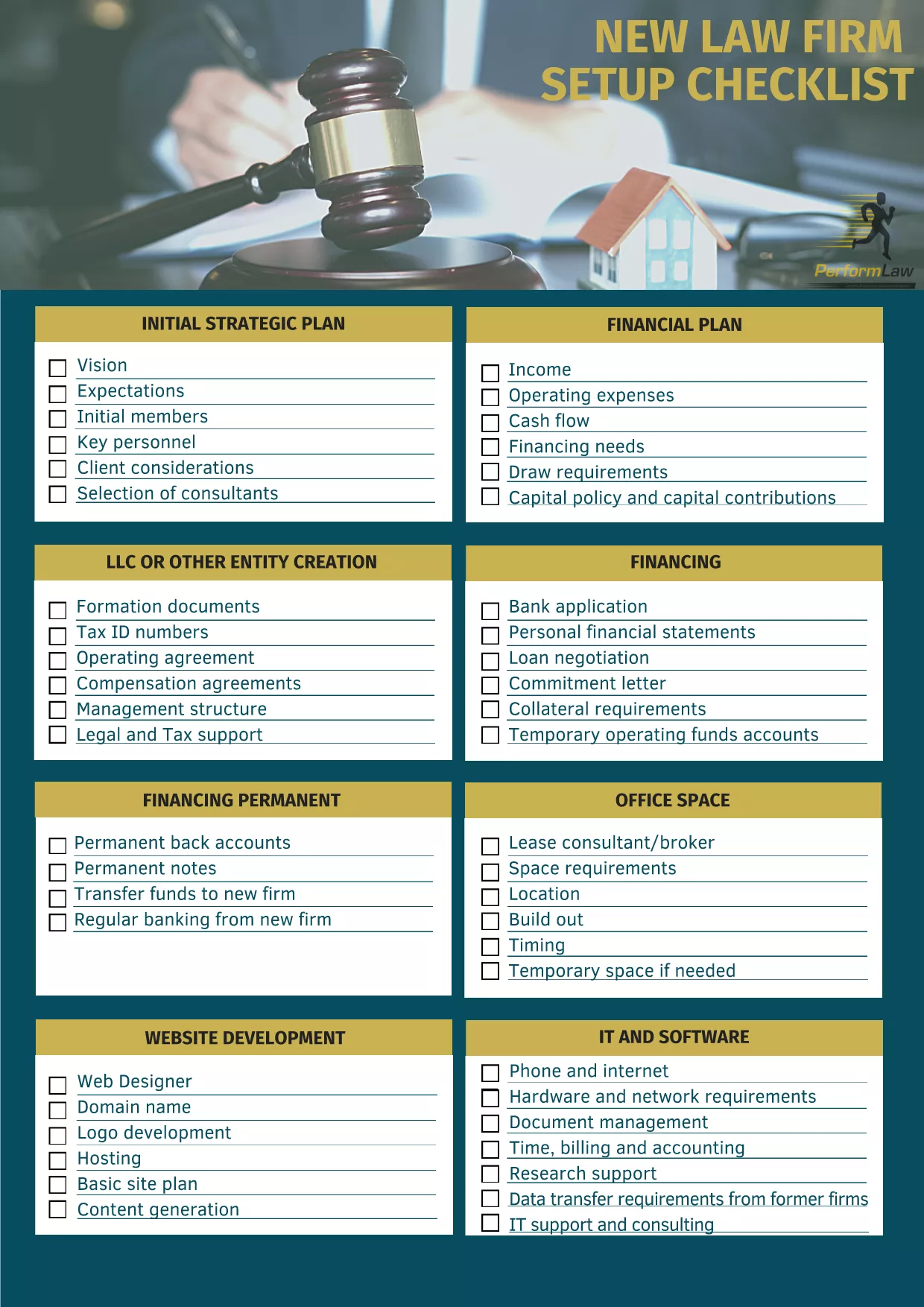
Legal Firm Website Template Checklist – Fillable PDF

  1. 言語 英語
  2. アメリカ合衆国
  3. アクティビティ Legal Services Business Setup
Legal Firm Website Template Checklist – Fillable PDF

Starting a law firm’s online presence can feel overwhelming. Our Legal Firm Website Template Checklist gives you a step‑by‑step, fillable PDF that ensures no critical detail is missed—from branding and navigation to compliance and client intake.

Why Use a Website Template Checklist?

A structured checklist saves time, reduces errors, and aligns your website with professional standards. It’s especially useful for solo practitioners and small firms that need a polished site without hiring a designer.

How to Fill the Checklist Online

Instead of downloading and opening the PDF in a separate editor, simply click the "Fill out this form" button on this page. The Formize PDF Filler app will load instantly, letting you type directly into each field, add dates, and select options.

Key Sections of the Legal Firm Template

  • Branding & Design – logo, color palette, typography.
  • Site Architecture – homepage, practice pages, contact form.
  • Compliance – privacy policy, attorney disclaimer, ADA considerations.
  • Content Strategy – blog topics, SEO keywords, client testimonials.
  • Technical Setup – domain registration, hosting, SSL certificate.

Common Mistakes to Avoid

Skipping the compliance section can lead to ethical issues. Also, neglecting mobile‑responsive design may turn away potential clients. Use the checklist to verify each item before publishing.

Download & Save Your Completed Form

Once you finish, click Save in the Formize interface to download a completed PDF copy. Keep it on file for future website updates or audits.

よくある質問
  • Do I need Adobe Acrobat to use this PDF?

    No. The Formize PDF Filler works entirely in your browser, so you can fill the form without any extra software.

  • Can I edit the checklist after I download it?

    Yes. The downloaded PDF remains fully editable in any standard PDF editor if you need to make changes later.

  • Is the checklist suitable for all types of law firms?

    The checklist covers core website elements that apply to solo practitioners, boutique firms, and larger practices alike.

  • Will my data be saved on Formize’s servers?

    All data is processed locally in your browser and is not stored on Formize’s servers unless you choose to upload it.

  • Can I print the filled checklist?

    Absolutely. After saving the completed PDF, you can print it for meetings or record‑keeping.

  • Is the PDF free to use?

    Yes. The Legal Firm Website Template Checklist is provided at no cost; you only need an internet connection to fill it online.

方法

オンラインで 5 回の簡単なステップで legal firm website template を無料で入力する方法:

  1. 1
    Click the Fill‑out Button
    Press the "Fill out this form" button on the page to launch the Formize PDF Filler.
  2. 2
    Wait for the Filler to Load
    The web app loads in seconds; you’ll see editable fields appear directly on the PDF.
  3. 3
    Complete Each Section
    Enter your firm’s information, tick checkboxes, and add dates where required.
  4. 4
    Save Your Work
    When finished, click the "Save" button to download the completed checklist to your computer.
  5. 5
    Print or Share
    Use the saved PDF for internal reviews, client presentations, or as a reference for future website updates.
Formize PDF Filler アプリ
だいたい

legal firm website template テンプレート

PDF ドキュメントを表示および入力するための従来の一連の機能に、Web アプリケーションおよびレスポンシブ レイアウトの利点を組み合わせることで、数分で legal firm website template を完成させることができます。
特徴

PDFフィラー

オンラインで PDF フォームに記入する最も簡単な方法

  • legal firm website template をすばやく入力してください
    legal firm website template をオンラインですばやく入力する方法をお探しですか?オンラインの無料 PDF フォーム フィラーを使用すると、この PDF ドキュメントを 1 分以内に編集して入力する方法がわかります。
  • 使いやすいオンライン PDF エディター
    再スキャンして返送する前に、編集できるように PDF ファイルを印刷することにうんざりしていませんか? PDFドキュメントをオンラインで無料で編集.当社のオンライン PDF エディターを使用して、時間と紙を節約してください。
  • 優れたツール、すべてのプラットフォーム
    Mac で legal firm website template を入力する方法や、PDF フィラーを無料で使用する方法を知りたいですか?当社のオンライン PDF ツールは、すべてのプラットフォームで動作します。
  • 安全なファイル ストレージ
    完成した「legal firm website template」ファイルは、Amazon クラウド ホスティングが管理する安全なデータベースに保存されます。いつでもシステムからファイルを削除できます。いずれにせよ、これらのファイルは 24 時間後に自動的に削除されます。
  • {キーワード} とチャットする
    無料の PDF リーダー アシスタントである Chatize で「legal firm website template」とチャットします。質問すると、「legal firm website template」から回答が得られます。上の [ドキュメントとチャット] ボタンをクリックするだけです。

フィルセッションを削除

選択したフィルセッションを削除しますか?この場合、フォームへの記入の進捗状況は失われます。

編集セッションを削除する

選択した編集セッションを削除しますか?この場合、フォームの作成および編集の進行状況は失われます。