
言語を選択する

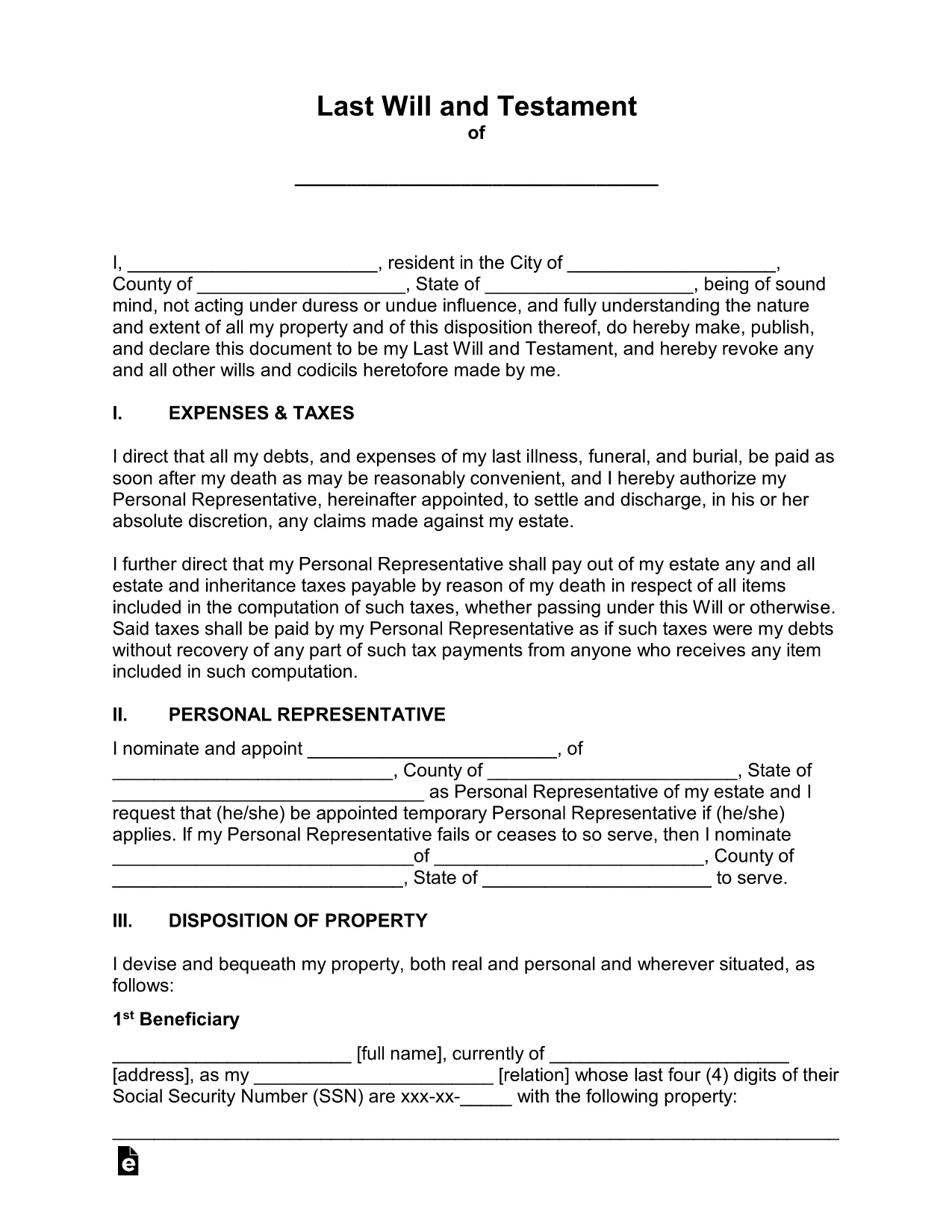
Free Fillable Legal Will Form Template

  1. 国 アメリカ合衆国
  2. 言語 英語
  3. デパートメント Legal
  4. アクティビティ Estate Planning
Free Fillable Legal Will Form Template

Planning for the future has never been easier. Our free fillable legal will form lets you create a binding Last Will and Testament in minutes—no printer, no fax, no attorney fees.

Why Use a Fillable Will Form?

Traditional paper wills require careful handwriting, legible printing, and often a notary. A fillable PDF eliminates those hassles. You can type directly into each field, save changes, and securely store the document online. The form complies with U.S. estate‑planning standards, making it suitable for most states.

How to Complete the Legal Will Form Online

Simply click the "Fill out this form" button on this page. The Formize PDF Filler app will load in your browser, and you can start entering your information right away. No extra software download is needed.

Common Mistakes to Avoid When Drafting a Will

  • Leaving fields blank – every section should be completed or marked as "N/A".
  • Using vague language – be specific about assets, beneficiaries, and guardians.
  • Forgetting to sign and date – an unsigned will is not legally enforceable.
  • Not updating the will after major life events – revisit the form after marriage, divorce, birth, or purchase of significant assets.

Key Sections of the Will Template

The template includes:

  • Testator Information – your full legal name and address.
  • Executor Appointment – who will manage your estate.
  • Beneficiary Designations – how assets are distributed.
  • Guardian Selection – for minor children or dependents.
  • Signature & Witnesses – legal signing requirements.

When you finish, click Save to download a completed PDF, then print, sign, and store it in a safe place.

よくある質問
  • Is a fillable PDF will legally binding?

    Yes, as long as it is signed, dated, and witnessed according to your state’s requirements, a fillable PDF has the same legal effect as a handwritten will.

  • Do I need a notary for this will?

    Most states do not require a notary for a will, but they do require two disinterested witnesses. Check your local laws for any specific requirements.

  • Can I edit the form after I download it?

    After you download the completed PDF, you can reopen it in Formize’s editor to make further changes, but you’ll need to re‑sign any edited sections.

  • What if I have a large estate with many assets?

    The template includes sections for real property, personal belongings, financial accounts, and digital assets. You can add supplemental schedules if needed.

  • How should I store my finished will?

    Store the signed original in a fire‑proof safe, and give copies to your executor, a trusted family member, or your attorney. Keep a digital copy in a secure cloud service.

  • Is this form suitable for all U.S. states?

    The template follows general U.S. will‑making principles and works in most states. However, some states have unique provisions (e.g., community property). Review local statutes or consult an attorney if you have specific concerns.

方法

オンラインで 5 回の簡単なステップで legal will form を無料で入力する方法:

  1. 1
    Open the Fillable Form
    Click the "Fill out this form" button on the page. The Formize PDF Filler will launch directly in your browser.
  2. 2
    Wait for the Filler to Load
    A few seconds may pass while the app loads. Once ready, you’ll see editable fields highlighted in blue.
  3. 3
    Enter Your Information
    Type your personal details, executor name, beneficiaries, and any guardians into the appropriate sections.
  4. 4
    Review and Validate
    Double‑check each entry for accuracy. Use the built‑in validation to catch missed required fields.
  5. 5
    Sign & Download
    Add your electronic signature, have the required witnesses sign, then click "Download" to save the completed will to your device.
Formize PDF Filler アプリ
だいたい

legal will form テンプレート

PDF ドキュメントを表示および入力するための従来の一連の機能に、Web アプリケーションおよびレスポンシブ レイアウトの利点を組み合わせることで、数分で legal will form を完成させることができます。
特徴

PDFフィラー

オンラインで PDF フォームに記入する最も簡単な方法

  • legal will form をすばやく入力してください
    legal will form をオンラインですばやく入力する方法をお探しですか?オンラインの無料 PDF フォーム フィラーを使用すると、この PDF ドキュメントを 1 分以内に編集して入力する方法がわかります。
  • 使いやすいオンライン PDF エディター
    再スキャンして返送する前に、編集できるように PDF ファイルを印刷することにうんざりしていませんか? PDFドキュメントをオンラインで無料で編集.当社のオンライン PDF エディターを使用して、時間と紙を節約してください。
  • 優れたツール、すべてのプラットフォーム
    Mac で legal will form を入力する方法や、PDF フィラーを無料で使用する方法を知りたいですか?当社のオンライン PDF ツールは、すべてのプラットフォームで動作します。
  • 安全なファイル ストレージ
    完成した「legal will form」ファイルは、Amazon クラウド ホスティングが管理する安全なデータベースに保存されます。いつでもシステムからファイルを削除できます。いずれにせよ、これらのファイルは 24 時間後に自動的に削除されます。
  • {キーワード} とチャットする
    無料の PDF リーダー アシスタントである Chatize で「legal will form」とチャットします。質問すると、「legal will form」から回答が得られます。上の [ドキュメントとチャット] ボタンをクリックするだけです。

フィルセッションを削除

選択したフィルセッションを削除しますか?この場合、フォームへの記入の進捗状況は失われます。

編集セッションを削除する

選択した編集セッションを削除しますか?この場合、フォームの作成および編集の進行状況は失われます。