
言語を選択する

RI 20-97 – Military Earnings Request Form (Fillable PDF)

  1. アメリカ合衆国
  2. 言語 英語
  3. デパートメント 人事管理室
  4. セクタ 退職および保険フォーム
RI 20-97 – Military Earnings Request Form (Fillable PDF)

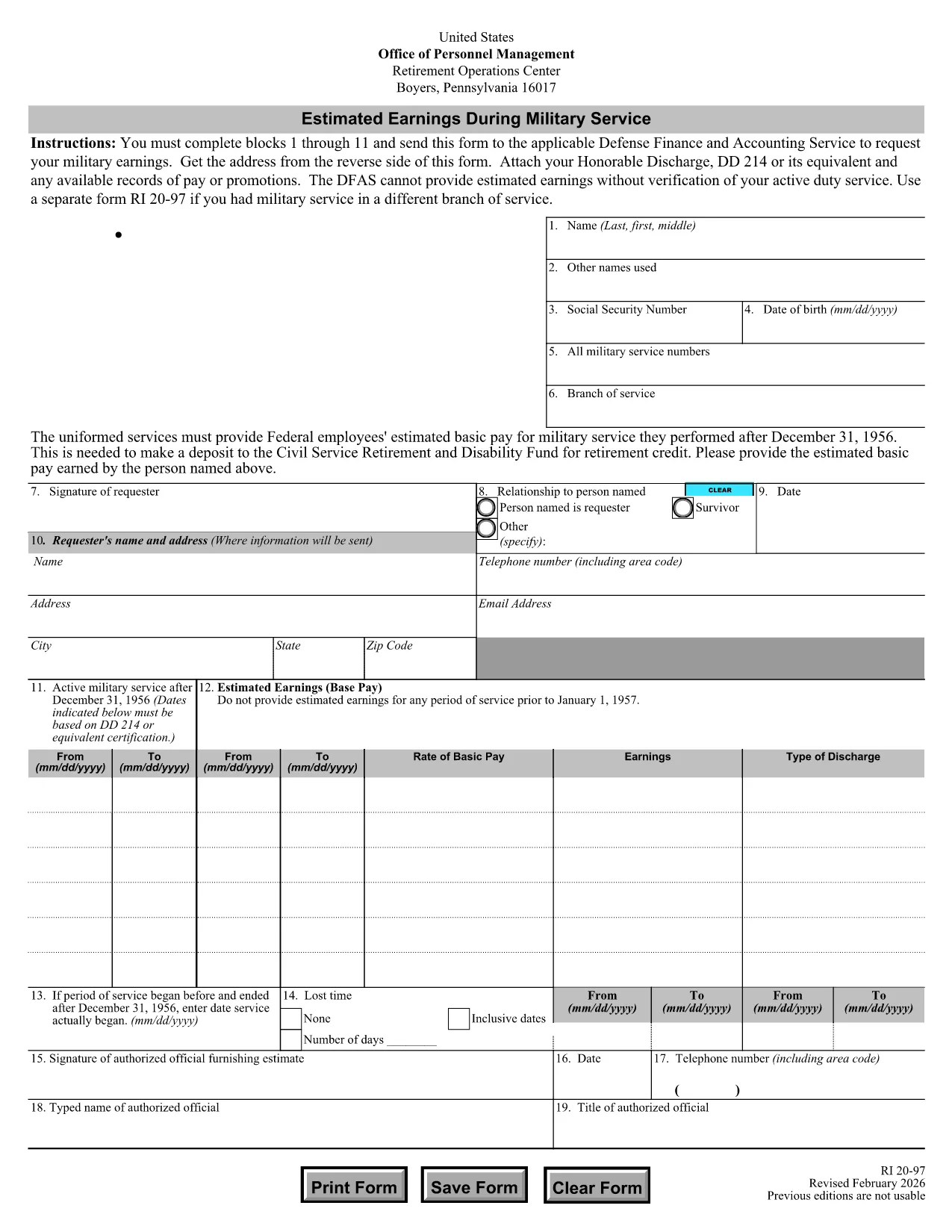
The RI 20-97 is the U.S. Office of Personnel Management (OPM) form used to request an estimate of your military earnings for retirement credit. Federal employees who have served in the armed forces use this form to ensure their service pay is counted toward their civil service pension.

What Is the RI 20-97 Form?

This official PDF, provided by OPM, captures personal details, service dates, pay grade, and any special pay received. Once completed, the form is sent to the Defense Finance and Accounting Service (DFAS) for calculation.

How to Complete the RI 20-97 Online with Formize

Instead of downloading, printing, and scanning, you can fill out the form directly on our site:

  1. Click the "Fill out this form" button below.
  2. The Formize PDF Filler app loads the fillable RI 20-97 template.
  3. Enter your information in each field (blocks 1‑11).
  4. Upload supporting documents such as your DD‑214.
  5. Review, e‑sign, and submit the form securely.

Common Mistakes & Tips for a Successful Submission

  • Missing DD‑214: The form will be rejected if you don’t attach a copy of your discharge papers.
  • Incorrect Service Dates: Double‑check start and end dates; even a one‑day error can delay processing.
  • Skipping Optional Fields: Fill in all optional fields when applicable; they help DFAS calculate a more accurate estimate.
  • Signature Errors: Both electronic and wet signatures are accepted – make sure the signature field is not left blank.

Supporting Documents You’ll Need

Prepare these items before you start:

  • DD‑214 or official military service record
  • Pay statements or promotion orders (if available)
  • Any previous RI 20‑97 submissions for reference

Where to Send Your Completed Form

After you finish the online fill, the Formize app will give you two options:

  • Download a PDF copy to mail to DFAS
  • Securely upload the completed form directly to DFAS through the provided portal link

Following these steps ensures your military earnings are counted toward your federal retirement benefits.

よくある質問
  • Who needs to fill out the RI 20-97 form?

    Any current or former federal employee who served in the U.S. military and wants their service earnings counted toward their civil service retirement credit.

  • Can I use a wet signature on the RI 20-97?

    Yes. Both electronic and wet signatures are accepted. If you print the form, sign it, and mail it, DFAS will process it without issue.

  • What if I don’t have my DD‑214?

    The DD‑214 is required for verification. If it’s lost, request a replacement from the National Archives before submitting the RI 20‑97.

  • How long does DFAS take to calculate my earnings?

    Processing typically takes 2‑4 weeks after receipt of a complete, correctly signed RI 20‑97 with all supporting documents.

  • Is the Formize filler secure?

    Yes. Formize uses SSL encryption and complies with federal data‑privacy standards, ensuring your personal and military information is protected.

  • Do I need to fill out every field?

    All mandatory fields (blocks 1‑11) must be completed. Optional fields should be filled when applicable to improve accuracy.

  • Can I submit the form directly to DFAS from Formize?

    After completing the form, you can either download a PDF to mail or use the secure upload link provided by Formize to send it directly to DFAS.

  • What is the difference between the RI 20‑97 and the RI‑20‑97‑2023 version?

    The content is the same; the year in the file name reflects the most recent revision. All versions are accepted by DFAS as long as they are the official OPM form.

方法

オンラインで 5 回の簡単なステップで RI 20-97 を無料で入力する方法:

  1. 1
    Open the Fillable Form
    Click the "Fill out this form" button on the page. The Formize PDF Filler will load the RI 20-97 template instantly.
  2. 2
    Enter Your Information
    Complete fields 1 through 11 with accurate personal and service details. Use dropdowns and date pickers for consistency.
  3. 3
    Attach Supporting Documents
    Upload your DD‑214 and any pay records using the attachment area. The system validates file types before you proceed.
  4. 4
    Review and Sign
    Double‑check every entry, then add an electronic signature or upload a scanned wet signature as required.
  5. 5
    Submit or Download
    Choose to submit directly to DFAS through the secure portal, or download the completed PDF to mail it yourself.
Formize PDF Filler アプリ
だいたい

人事管理局 (OPM) フォーム

RI 20-97 は、公務員労働力と連邦職員の福利厚生の管理を担当する連邦政府の独立機関である米国人事管理局で使用される公式フォームの 1 つです。 OPM は、連邦雇用に関連する政策と規制を確立し、さまざまな人事プログラムを管理し、連邦職員、退職者、求職者にサービスを提供します。

人事管理局のフォームの例をいくつか示します。

標準フォーム 86 (SF-86) : このフォームは、セキュリティ許可を申請する個人の身元調査プロセスに使用されます。包括的な個人情報、雇用情報、教育情報、財務情報に加え、外国との接触や活動に関する詳細も収集します。

標準フォーム 2809 (SF-2809) : このフォームは、連邦職員、退職者、および資格のある家族に健康保険を提供する連邦職員健康給付 (FEHB) プログラムに登録するために使用されます。

標準フォーム 2817 (SF-2817): このフォームは、退職後または連邦勤務からの離職後に、連邦職員歯科および視力保険プログラム (FEDVIP) に基づく保険の継続を申請するために使用されます。

標準フォーム 3107 (SF-3107) : このフォームは、公務員退職制度 (CSRS) に基づく退職金を申請するために使用されます。

標準フォーム 2801 (SF-2801) : このフォームは、連邦従業員退職制度 (FERS) に基づく退職金の申請に使用されます。

標準フォーム 15 (SF-15) : このフォームは、連邦政府の雇用における退役軍人の優遇に応募するために使用されます。この申請書は、連邦政府での雇用の機会を求めている退役軍人またはその資格のある家族によって提出されます。

これらの例は、連邦政府の雇用および従業員福利厚生の文脈で使用される一般的な OPM フォームの一部を表しています。ただし、OPM には、さまざまな人事プログラム、退職金、保険、および連邦雇用のその他の側面に関連する他のさまざまな形式があります。必要な特定のフォームは、求められる取引、プログラム、または利益の性質によって異なる場合があります。正確かつ最新の情報を入手するには、米国人事管理局の公式 Web サイト (www.opm.gov) を参照するか、OPM または関連する人事担当者から指導を求めることをお勧めします。連邦雇用または福利厚生関連のニーズに関連する特定の OPM フォームに関する最新情報。

特徴

PDFフィラー

オンラインで PDF フォームに記入する最も簡単な方法

  • RI 20-97 をすばやく入力してください
    RI 20-97 をオンラインですばやく入力する方法をお探しですか?オンラインの無料 PDF フォーム フィラーを使用すると、この PDF ドキュメントを 1 分以内に編集して入力する方法がわかります。
  • 使いやすいオンライン PDF エディター
    再スキャンして返送する前に、編集できるように PDF ファイルを印刷することにうんざりしていませんか? PDFドキュメントをオンラインで無料で編集.当社のオンライン PDF エディターを使用して、時間と紙を節約してください。
  • 優れたツール、すべてのプラットフォーム
    Mac で RI 20-97 を入力する方法や、PDF フィラーを無料で使用する方法を知りたいですか?当社のオンライン PDF ツールは、すべてのプラットフォームで動作します。
  • 安全なファイル ストレージ
    完成した「RI 20-97」ファイルは、Amazon クラウド ホスティングが管理する安全なデータベースに保存されます。いつでもシステムからファイルを削除できます。いずれにせよ、これらのファイルは 24 時間後に自動的に削除されます。
  • {キーワード} とチャットする
    無料の PDF リーダー アシスタントである Chatize で「RI 20-97」とチャットします。質問すると、「RI 20-97」から回答が得られます。上の [ドキュメントとチャット] ボタンをクリックするだけです。

フィルセッションを削除

選択したフィルセッションを削除しますか?この場合、フォームへの記入の進捗状況は失われます。

編集セッションを削除する

選択した編集セッションを削除しますか?この場合、フォームの作成および編集の進行状況は失われます。