
言語を選択する

RI 92-22 – 2021 FERS Annuity Supplement Earnings Report (Fillable PDF)

  1. アメリカ合衆国
  2. デパートメント 人事管理室
  3. セクタ 退職および保険フォーム
RI 92-22 – 2021 FERS Annuity Supplement Earnings Report (Fillable PDF)

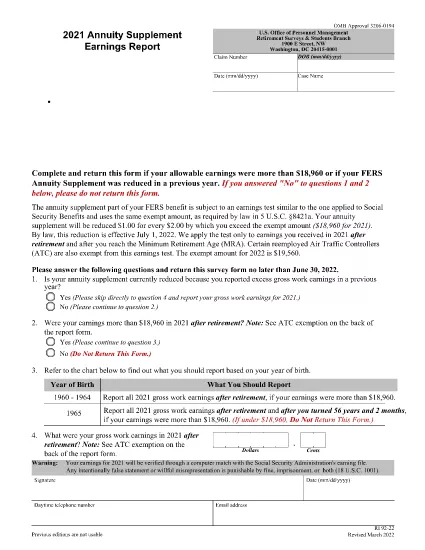
The RI 92-22 is the official Office of Personnel Management (OPM) form used by Federal Employees Retirement System (FERS) retirees to report any earnings that may affect their annuity supplement. Each year, retirees must disclose wages, self‑employment income, and other compensation to determine if the earnings test applies.

What Is the RI 92-22 Form?

This form collects the amount of personal earnings you earned during the calendar year and calculates the exempt amount allowed under the FERS earnings test. The 2021 version is available as a fillable PDF, making data entry quick and error‑free.

Why You Need to File the RI 92-22 Annually

  • Compliance with OPM regulations.
  • Avoid penalties for under‑reporting earnings.
  • Ensure accurate calculation of your annuity supplement.
  • Maintain eligibility for other federal benefits.

How to Complete the Fillable PDF with Formize

Instead of downloading the PDF and opening a separate editor, simply click the "Fill out this form" button on this page. The Formize PDF Filler app loads directly in your browser, letting you:

  1. Enter personal information and earnings data.
  2. See real‑time validation messages.
  3. Save progress and return later if needed.
  4. Download a completed, OPM‑ready PDF or submit electronically as instructed.

Common Mistakes to Avoid

  • Leaving fields blank: Every required field must be completed; otherwise OPM may reject the form.
  • Mis‑reporting exempt earnings: Use the correct exempt amount for the year (2021 exempt amount is $3,600).
  • Submitting after the deadline: The deadline is typically March 31 of the following year.
  • Using an outdated PDF version: Always use the latest fillable version linked below.

Where to Submit Your Completed Form

After you finish, print the completed PDF and mail it to the address listed on the form, or follow any electronic submission instructions provided by your agency’s HR office.

よくある質問
  • Who must file the RI 92-22 form?

    All FERS retirees who earned wages, self‑employment income, or other compensation during the reporting year must file.

  • What is the exempt amount for 2021?

    For 2021, the earnings test exempt amount is $3,600. Earnings above this limit may reduce your annuity supplement.

  • Can I submit the RI 92-22 electronically?

    OPM currently requires a printed, signed PDF for most retirees. Some agencies accept electronic copies; check with your HR office.

  • What happens if I miss the filing deadline?

    Late filing can result in penalties, loss of the annuity supplement, and potential interest charges on any under‑reported earnings.

  • Is the Formize filler secure?

    Yes. Formize uses SSL encryption and does not store your personal data on its servers after the session ends.

  • Do I need to attach supporting documents?

    Generally, no. OPM may request wage statements or tax returns during an audit, but they are not required with the initial filing.

  • What if my earnings are below the exempt amount?

    If total earnings are at or below the exempt amount, you still must submit the form, but your annuity supplement will not be reduced.

  • Can I correct a mistake after submitting?

    Yes. Submit a corrected RI 92-22 form with a note explaining the change, or contact OPM for guidance.

方法

オンラインで 4 回の簡単なステップで RI 92-22 を無料で入力する方法:

  1. 1
    Open the Fillable Form
    Click the "Fill out this form" button on the page. The Formize PDF Filler loads instantly in your browser.
  2. 2
    Enter Your Information
    Complete all required fields: personal details, earnings amounts, and exemptions. Validation prompts appear if data is missing or incorrect.
  3. 3
    Review and Save
    Use the preview feature to double‑check entries. Save the form to your device or cloud storage if you need to pause.
  4. 4
    Download or Print
    When finished, download the completed PDF or print it for mailing to OPM as instructed.
Formize PDF Filler アプリ
だいたい

人事管理局 (OPM) フォーム

RI 92-22 は、公務員労働力と連邦職員の福利厚生の管理を担当する連邦政府の独立機関である米国人事管理局で使用される公式フォームの 1 つです。 OPM は、連邦雇用に関連する政策と規制を確立し、さまざまな人事プログラムを管理し、連邦職員、退職者、求職者にサービスを提供します。

人事管理局のフォームの例をいくつか示します。

標準フォーム 86 (SF-86) : このフォームは、セキュリティ許可を申請する個人の身元調査プロセスに使用されます。包括的な個人情報、雇用情報、教育情報、財務情報に加え、外国との接触や活動に関する詳細も収集します。

標準フォーム 2809 (SF-2809) : このフォームは、連邦職員、退職者、および資格のある家族に健康保険を提供する連邦職員健康給付 (FEHB) プログラムに登録するために使用されます。

標準フォーム 2817 (SF-2817): このフォームは、退職後または連邦勤務からの離職後に、連邦職員歯科および視力保険プログラム (FEDVIP) に基づく保険の継続を申請するために使用されます。

標準フォーム 3107 (SF-3107) : このフォームは、公務員退職制度 (CSRS) に基づく退職金を申請するために使用されます。

標準フォーム 2801 (SF-2801) : このフォームは、連邦従業員退職制度 (FERS) に基づく退職金の申請に使用されます。

標準フォーム 15 (SF-15) : このフォームは、連邦政府の雇用における退役軍人の優遇に応募するために使用されます。この申請書は、連邦政府での雇用の機会を求めている退役軍人またはその資格のある家族によって提出されます。

これらの例は、連邦政府の雇用および従業員福利厚生の文脈で使用される一般的な OPM フォームの一部を表しています。ただし、OPM には、さまざまな人事プログラム、退職金、保険、および連邦雇用のその他の側面に関連する他のさまざまな形式があります。必要な特定のフォームは、求められる取引、プログラム、または利益の性質によって異なる場合があります。正確かつ最新の情報を入手するには、米国人事管理局の公式 Web サイト (www.opm.gov) を参照するか、OPM または関連する人事担当者から指導を求めることをお勧めします。連邦雇用または福利厚生関連のニーズに関連する特定の OPM フォームに関する最新情報。

特徴

PDFフィラー

オンラインで PDF フォームに記入する最も簡単な方法

  • RI 92-22 をすばやく入力してください
    RI 92-22 をオンラインですばやく入力する方法をお探しですか?オンラインの無料 PDF フォーム フィラーを使用すると、この PDF ドキュメントを 1 分以内に編集して入力する方法がわかります。
  • 使いやすいオンライン PDF エディター
    再スキャンして返送する前に、編集できるように PDF ファイルを印刷することにうんざりしていませんか? PDFドキュメントをオンラインで無料で編集.当社のオンライン PDF エディターを使用して、時間と紙を節約してください。
  • 優れたツール、すべてのプラットフォーム
    Mac で RI 92-22 を入力する方法や、PDF フィラーを無料で使用する方法を知りたいですか?当社のオンライン PDF ツールは、すべてのプラットフォームで動作します。
  • 安全なファイル ストレージ
    完成した「RI 92-22」ファイルは、Amazon クラウド ホスティングが管理する安全なデータベースに保存されます。いつでもシステムからファイルを削除できます。いずれにせよ、これらのファイルは 24 時間後に自動的に削除されます。
  • {キーワード} とチャットする
    無料の PDF リーダー アシスタントである Chatize で「RI 92-22」とチャットします。質問すると、「RI 92-22」から回答が得られます。上の [ドキュメントとチャット] ボタンをクリックするだけです。

フィルセッションを削除

選択したフィルセッションを削除しますか?この場合、フォームへの記入の進捗状況は失われます。

編集セッションを削除する

選択した編集セッションを削除しますか?この場合、フォームの作成および編集の進行状況は失われます。