
言語を選択する

DS-5504 Fillable PDF – Name Change, Data Correction & Limited Passport Replacement

  1. 言語 英語
  2. アメリカ合衆国
  3. アクティビティ パスポート
DS-5504 Fillable PDF – Name Change, Data Correction & Limited Passport Replacement

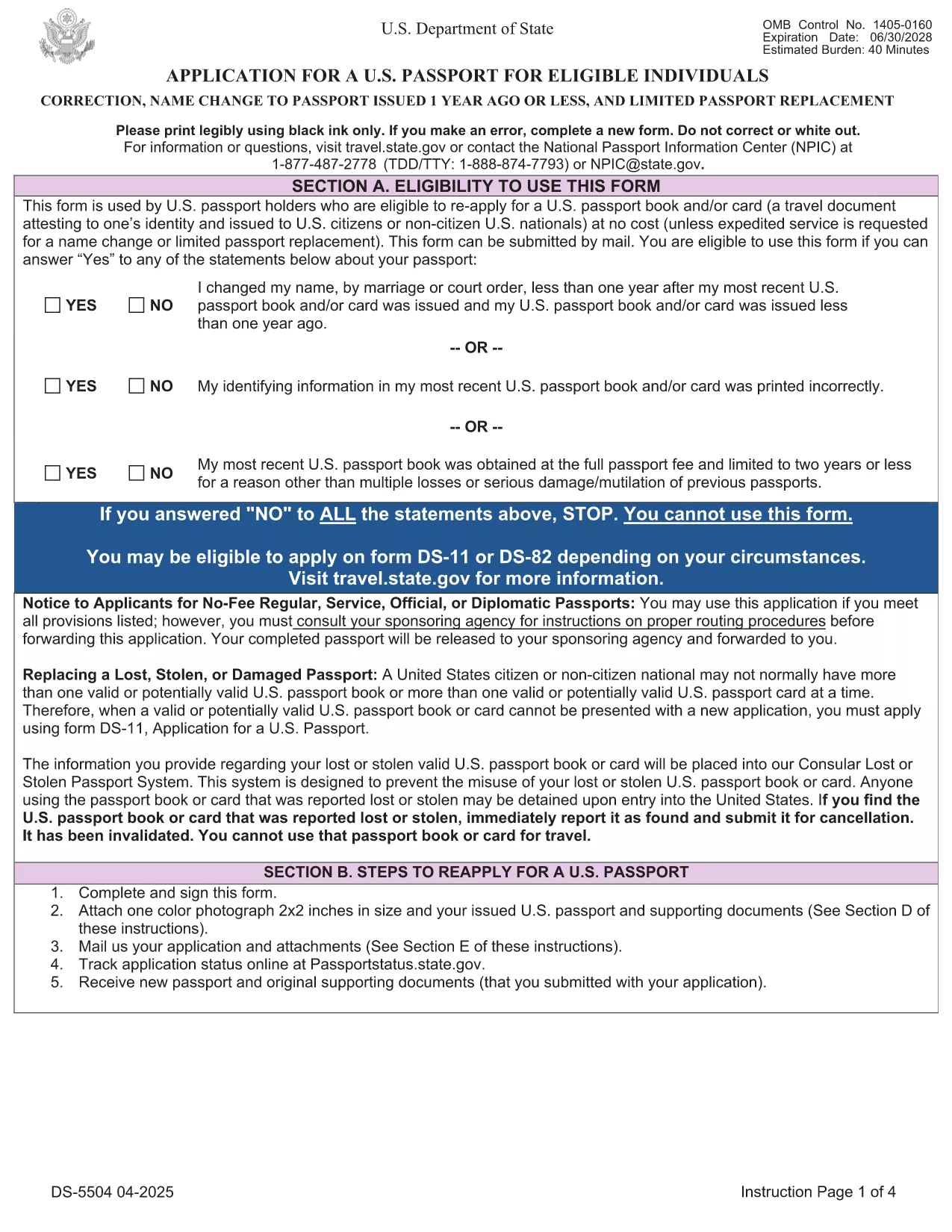
The DS-5504 is the official U.S. Department of State application used when you need to change the name on a passport, correct a printing error, or replace a limited‑validity passport. With Formize’s fillable PDF tool you can complete the form online, avoid manual errors, and print a clean copy ready for submission.

What Is the DS-5504 Form?

DS-5504 is designed for three specific situations:

  • Name change – if your legal name changed within one year of your last passport issuance.
  • Data correction – to fix a typo or incorrect personal information on an existing passport.
  • Limited passport replacement – when a temporary or limited‑validity passport expires or is damaged.

How to Fill Out DS-5504 with Formize

Instead of downloading the PDF and opening a separate editor, simply click the “Fill out this form” button on this page. The Formize PDF Filler app loads in your browser, letting you:

  1. Enter personal details directly into interactive fields.
  2. Upload a passport‑style photo.
  3. Save a draft and return later if needed.
  4. Download the completed, printable PDF with one click.

Common Mistakes to Avoid

  • Using a name change older than one year – the form will be rejected.
  • Leaving the signature line blank or signing on the wrong page.
  • Submitting an incorrect passport number or expiration date.
  • Forgetting to attach the required supporting documents (photo, legal name‑change proof, etc.).

Required Supporting Documents

Depending on your request, you will need to include:

  • Current valid U.S. passport (or limited‑validity passport).
  • One recent color passport photo (2" x 2").
  • Legal name‑change documentation (marriage certificate, court order) – if applicable.
  • Proof of the printing error (e.g., a copy of the original passport showing the mistake).

Where to Submit Your Completed Form

After printing, mail the DS-5504 package to the address listed in the form’s instructions or bring it to a regional passport agency. The application is free of charge; expedited processing is available for a fee.

Need help? Review the official DS‑5504 PDF for detailed instructions.

よくある質問
  • Can I use DS-5504 for a name change after one year?

    No. The DS‑5504 is only valid for name changes that occurred within one year of your most recent passport issuance. For older changes, use form DS‑82.

  • Is there a fee to file DS-5504?

    The DS‑5504 application itself is free. Fees only apply if you request expedited processing or need a new passport book.

  • Do I need a photo for a data‑correction request?

    Yes. All DS‑5504 submissions require one recent color passport photo, even if you are only correcting printed information.

  • Can I submit the completed form electronically?

    The State Department currently requires a printed, signed PDF with supporting documents. Electronic submission is not accepted for DS‑5504.

  • What if my limited‑validity passport is still valid?

    You can use DS‑5504 to replace a limited‑validity passport that is damaged, lost, or you simply need a full‑validity book. Include the limited passport and a written explanation.

  • How long does processing take?

    Regular processing usually takes 6‑8 weeks. Expedited service (for a fee) can reduce the time to 2‑3 weeks.

  • Can I use Formize on a mobile device?

    Yes. The Formize PDF Filler works on most modern smartphones and tablets, letting you fill out DS‑5504 on the go.

方法

オンラインで 5 回の簡単なステップで DS-5504 を無料で入力する方法:

  1. 1
    Open the Fillable Form
    Click the "Fill out this form" button on the page. The Formize PDF Filler loads instantly in your browser.
  2. 2
    Enter Your Information
    Complete each interactive field – personal details, passport number, reason for the request, and upload your passport‑style photo.
  3. 3
    Review & Sign
    Double‑check all entries for accuracy, then add your electronic signature in the designated box.
  4. 4
    Download & Print
    Save the completed PDF, print a clean copy on white paper, and attach any required supporting documents.
  5. 5
    Submit to the State Department
    Mail or deliver the package to the address specified in the form instructions, or schedule an appointment at a passport agency.
Formize PDF Filler アプリ
だいたい

パスポートフォーム

DS-5504 は、パスポートの申請に使用する書類であるパスポートフォームの 1 つです。パスポートは、所有者の身元と国籍を証明し、海外旅行を許可する旅行書類です。パスポートのフォームは、パスポートを発行する国によって異なる場合がありますが、通常、名前、生年月日、出生地などの申請者に関する個人情報、申請者の両親、以前のパスポートまたは旅行書類に関する情報が含まれています。 .

米国では、最も一般的な 2 つのパスポート フォームは、DS-11 と DS-82 です。 DS-11 フォームは、初めての申請者、未成年者、または DS-82 フォームを使用する資格がない個人に使用されます。 DS-82 フォームは、適格な申請者が郵便でパスポートを更新するために使用されます。どちらのフォームでも、申請者は個人情報と、パスポートの写真や市民権の証明などの補足書類を提供する必要があります。

他の国ではパスポートのフォームと要件が異なる場合がありますが、基本的なプロセスには通常、パスポート申請の完了、補足書類の提供、および政府施設または大使館でのパスポート担当官との面接が含まれます。パスポートの申請プロセスには数週間から数か月かかる場合があることに注意することが重要です。そのため、予定されている旅行の十分前に申請することをお勧めします。

特徴

PDFフィラー

オンラインで PDF フォームに記入する最も簡単な方法

  • DS-5504 をすばやく入力してください
    DS-5504 をオンラインですばやく入力する方法をお探しですか?オンラインの無料 PDF フォーム フィラーを使用すると、この PDF ドキュメントを 1 分以内に編集して入力する方法がわかります。
  • 使いやすいオンライン PDF エディター
    再スキャンして返送する前に、編集できるように PDF ファイルを印刷することにうんざりしていませんか? PDFドキュメントをオンラインで無料で編集.当社のオンライン PDF エディターを使用して、時間と紙を節約してください。
  • 優れたツール、すべてのプラットフォーム
    Mac で DS-5504 を入力する方法や、PDF フィラーを無料で使用する方法を知りたいですか?当社のオンライン PDF ツールは、すべてのプラットフォームで動作します。
  • 安全なファイル ストレージ
    完成した「DS-5504」ファイルは、Amazon クラウド ホスティングが管理する安全なデータベースに保存されます。いつでもシステムからファイルを削除できます。いずれにせよ、これらのファイルは 24 時間後に自動的に削除されます。
  • {キーワード} とチャットする
    無料の PDF リーダー アシスタントである Chatize で「DS-5504」とチャットします。質問すると、「DS-5504」から回答が得られます。上の [ドキュメントとチャット] ボタンをクリックするだけです。

フィルセッションを削除

選択したフィルセッションを削除しますか?この場合、フォームへの記入の進捗状況は失われます。

編集セッションを削除する

選択した編集セッションを削除しますか?この場合、フォームの作成および編集の進行状況は失われます。