
言語を選択する

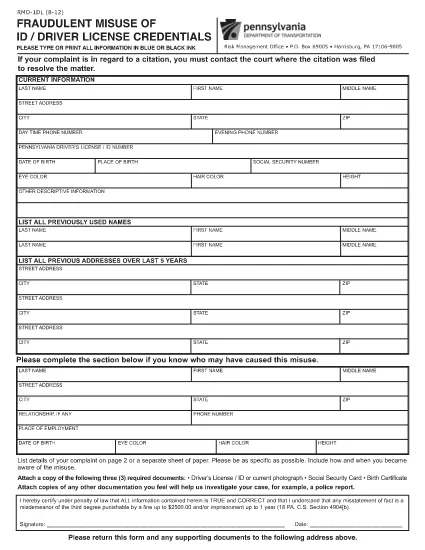
Pennsylvania RMO-1DL Fillable PDF Form

  1. 言語 英語
  2. アメリカ合衆国
  3. デパートメント PennDOT
  4. アクティビティ 車両登録
Pennsylvania RMO-1DL Fillable PDF Form

The RMO-1DL is a Pennsylvania Department of Transportation (PennDOT) form used for vehicle‑related reporting. Whether you need to update registration details, correct a citation, or provide official documentation, the fillable PDF version lets you finish the work from any device.

What Is the RMO-1DL Form?

RMO‑1DL stands for "Report of Motor Vehicle Operations – Driver License". It is commonly required when a driver must report changes to vehicle ownership, address, or when a citation needs official clarification. The form is officially published by PennDOT and must be signed before submission.

How to Complete the RMO-1DL Online

With Formize, you don’t need to print, scan, or use a third‑party PDF editor. Simply click the Fill out this form button below and the Formize PDF Filler loads the official document ready for you to complete.

Common Mistakes to Avoid

  • Leaving required fields blank: Every field marked with an asterisk (*) must be completed.
  • Mismatched VIN numbers: Double‑check the Vehicle Identification Number against your registration.
  • Incorrect signatures: Use a clear electronic signature or print, sign, and re‑upload.

Where to Submit the Completed Form

After you save the completed PDF, you can either:

  • Mail it to the PennDOT address listed on the form, or
  • Upload it through the PennDOT online portal if you have an account.

Download the Official PDF

For reference or offline use, you can download the original, unfilled RMO‑1DL PDF directly from PennDOT.

Download RMO-1DL PDF

よくある質問
  • What is the purpose of the RMO‑1DL form?

    RMO‑1DL is used to report driver‑license related vehicle information to PennDOT, such as address changes, ownership transfers, or citation clarifications.

  • Can I submit the form electronically?

    Yes. After completing the fillable PDF, you can upload it through the PennDOT online portal if you have an account, or you can mail the printed version.

  • Do I need a PDF editor to fill out RMO‑1DL?

    No. Formize’s built‑in PDF Filler lets you fill out the form directly in your browser without any additional software.

  • Is there a fee to download or use the RMO‑1DL form?

    Downloading the official PDF from PennDOT is free, and Formize’s online filler is also free for this form.

  • What should I do if I make a mistake after saving?

    Open the saved PDF again in Formize, correct the error, and re‑save. You can also download a fresh copy of the official PDF and start over.

  • How long is the RMO‑1DL form valid?

    The form does not expire, but be sure to use the most recent version available on the PennDOT website.

方法

オンラインで 5 回の簡単なステップで RMO-1DL を無料で入力する方法:

  1. 1
    Click the Fill‑out Button
    Press the “Fill out this form” button on this page. The Formize PDF Filler will open in a new tab.
  2. 2
    Wait for the PDF Filler to Load
    The fillable RMO‑1DL PDF loads automatically. No download or extra software is required.
  3. 3
    Enter Your Information
    Complete each field using your keyboard or touch device. Required fields are marked with an asterisk.
  4. 4
    Review and Sign
    Double‑check all entries for accuracy, then add your electronic signature or print to sign manually.
  5. 5
    Save, Download, or Print
    When you’re satisfied, click “Save” to store the file in your browser, then download or print the completed form for submission.
Formize PDF Filler アプリ
だいたい

車両登録フォーム

RMO-1DL は DMV フォームの 1 つであり、自動車省フォームとしても知られており、自動車に関連するさまざまな取引やプロセスで使用される文書です。 DMV は、運転免許証、車両登録、自動車法の執行を担当する政府機関です。利用可能な具体的な DMV フォームは管轄区域によって異なりますが、一般的な例をいくつか示します。

運転免許証フォーム: これらのフォームは、運転免許証の申請、または変更または更新のリクエストに使用されます。通常、個人情報や身元証明が必要で、医療情報や運転履歴のセクションが含まれる場合もあります。

車両登録フォーム: これらのフォームは、DMV に自動車を登録するために使用されます。車両情報、所有権の詳細、保険証が必要です。

所有権譲渡フォーム: 車両の売買の際、これらのフォームは所有権を一方の当事者から別の当事者に譲渡するために使用されます。購入者、販売者、車両の詳細に関する情報が必要で、請求書が含まれる場合もあります。

車両責任放棄フォーム: 車両の所有権を売却または譲渡する場合、これらのフォームは、販売者が車両に対して責任を負わないことを DMV に通知します。これは、販売後の車両に関連する事故や事件の責任から売主を保護するのに役立ちます。

ライセンス プレートおよび登録更新フォーム: これらのフォームは、車両の登録を更新したり、新しいナンバー プレートをリクエストしたりするために使用されます。通常、登録所有者、現在の登録の詳細、および該当する料金の支払いに関する情報が必要です。

運転記録リクエスト フォーム: このフォームを使用すると、個人は DMV に自分の運転記録をリクエストできます。これにより、運転違反、免許証のステータス、その他の関連詳細に関する情報が提供されます。

特殊または特殊なナンバー プレート フォーム: これらのフォームは、個人が特定の文字やデザインでナンバー プレートをカスタマイズできるようにする、特殊または特殊なナンバー プレートの申請に使用されます。

これらは、DMV を通じて利用できる多くのフォームのほんの一例です。特定のフォームと要件は管轄区域によって異なる場合があるため、地元の DMV Web サイトを参照するか、DMV オフィスを訪問して、特定のニーズに合った正しいフォームを入手することが重要です。

特徴

PDFフィラー

オンラインで PDF フォームに記入する最も簡単な方法

  • RMO-1DL をすばやく入力してください
    RMO-1DL をオンラインですばやく入力する方法をお探しですか?オンラインの無料 PDF フォーム フィラーを使用すると、この PDF ドキュメントを 1 分以内に編集して入力する方法がわかります。
  • 使いやすいオンライン PDF エディター
    再スキャンして返送する前に、編集できるように PDF ファイルを印刷することにうんざりしていませんか? PDFドキュメントをオンラインで無料で編集.当社のオンライン PDF エディターを使用して、時間と紙を節約してください。
  • 優れたツール、すべてのプラットフォーム
    Mac で RMO-1DL を入力する方法や、PDF フィラーを無料で使用する方法を知りたいですか?当社のオンライン PDF ツールは、すべてのプラットフォームで動作します。
  • 安全なファイル ストレージ
    完成した「RMO-1DL」ファイルは、Amazon クラウド ホスティングが管理する安全なデータベースに保存されます。いつでもシステムからファイルを削除できます。いずれにせよ、これらのファイルは 24 時間後に自動的に削除されます。
  • {キーワード} とチャットする
    無料の PDF リーダー アシスタントである Chatize で「RMO-1DL」とチャットします。質問すると、「RMO-1DL」から回答が得られます。上の [ドキュメントとチャット] ボタンをクリックするだけです。

フィルセッションを削除

選択したフィルセッションを削除しますか?この場合、フォームへの記入の進捗状況は失われます。

編集セッションを削除する

選択した編集セッションを削除しますか?この場合、フォームの作成および編集の進行状況は失われます。