
言語を選択する

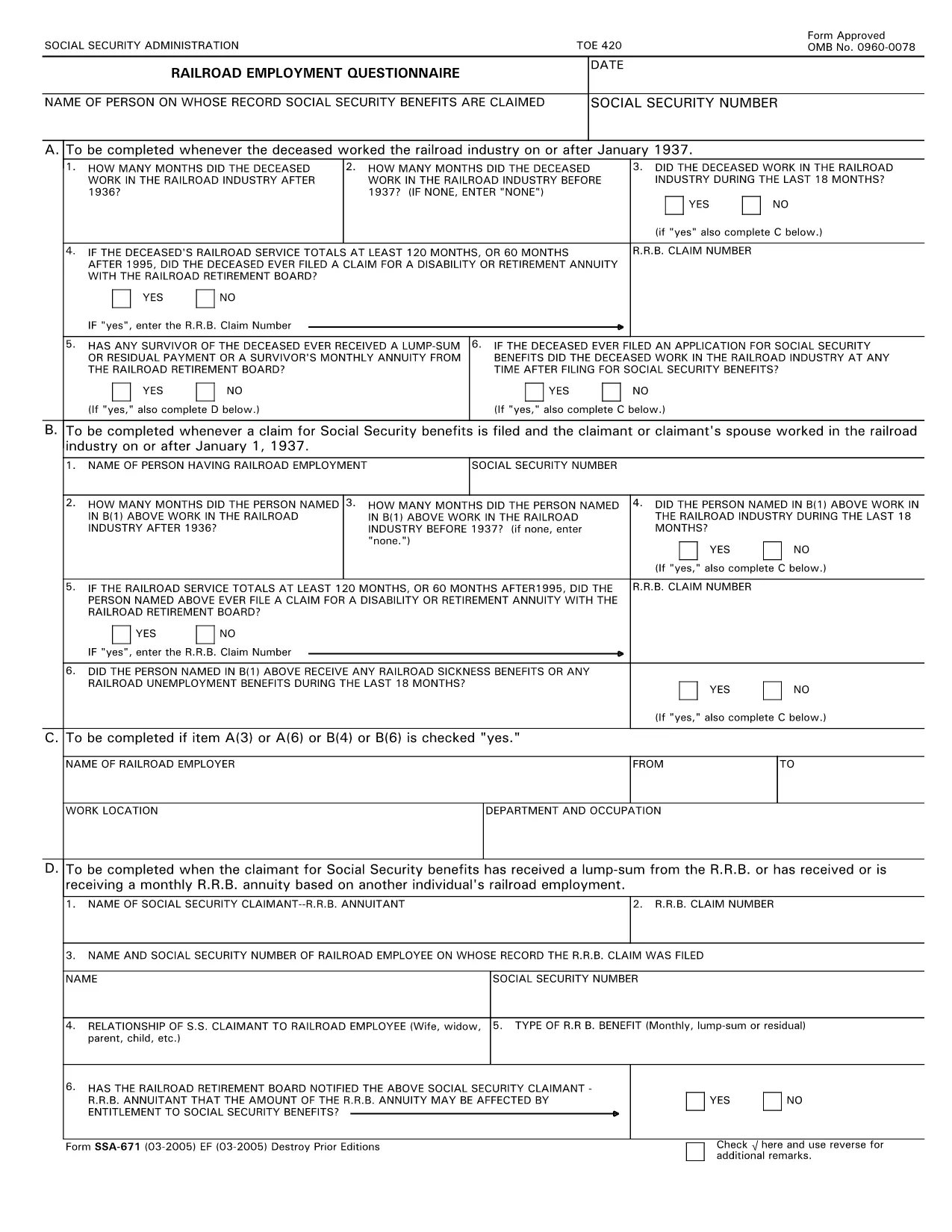
SSA-671 Railroad Employment Questionnaire (Fillable PDF)

  1. 言語 英語
  2. アメリカ合衆国
  3. アクティビティ 社会保障
このフォームに記入してください
SSA-671 Railroad Employment Questionnaire (Fillable PDF)

The SSA‑671, also known as the Railroad Employment Questionnaire, is required by the Social Security Administration (SSA) to verify railroad employment history. Accurate completion ensures you receive proper credit for railroad work in your Social Security record.

Our fillable PDF version lets you complete the questionnaire directly in your browser—no extra software needed. Simply click the button below, fill out each field, and download or print the finished form.

Key sections of the form include personal identification, employer details, dates of employment, and the type of railroad work performed. All fields marked with an asterisk (*) are mandatory.

Using the online Formize PDF Filler reduces errors, speeds up processing, and keeps a digital copy for your records.

よくある質問
  • Who needs to fill out SSA‑671?

    Anyone who has worked for a railroad employer and needs to have that employment credited toward Social Security benefits.

  • Can I submit the form electronically?

    Yes. After completing the fillable PDF, you can email or upload the PDF to your local SSA office if they accept electronic submissions.

  • What happens if I leave a required field blank?

    The SSA may reject the questionnaire, causing delays in crediting your railroad employment. All fields marked * must be completed.

  • Do I need a PDF editor to use this form?

    No. The Formize online filler lets you complete the PDF in the browser without any additional software.

  • How long does it take to fill out SSA‑671?

    Typically 5‑10 minutes if you have your employment details handy.

  • Where should I send the completed form?

    Mail it to your local Social Security Administration office or follow the submission instructions on the SSA website.

  • Is there a fee to use the Formize PDF Filler?

    No. Formize provides free online filling for this government form.

  • Can I save a draft and finish later?

    Yes. The Formize app lets you download a partially completed PDF and resume editing later.

方法

オンラインで 5 回の簡単なステップで SSA-671 を無料で入力する方法:

  1. 1
    Click the Fill Out Button
    Press the "Fill out this form" button on the page to launch the Formize PDF Filler directly in your browser.
  2. 2
    Wait for the Filler to Load
    The Formize app loads automatically—no download or installation is required.
  3. 3
    Complete Each Field
    Enter your information in the fillable fields. Required fields are marked with an asterisk (*).
  4. 4
    Review and Save
    Double‑check all entries, then click "Save" to download a copy or "Print" to create a hard copy.
  5. 5
    Submit to SSA
    Send the completed PDF to the Social Security Administration by mail or upload it through your local SSA portal.
Formize PDF Filler アプリ
だいたい

社会保障フォーム

SSA-671 は、米国社会保障局 (SSA) が提供するさまざまな給付やサービスを申請するために使用される書類である社会保障フォームの 1 つです。 SSA は、退職給付、障害給付、生存者給付、および補足的保障所得 (SSI) など、適格な個人および家族に財政支援を提供するように設計されたプログラムを管理する連邦機関です。

一般的な社会保障フォームには次のものがあります。

社会保障退職給付申請書: このフォームは、個人の職歴と収入に基づいて退職給付を申請するために使用されます。

社会保障障害給付申請書: このフォームは、働くことができない身体的または精神的な状態にある個人が障害給付を申請するために使用されます。

社会保障遺族給付申請書: このフォームは、個人の配偶者または親が亡くなり、遺族給付の資格がある場合に、遺族給付を申請するために使用されます。

メディケア登録申請書: このフォームは、65 歳以上の個人および特定の障害または病状を持つ個人向けの連邦健康保険プログラムであるメディケアに登録するために使用されます。

住所変更フォーム: このフォームは、個人の住所を SSA で更新するために使用されます。

収入記録申請書: このフォームは、社会保障給付の計算に使用される個人の収入記録のコピーを要求するために使用されます。

これらのフォームは、オンライン、郵送、または地元の社会保障事務所で直接記入できます。社会保障給付のタイムリーかつ正確な処理を確実にするために、必要なすべてのフォームを慎重に確認して記入することが重要です。

特徴

PDFフィラー

オンラインで PDF フォームに記入する最も簡単な方法

  • SSA-671 をすばやく入力してください
    SSA-671 をオンラインですばやく入力する方法をお探しですか?オンラインの無料 PDF フォーム フィラーを使用すると、この PDF ドキュメントを 1 分以内に編集して入力する方法がわかります。
  • 使いやすいオンライン PDF エディター
    再スキャンして返送する前に、編集できるように PDF ファイルを印刷することにうんざりしていませんか? PDFドキュメントをオンラインで無料で編集.当社のオンライン PDF エディターを使用して、時間と紙を節約してください。
  • 優れたツール、すべてのプラットフォーム
    Mac で SSA-671 を入力する方法や、PDF フィラーを無料で使用する方法を知りたいですか?当社のオンライン PDF ツールは、すべてのプラットフォームで動作します。
  • 安全なファイル ストレージ
    完成した「SSA-671」ファイルは、Amazon クラウド ホスティングが管理する安全なデータベースに保存されます。いつでもシステムからファイルを削除できます。いずれにせよ、これらのファイルは 24 時間後に自動的に削除されます。
  • {キーワード} とチャットする
    無料の PDF リーダー アシスタントである Chatize で「SSA-671」とチャットします。質問すると、「SSA-671」から回答が得られます。上の [ドキュメントとチャット] ボタンをクリックするだけです。

フィルセッションを削除

選択したフィルセッションを削除しますか?この場合、フォームへの記入の進捗状況は失われます。

編集セッションを削除する

選択した編集セッションを削除しますか?この場合、フォームの作成および編集の進行状況は失われます。