
言語を選択する

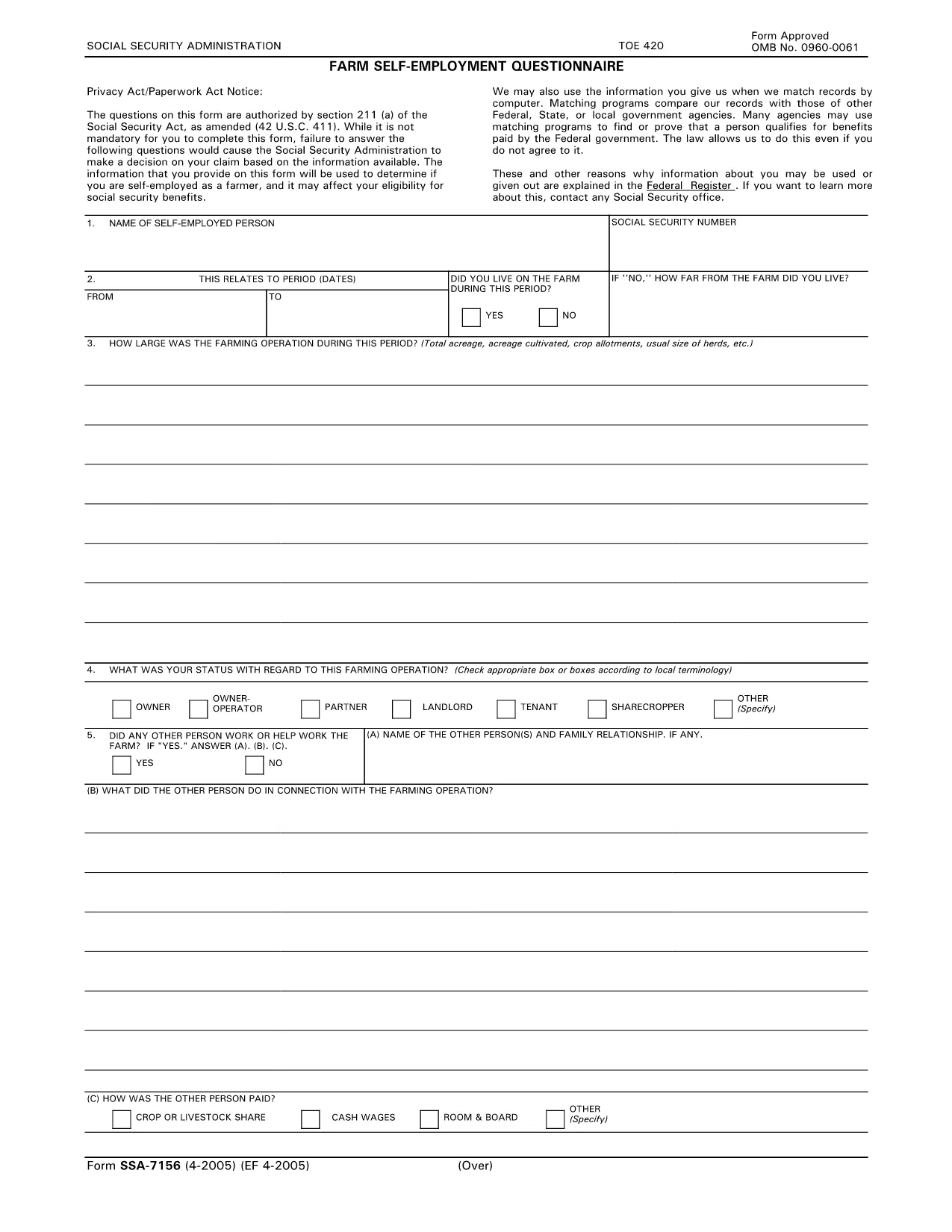
SSA-7156 Farm Self‑Employment Questionnaire

  1. 言語 英語
  2. アメリカ合衆国
  3. アクティビティ 社会保障
このフォームに記入してください
SSA-7156 Farm Self‑Employment Questionnaire

The SSA-7156 is the Social Security Administration’s Farm Self‑Employment Questionnaire. It is used to verify agricultural earnings when you apply for Social Security benefits.

What is SSA-7156?

This questionnaire asks detailed questions about your farm or agricultural business, including income, expenses, and the nature of the work performed. The SSA uses this information to determine if you have covered self‑employment earnings.

Why You Need This Form

Providing accurate information on SSA-7156 helps prevent delays or adverse decisions on your benefit claim. Even though the form is not mandatory, an incomplete questionnaire may cause the SSA to rely on limited data, which could affect your entitlement.

How to Complete the SSA-7156 Online

Instead of downloading and editing the PDF manually, simply click the "Fill out this form" button on this page. The Formize PDF Filler app will load directly in your browser, allowing you to fill, save, and submit the form securely.

Common Mistakes to Avoid

  • Leaving any required fields blank.
  • Providing estimates instead of actual figures.
  • Using the wrong tax year for income reporting.
  • Submitting the form without a digital signature (if required).

Download & Save the PDF

If you prefer to keep a copy for your records, you can download the original fillable PDF using the link below. The file is hosted by a trusted government source.

Download SSA-7156 PDF

よくある質問
  • Do I have to file SSA-7156 to receive Social Security benefits?

    No, the form is not mandatory, but providing it helps the SSA make an accurate decision based on your farm earnings.

  • Can I fill out SSA-7156 on a mobile device?

    Yes. The Formize PDF Filler works on most smartphones and tablets with a modern browser.

  • What if I make a mistake after submitting?

    Contact your local Social Security office to request a correction. You may need to submit a revised questionnaire.

  • Is my data secure when using Formize?

    Formize uses SSL encryption, so your personal and financial information is protected during the filling process.

  • Do I need a digital signature for SSA-7156?

    The SSA may require a handwritten signature on the printed form. Check the instructions on the last page of the questionnaire.

方法

オンラインで 3 回の簡単なステップで SSA-7156 を無料で入力する方法:

  1. 1
    Open the Form
    Click the "Fill out this form" button on the page. The Formize PDF Filler will launch in a new browser tab.
  2. 2
    Enter Your Information
    Complete each field using the on‑screen prompts. All required fields are marked with an asterisk.
  3. 3
    Save and Submit
    When finished, click "Save" to download a copy for your records, then follow the SSA instructions to submit the completed questionnaire.
Formize PDF Filler アプリ
だいたい

社会保障フォーム

SSA-7156 は、米国社会保障局 (SSA) が提供するさまざまな給付やサービスを申請するために使用される書類である社会保障フォームの 1 つです。 SSA は、退職給付、障害給付、生存者給付、および補足的保障所得 (SSI) など、適格な個人および家族に財政支援を提供するように設計されたプログラムを管理する連邦機関です。

一般的な社会保障フォームには次のものがあります。

社会保障退職給付申請書: このフォームは、個人の職歴と収入に基づいて退職給付を申請するために使用されます。

社会保障障害給付申請書: このフォームは、働くことができない身体的または精神的な状態にある個人が障害給付を申請するために使用されます。

社会保障遺族給付申請書: このフォームは、個人の配偶者または親が亡くなり、遺族給付の資格がある場合に、遺族給付を申請するために使用されます。

メディケア登録申請書: このフォームは、65 歳以上の個人および特定の障害または病状を持つ個人向けの連邦健康保険プログラムであるメディケアに登録するために使用されます。

住所変更フォーム: このフォームは、個人の住所を SSA で更新するために使用されます。

収入記録申請書: このフォームは、社会保障給付の計算に使用される個人の収入記録のコピーを要求するために使用されます。

これらのフォームは、オンライン、郵送、または地元の社会保障事務所で直接記入できます。社会保障給付のタイムリーかつ正確な処理を確実にするために、必要なすべてのフォームを慎重に確認して記入することが重要です。

特徴

PDFフィラー

オンラインで PDF フォームに記入する最も簡単な方法

  • SSA-7156 をすばやく入力してください
    SSA-7156 をオンラインですばやく入力する方法をお探しですか?オンラインの無料 PDF フォーム フィラーを使用すると、この PDF ドキュメントを 1 分以内に編集して入力する方法がわかります。
  • 使いやすいオンライン PDF エディター
    再スキャンして返送する前に、編集できるように PDF ファイルを印刷することにうんざりしていませんか? PDFドキュメントをオンラインで無料で編集.当社のオンライン PDF エディターを使用して、時間と紙を節約してください。
  • 優れたツール、すべてのプラットフォーム
    Mac で SSA-7156 を入力する方法や、PDF フィラーを無料で使用する方法を知りたいですか?当社のオンライン PDF ツールは、すべてのプラットフォームで動作します。
  • 安全なファイル ストレージ
    完成した「SSA-7156」ファイルは、Amazon クラウド ホスティングが管理する安全なデータベースに保存されます。いつでもシステムからファイルを削除できます。いずれにせよ、これらのファイルは 24 時間後に自動的に削除されます。
  • {キーワード} とチャットする
    無料の PDF リーダー アシスタントである Chatize で「SSA-7156」とチャットします。質問すると、「SSA-7156」から回答が得られます。上の [ドキュメントとチャット] ボタンをクリックするだけです。

フィルセッションを削除

選択したフィルセッションを削除しますか?この場合、フォームへの記入の進捗状況は失われます。

編集セッションを削除する

選択した編集セッションを削除しますか?この場合、フォームの作成および編集の進行状況は失われます。