
言語を選択する

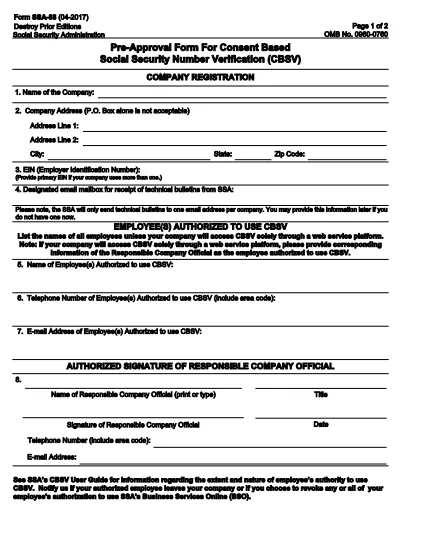
SSA-88 Consent for Release of Information – Fillable PDF

  1. 言語 英語
  2. アメリカ合衆国
  3. アクティビティ 社会保障
SSA-88 Consent for Release of Information – Fillable PDF

The SSA-88 is the Social Security Administration’s official consent form that authorizes the release of an individual’s Social Security records to a designated third party. Whether you need medical records, legal documents, or verification of benefits, the SSA-88 ensures that your personal information is shared securely and with your explicit permission.

What Is the SSA-88 Form?

The SSA-88, titled “Authorization for the Social Security Administration (SSA) to Disclose Personal Information,” is used to:

  • Grant permission for the SSA to release your records to a specific person or organization.
  • Specify the type of information to be disclosed (e.g., earnings record, benefit status).
  • Provide a clear timeframe for the release.

Who Must Complete SSA-88?

Anyone who needs to share their Social Security information with another party must complete this form. Typical users include:

  • Individuals requesting medical records for treatment.
  • Legal representatives needing proof of earnings.
  • Employers verifying eligibility for benefits.
  • Family members acting on behalf of a minor or incapacitated person.

How to Fill Out SSA-88 Online with Formize

Formize makes the SSA-88 easy to complete without downloading a separate PDF editor. Follow these simple steps:

  1. Click the “Fill out this form” button on this page.
  2. Wait a few seconds while the Formize PDF Filler app loads the fillable SSA-88.
  3. Enter the required information—personal details, recipient data, and the specific records you’re authorizing.
  4. Use the built‑in e‑signature field to sign electronically.
  5. When finished, click Submit to download a completed copy or share it directly from Formize.

Common Mistakes to Avoid

  • Leaving required fields blank: The SSA will reject an incomplete form.
  • Incorrect Social Security number: Double‑check the nine‑digit number.
  • Missing signature or date: Both are mandatory for validity.
  • Using the wrong form version: Ensure you are on the latest SSA‑88 (2024 edition).

Download & Save Your Completed Form

After you submit, Formize provides a secure PDF that you can:

  • Print for in‑person delivery.
  • Save to your device for future reference.
  • Upload directly to the Social Security Administration’s portal if required.

Using a fillable PDF saves time, reduces errors, and keeps your data protected.

よくある質問
  • What is the purpose of the SSA-88 form?

    The SSA-88 authorizes the Social Security Administration to release your personal records to a designated individual or organization.

  • Can I sign the SSA-88 electronically?

    Yes. Formize provides a secure e‑signature field that meets SSA requirements.

  • Do I need to print the form after filling it out online?

    Printing is optional. You can download the completed PDF and upload it directly to the SSA portal, or print it for in‑person submission.

  • How long is the SSA-88 valid?

    The form is valid for the time period you specify in the “Effective Date” and “Expiration Date” fields. If no expiration is set, it remains valid until revoked.

  • What if I make a mistake after submitting?

    You can download a new copy of the SSA-88, correct the error, and re‑submit. The SSA will only process the most recent, correctly signed version.

  • Is there a fee to use Formize for the SSA-88?

    Formize offers a free basic fill‑and‑sign option for the SSA-88. Premium features such as cloud storage are optional.

  • Who can act as a representative on the SSA-88?

    A parent, legal guardian, or an authorized attorney can complete the form on behalf of a minor or incapacitated individual.

方法

オンラインで 3 回の簡単なステップで SSA-88 を無料で入力する方法:

  1. 1
    Open the Fillable Form
    Click the “Fill out this form” button on the page. The Formize PDF Filler will open the SSA-88 automatically.
  2. 2
    Enter Required Information
    Fill in your personal details, the recipient’s information, and specify which records may be released.
  3. 3
    Sign and Submit
    Add your electronic signature, date the form, and click Submit to download or share the completed PDF.
Formize PDF Filler アプリ
だいたい

社会保障フォーム

SSA-88 は、米国社会保障局 (SSA) が提供するさまざまな給付やサービスを申請するために使用される書類である社会保障フォームの 1 つです。 SSA は、退職給付、障害給付、生存者給付、および補足的保障所得 (SSI) など、適格な個人および家族に財政支援を提供するように設計されたプログラムを管理する連邦機関です。

一般的な社会保障フォームには次のものがあります。

社会保障退職給付申請書: このフォームは、個人の職歴と収入に基づいて退職給付を申請するために使用されます。

社会保障障害給付申請書: このフォームは、働くことができない身体的または精神的な状態にある個人が障害給付を申請するために使用されます。

社会保障遺族給付申請書: このフォームは、個人の配偶者または親が亡くなり、遺族給付の資格がある場合に、遺族給付を申請するために使用されます。

メディケア登録申請書: このフォームは、65 歳以上の個人および特定の障害または病状を持つ個人向けの連邦健康保険プログラムであるメディケアに登録するために使用されます。

住所変更フォーム: このフォームは、個人の住所を SSA で更新するために使用されます。

収入記録申請書: このフォームは、社会保障給付の計算に使用される個人の収入記録のコピーを要求するために使用されます。

これらのフォームは、オンライン、郵送、または地元の社会保障事務所で直接記入できます。社会保障給付のタイムリーかつ正確な処理を確実にするために、必要なすべてのフォームを慎重に確認して記入することが重要です。

特徴

PDFフィラー

オンラインで PDF フォームに記入する最も簡単な方法

  • SSA-88 をすばやく入力してください
    SSA-88 をオンラインですばやく入力する方法をお探しですか?オンラインの無料 PDF フォーム フィラーを使用すると、この PDF ドキュメントを 1 分以内に編集して入力する方法がわかります。
  • 使いやすいオンライン PDF エディター
    再スキャンして返送する前に、編集できるように PDF ファイルを印刷することにうんざりしていませんか? PDFドキュメントをオンラインで無料で編集.当社のオンライン PDF エディターを使用して、時間と紙を節約してください。
  • 優れたツール、すべてのプラットフォーム
    Mac で SSA-88 を入力する方法や、PDF フィラーを無料で使用する方法を知りたいですか?当社のオンライン PDF ツールは、すべてのプラットフォームで動作します。
  • 安全なファイル ストレージ
    完成した「SSA-88」ファイルは、Amazon クラウド ホスティングが管理する安全なデータベースに保存されます。いつでもシステムからファイルを削除できます。いずれにせよ、これらのファイルは 24 時間後に自動的に削除されます。
  • {キーワード} とチャットする
    無料の PDF リーダー アシスタントである Chatize で「SSA-88」とチャットします。質問すると、「SSA-88」から回答が得られます。上の [ドキュメントとチャット] ボタンをクリックするだけです。

フィルセッションを削除

選択したフィルセッションを削除しますか?この場合、フォームへの記入の進捗状況は失われます。

編集セッションを削除する

選択した編集セッションを削除しますか?この場合、フォームの作成および編集の進行状況は失われます。