
言語を選択する

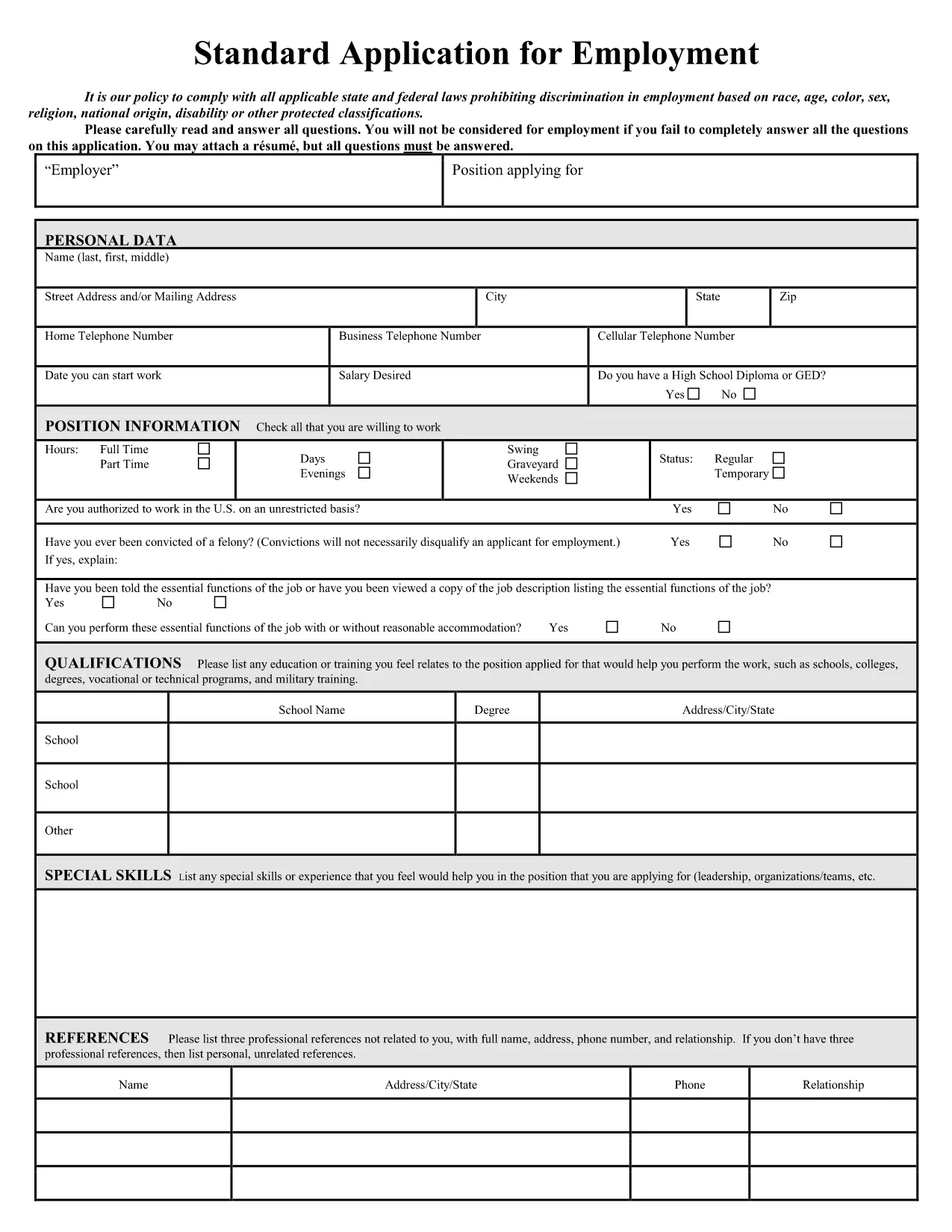
Application Form Sample – Fillable PDF Online

  1. 言語 英語
  2. 国 アメリカ合衆国
  3. アクティビティ 移民
  4. デパートメント USCIS
Application Form Sample – Fillable PDF Online

Looking for a professional application form sample that you can edit instantly? Our free fillable PDF lets you complete a job‑application style form without installing any software. Simply click the button, let Formize load the PDF filler, and start typing.

Why Choose a Fillable Application Form?

Fillable PDFs eliminate the hassle of printing, scanning, or re‑typing. They preserve the original layout, keep your data secure, and work on any device – desktop, tablet, or phone.

How to Complete the Form in Seconds

Follow the step‑by‑step guide below. The process takes less than two minutes, even for first‑time users.

Common Mistakes to Avoid

  • Leaving required fields blank – the filler will highlight them.
  • Using special characters in name fields – stick to letters, hyphens, and apostrophes.
  • Skipping the final review – errors can be costly for employers.

Download vs. Fill Online – Which Is Best?

Downloading gives you an offline copy, but filling online guarantees you always have the latest version and automatic saving.

Legal Compliance & Privacy Guarantees

Our PDF filler complies with U.S. data‑protection standards. Your information never leaves the secure Formize environment unless you choose to submit it.

Ready to start? Click the button below and experience a smooth, paper‑less application process.

よくある質問
  • Do I need a PDF reader to fill the form?

    No. The Formize online filler works in any modern browser, so you don’t need Adobe Acrobat or any other software.

  • Can I edit the form after I download it?

    Yes. The saved PDF remains fully editable with any standard PDF editor if you need to make changes later.

  • Is my personal data safe?

    Absolutely. All data is processed in a secure, encrypted session and never stored on our servers unless you choose to save it.

  • What if I make a mistake while filling?

    You can simply click back into the field and correct it. The filler also offers an “Undo” button for quick fixes.

  • Can I print the completed form?

    Yes. After you save the filled PDF, you can print it using any standard printer.

  • Is the form compatible with mobile devices?

    The online filler is responsive and works on smartphones and tablets as well as desktops.

  • Do I need to create an account?

    No account is required. The filler is free and anonymous; you only need to click the button to start.

  • Can I use this form for any job application?

    The sample follows standard U.S. employment‑application conventions and works for most entry‑level and professional positions.

方法

オンラインで 4 回の簡単なステップで application form sample を無料で入力する方法:

  1. 1
    Click the Fill‑out Button
    Press the “Fill out this form” button on the page. The Formize PDF Filler app will open in a new tab.
  2. 2
    Wait for the Filler to Load
    The app loads the fillable PDF automatically. No download or installation is required.
  3. 3
    Enter Your Information
    Type directly into each field. Required fields are marked with a red asterisk.
  4. 4
    Review and Save
    Use the “Preview” button to check for errors, then click “Save” to download a completed copy or submit it directly to the employer.
Formize PDF Filler アプリ
だいたい

application form sample テンプレート

PDF ドキュメントを表示および入力するための従来の一連の機能に、Web アプリケーションおよびレスポンシブ レイアウトの利点を組み合わせることで、数分で application form sample を完成させることができます。
特徴

PDFフィラー

オンラインで PDF フォームに記入する最も簡単な方法

  • application form sample をすばやく入力してください
    application form sample をオンラインですばやく入力する方法をお探しですか?オンラインの無料 PDF フォーム フィラーを使用すると、この PDF ドキュメントを 1 分以内に編集して入力する方法がわかります。
  • 使いやすいオンライン PDF エディター
    再スキャンして返送する前に、編集できるように PDF ファイルを印刷することにうんざりしていませんか? PDFドキュメントをオンラインで無料で編集.当社のオンライン PDF エディターを使用して、時間と紙を節約してください。
  • 優れたツール、すべてのプラットフォーム
    Mac で application form sample を入力する方法や、PDF フィラーを無料で使用する方法を知りたいですか?当社のオンライン PDF ツールは、すべてのプラットフォームで動作します。
  • 安全なファイル ストレージ
    完成した「application form sample」ファイルは、Amazon クラウド ホスティングが管理する安全なデータベースに保存されます。いつでもシステムからファイルを削除できます。いずれにせよ、これらのファイルは 24 時間後に自動的に削除されます。
  • {キーワード} とチャットする
    無料の PDF リーダー アシスタントである Chatize で「application form sample」とチャットします。質問すると、「application form sample」から回答が得られます。上の [ドキュメントとチャット] ボタンをクリックするだけです。

フィルセッションを削除

選択したフィルセッションを削除しますか?この場合、フォームへの記入の進捗状況は失われます。

編集セッションを削除する

選択した編集セッションを削除しますか?この場合、フォームの作成および編集の進行状況は失われます。