
言語を選択する

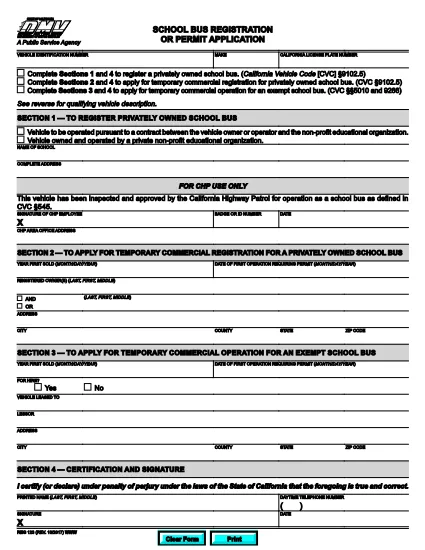
California Reg 123 School Bus Registration Form

  1. 言語 英語
  2. アメリカ合衆国
  3. アクティビティ 車両登録
  4. カリフォルニア
California Reg 123 School Bus Registration Form

The Reg 123 form is the official California Department of Motor Vehicles (DMV) application for a temporary commercial registration or permit for privately owned school buses. This fillable PDF lets school districts, non‑profit education organizations, and contract operators register their vehicles quickly and securely.

What Is Reg 123?

Reg 123 (California Vehicle Code §9102.5) authorizes a temporary commercial registration for a school bus that is owned or operated by a private, non‑profit education organization. The permit is required before the bus can be used for transporting students on public roads.

How to Fill the Reg 123 Form Online

Instead of downloading the PDF and opening it in a separate editor, simply click the "Fill out this form" button below. The Formize PDF Filler app will load directly in your browser, allowing you to complete every field with auto‑save, validation, and e‑signature capabilities.

Common Mistakes to Avoid

  • Leaving required fields blank: The filler highlights missing information before you can submit.
  • Using the wrong vehicle identification number (VIN): Verify the VIN on the vehicle registration card.
  • Incorrect ownership details: The form must match the legal name of the owning organization.
  • Submitting outdated insurance proof: Attach a current certificate of insurance that meets DMV requirements.

Where to Submit Your Completed Form

After you finish and sign the form, you can:

  • Download the completed PDF and mail it to your local DMV office.
  • Email the PDF directly to the DMV’s designated address (found on the confirmation screen).
  • Upload the file through the DMV’s online portal if you have an account.

Keep a copy for your records; the DMV will issue a temporary commercial registration sticker once the application is approved.

よくある質問
  • Who can use Reg 123?

    Any private, non‑profit education organization or contract school bus operator that needs a temporary commercial registration in California.

  • Do I need a California driver’s license to submit this form?

    No, the form is for the vehicle’s registration. However, the driver operating the bus must hold a valid California commercial driver’s license.

  • Can I submit Reg 123 electronically?

    Yes. After completing the fillable PDF, you can email the file to the DMV or upload it via the DMV’s online portal.

  • How long is the temporary registration valid?

    Typically 30 days, but the exact period is printed on the issued permit after approval.

  • What insurance coverage is required?

    You must provide proof of liability insurance that meets California DMV standards for commercial passenger vehicles.

  • Is there a fee to file Reg 123?

    Yes, a filing fee is required. The amount is listed on the DMV fee schedule and must be paid when the permit is issued.

  • What should I do if I make a mistake on the form?

    Use the Formize filler’s undo feature to correct errors before saving. If you have already submitted, contact the DMV to request a correction.

方法

オンラインで 5 回の簡単なステップで Reg 123 form を無料で入力する方法:

  1. 1
    Click the Fill button
    Press the "Fill out this form" button on the page to launch the Formize PDF Filler.
  2. 2
    Wait for the filler to load
    The browser will open the fillable PDF in a secure window; all fields become editable automatically.
  3. 3
    Complete each section
    Enter the required information, and the filler will validate formats (VIN, dates, numbers) as you type.
  4. 4
    Add your electronic signature
    Use the built‑in e‑signature tool to sign the form without printing.
  5. 5
    Save or submit
    Download the finished PDF, email it to the DMV, or upload it through the online portal.
Formize PDF Filler アプリ
だいたい

車両登録フォーム

自動車、トレーラー、またはボートを所有またはリースしている場合は、車両を合法的に登録し、安全に保つという特定の義務を果たさなければなりません。

Reg 123 form は、車両登録フォームの 1 つで、自動車を関連する州または地方当局に登録するために使用される書類です。これらのフォームは通常、人が新車または中古車を購入するとき、または車を持って新しい州または州に移動するときに必要です。

車両登録に必要な正確な要件とフォームは場所によって異なる場合がありますが、一般的に、プロセスには車両、所有者、および車両の先取特権に関する情報を提供することが含まれます。

登録フォームと手数料が提出されると、州または地方当局は車両の所有者に登録証明書またはナンバープレートを発行します。この登録により、車両は公道および高速道路で合法的に運転することができます。

特徴

PDFフィラー

オンラインで PDF フォームに記入する最も簡単な方法

  • Reg 123 form をすばやく入力してください
    Reg 123 form をオンラインですばやく入力する方法をお探しですか?オンラインの無料 PDF フォーム フィラーを使用すると、この PDF ドキュメントを 1 分以内に編集して入力する方法がわかります。
  • 使いやすいオンライン PDF エディター
    再スキャンして返送する前に、編集できるように PDF ファイルを印刷することにうんざりしていませんか? PDFドキュメントをオンラインで無料で編集.当社のオンライン PDF エディターを使用して、時間と紙を節約してください。
  • 優れたツール、すべてのプラットフォーム
    Mac で Reg 123 form を入力する方法や、PDF フィラーを無料で使用する方法を知りたいですか?当社のオンライン PDF ツールは、すべてのプラットフォームで動作します。
  • 安全なファイル ストレージ
    完成した「Reg 123 form」ファイルは、Amazon クラウド ホスティングが管理する安全なデータベースに保存されます。いつでもシステムからファイルを削除できます。いずれにせよ、これらのファイルは 24 時間後に自動的に削除されます。
  • {キーワード} とチャットする
    無料の PDF リーダー アシスタントである Chatize で「Reg 123 form」とチャットします。質問すると、「Reg 123 form」から回答が得られます。上の [ドキュメントとチャット] ボタンをクリックするだけです。

フィルセッションを削除

選択したフィルセッションを削除しますか?この場合、フォームへの記入の進捗状況は失われます。

編集セッションを削除する

選択した編集セッションを削除しますか?この場合、フォームの作成および編集の進行状況は失われます。